TryHackMe | ItsyBitsy: Hunting C2 Beacons in Kibana
Investigating a C2 alert in TryHackMe's ItsyBitsy room — analyzing HTTP logs in Kibana to track down a host beaconing out to Pastebin via bitsadmin.


During normal SOC monitoring, Analyst John observed an alert on an IDS solution indicating a potential C2 communication from a user Browne from the HR department. A suspicious file was accessed containing a malicious patternTHM:{ ________ }. A week-long HTTP connection logs have been pulled to investigate. Due to limited resources, only the connection logs could be pulled out and are ingested into theconnection_logsindex in Kibana.
Our task in this room will be to examine the network connection logs of this user, find the link and the content of the file, and answer the questions.
Preperation:
In this room we are working in an ELK environment. Head over to Analytics > Discover to access the logs.
From there you can filter for _index:connection_logs.
At the beginning no logs will be displayed yet — but we'll get to that in the first question
Questions:
How many events were returned for the month of March 2022?
This task is about setting up our ELK environment. We can filter for the requested timeframe in the top right corner of the Discover view:
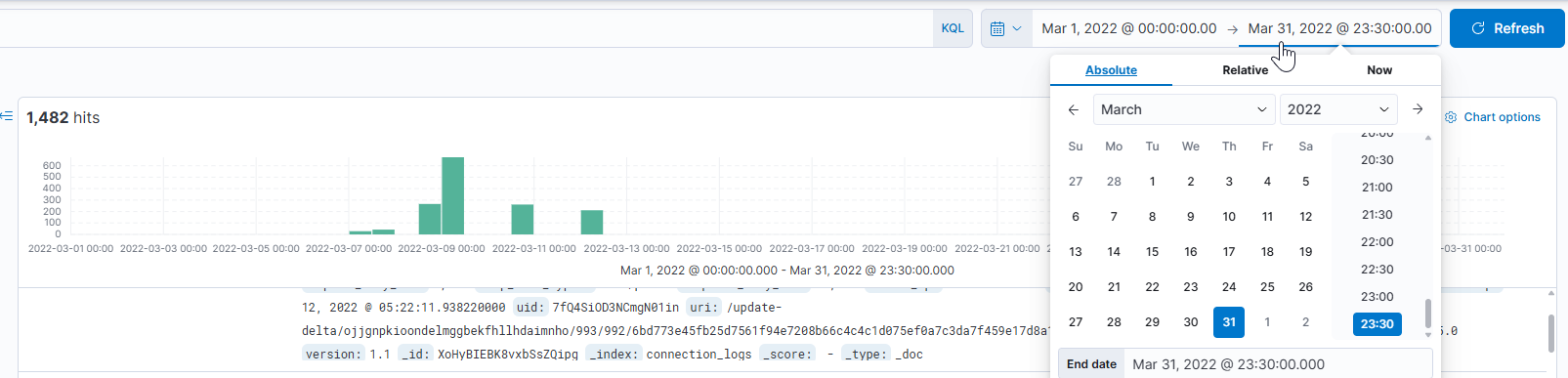
We can also see straight away how many logs are loaded.
Click to reveal
1482
What is the IP associated with the suspected user in the logs?
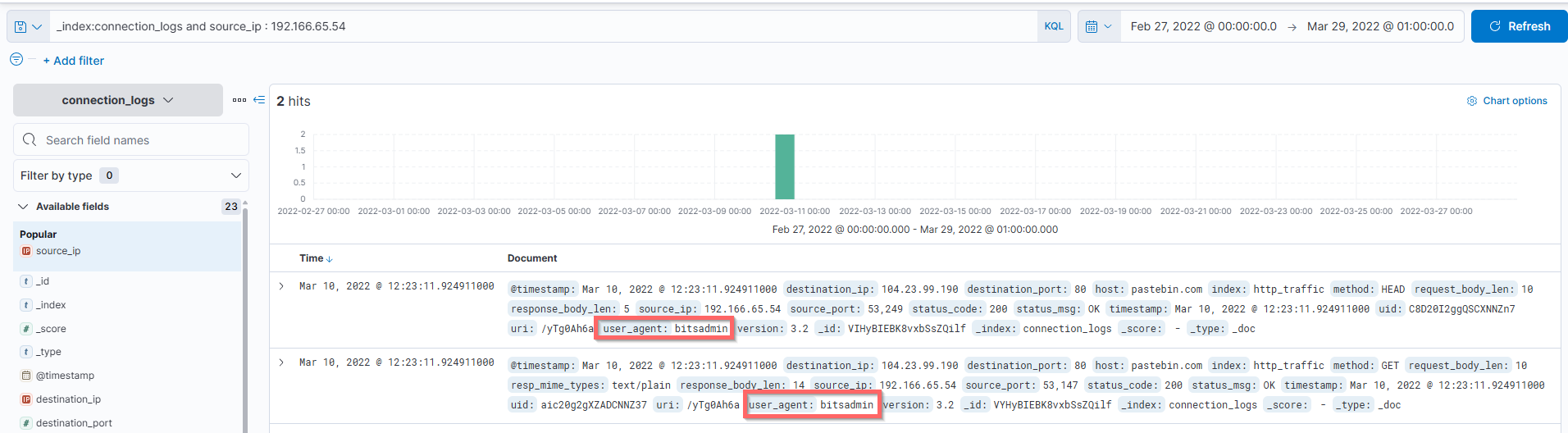
By clicking on the source_ip field in the left panel, Kibana shows us the top values. There are only two IPs, one accounts for 99.6% of the traffic and the other for just 0.4%.
That alone is interesting. Checking the user_agent field reveals that the low-traffic IP is using bitsadmin, a legitimate Windows tool but definitely not something you would expect to see in normal browsing traffic. That's our suspicious IP.
Click to reveal
192.166.65.54
The user’s machine used a legit windows binary to download a file from the C2 server. What is the name of the binary?
We already discovered this in the previous question.
The binary in question is bitsadmin.
Bitsadmin is a command-line tool used to create, download or upload jobs, and to monitor their progress. The bitsadmin tool uses switches to identify the work to perform. You can callbitsadmin /?orbitsadmin /helpto get a list of switches.
Example:bitsadmin /transfer myDownloadJob /download /priority normal https://downloadsrv/10mb.zip c:\\10mb.zip
Click to reveal
bitsadmin
The infected machine connected with a famous filesharing site in this period, which also acts as a C2 server used by the malware authors to communicate. What is the name of the filesharing site?
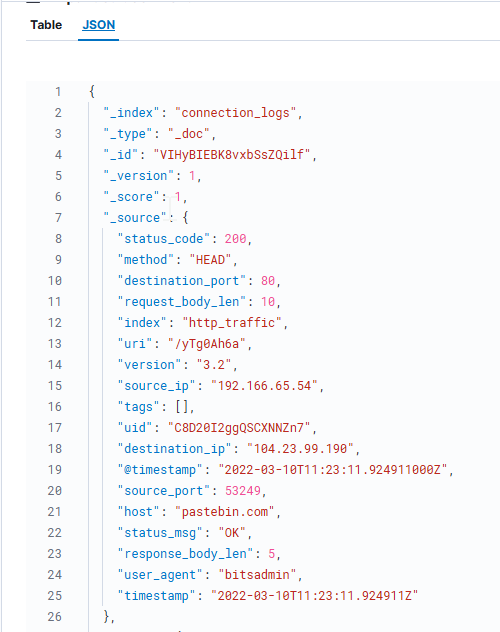
Let's look at one of the web traffic log entries to answer this question.
We can see some interesting information like the destination IP, HTTP method and status codes, but the most important field here is the host: pastebin.com
Pastebin is a legitimate file sharing site, which makes it an attractive option for attackers. Instead of setting up their own C2 infrastructure, they simply host their payload as a public paste. The malware then retrieves it via a plain HTTP request traffic that blends in perfectly with normal web browsing and is unlikely to raise any alarms.
Click to reveal
pastebin.com
What is the full URL of the C2 to which the infected host is connected?
Let's look closer at one request:
{
  "_index": "connection_logs",
  "_type": "_doc",
  "_id": "VIHyBIEBK8vxbSsZQilf",
  "_version": 1,
  "_score": 1,
  "_source": {
    "status_code": 200,
    "method": "HEAD",
    "destination_port": 80,
    "request_body_len": 10,
    "index": "http_traffic",
    "uri": "/yTg0Ah6a",
    "version": "3.2",
    "source_ip": "192.166.65.54",
    "tags": [],
    "uid": "C8D20I2ggQSCXNNZn7",
    "destination_ip": "104.23.99.190",
    "@timestamp": "2022-03-10T11:23:11.924911000Z",
    "source_port": 53249,
    "host": "pastebin.com",
    "status_msg": "OK",
    "response_body_len": 5,
    "user_agent": "bitsadmin",
    "timestamp": "2022-03-10T11:23:11.924911Z"
  },
  "fields": {
    "status_code": [
      200
    ],
    "method": [
      "HEAD"
    ],
    "destination_port": [
      80
    ],
    "request_body_len": [
      10
    ],
    "index": [
      "http_traffic"
    ],
    "uri": [
      "/yTg0Ah6a"
    ],
    "version": [
      3.2
    ],
    "source_ip": [
      "192.166.65.54"
    ],
    "uid": [
      "C8D20I2ggQSCXNNZn7"
    ],
    "@timestamp": [
      "2022-03-10T11:23:11.924911Z"
    ],
    "destination_ip": [
      "104.23.99.190"
    ],
    "source_port": [
      53249
    ],
    "host": [
      "pastebin.com"
    ],
    "status_msg": [
      "OK"
    ],
    "response_body_len": [
      5
    ],
    "user_agent": [
      "bitsadmin"
    ],
    "timestamp": [
      "2022-03-10T11:23:11.924911Z"
    ]
  }
}
We already know the host is pastebin.com. To get the full URL we also need the URI path, which we can find in the uri field. Combining both gives us the complete URL: pastebin.com/yTg0Ah6a
Click to reveal
pastebin.com/yTg0Ah6a
A file was accessed on the filesharing site. What is the name of the file accessed?
The logs alone don't reveal the filename directly, but the resp_mime_types field tells us we're looking for a text/plain file - so a .txt file.
To find the actual filename, we visit the URL we found in the previous step.
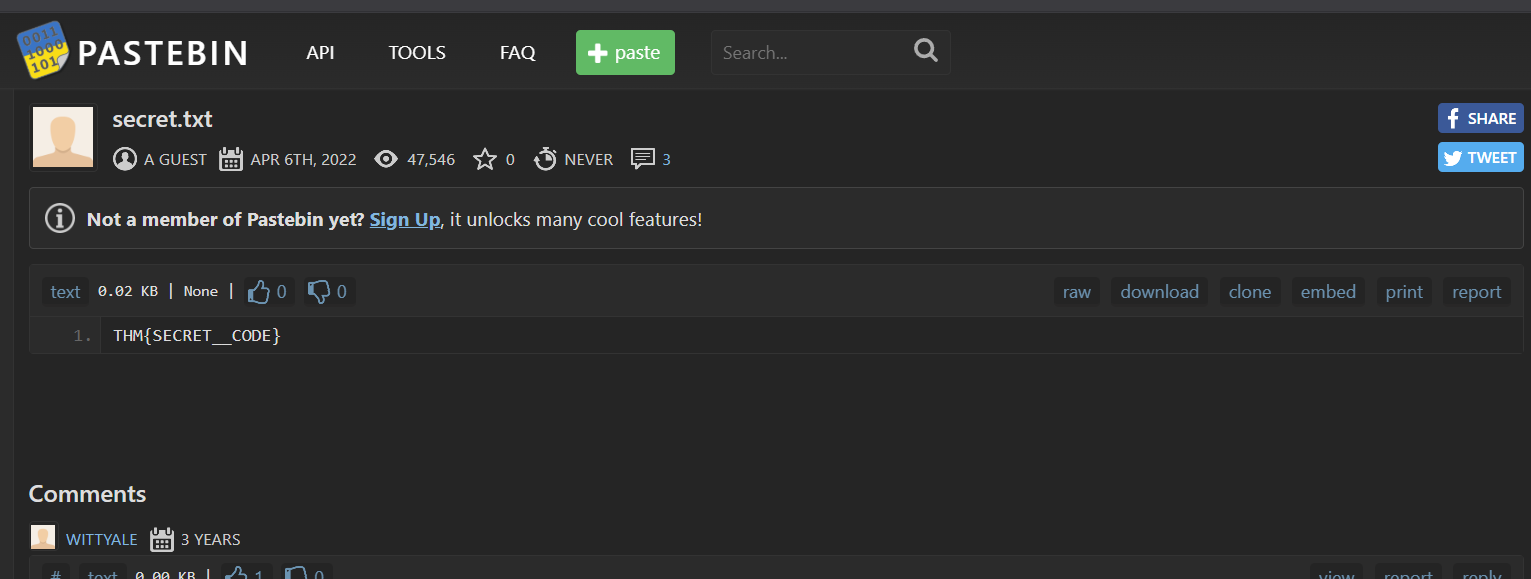
The Pastebin page reveals the file is called secret.txt and as a bonus, we can already see the contents, which contain the flag.
Click to reveal
secret.txt
The file contains a secret code with the format THM{_____}.
As mentioned in the previous step, we can find the answer by simply visiting the URL we identified earlier:
Click to reveal
THM{SECRET__CODE}
You can find more of my posts and projects here: https://blog.janalhorn.de